Introducing Database Identities in Varonis Next-Gen DAM
Database Identities discovers every human and non-human identity across your databases, automatically.

Key Takeaways
- Database users typically live outside SSO and IAM systems, creating a blind spot that access reviews never catch.
- Varonis Database Identities now discovers every database user and role, including non-human identities like service accounts.
- Identity profiles unify access, activity, and exposure in one view, showing who did what and whether data was shared externally.
Most organizations can tell you who has access to their files. Far fewer can tell you who has access to their databases. The users behind your files and folders live in Active Directory, Entra ID, and Okta, but database users typically don’t. They’re created and stored locally on each database server, outside your SSO and IAM systems. That means they never show up in the access reviews that cover everything else.
That blind spot is usually bigger than anyone expects. A newly appointed CISO at a bank once reviewed permissions on his core banking application and found roughly 3,000 database users. Nothing had been deleted since the system went live. Before he could decide which accounts were still needed, he first had to learn that they existed.
The stakes are rising. Databases are now a source of truth for AI agents and AI systems, so it’s essential to know who and what is connecting to them, what sensitive data is exposed, and what they’re doing with it.
That’s the gap Database Identities closes. Varonis Next-Gen DAM now discovers every identity and role in your databases and ties them to the classification and activity telemetry Varonis already collects.
What is Varonis Database Identities?
Until now, building a complete picture of database access meant connecting to each database individually and piecing together local user lists by hand. Varonis already makes those connections automatically to classify data and assess exposure.
Now, that same connection also discovers every database user and their roles, including non-human identities such as service accounts and service principals.
Why does identity matter for securing databases?
With identity visibility in place, you can see the full picture of how sensitive data is exposed in your databases:
- Classification tells you where your sensitive data lives.
- Identity tells you who has access to it.
- Activity tells you who is actually using it.
With identity as part of database security, you no longer have to wait on a DBA to produce a user.
Where to find Database Identities in Varonis
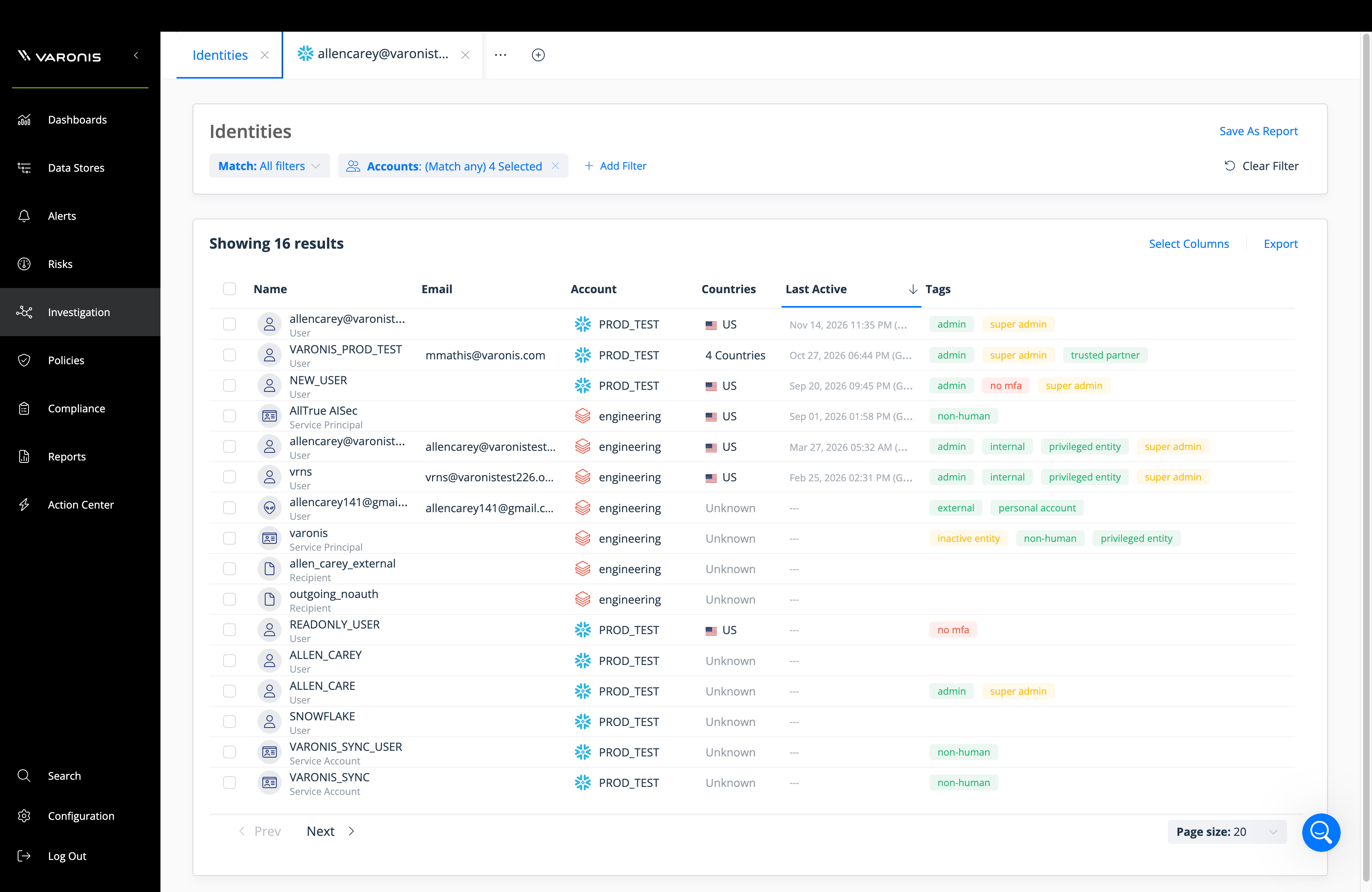
Open the Identities section of the Varonis UI and filter by the database accounts you want to review. Every identity across those databases appears in one list. That covers human users, service accounts, service principals, and sharing recipients, whether they’re tied to a corporate email, a personal account, or neither.
The list view answers the first questions quickly:
- Where it lives: the database account it belongs to, such as a Snowflake or Databricks environment.
- When it was last active, so dormant accounts stand out right away.
- Where it connects from, by country.
- Risk tags that flag what needs a closer look: admin and super admin privileges, missing MFA, non-human identities, inactive accounts, external and personal accounts, and privileged entities.
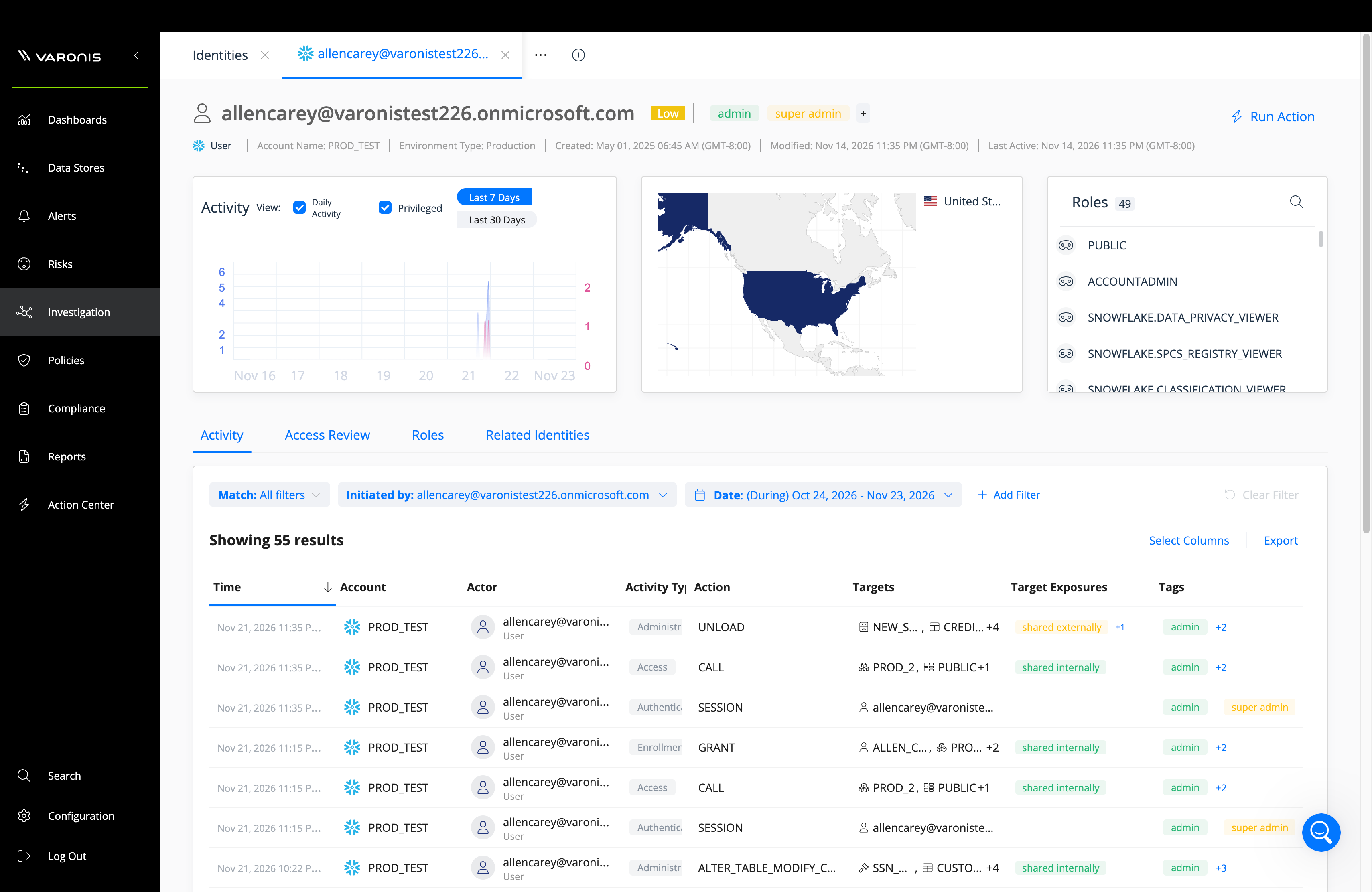
Click into any identity to see access, activity, and exposure in one place. Each identity profile shows:
- Context: the identity’s risk level, the account and environment it lives in (production or not), and when it was created, last modified, and last active.
- Activity trends over the last 7 or 30 days, with privileged activity broken out.
- Locations it connects from, on a map.
- Every role it holds. One test user in our environment had 49, including ACCOUNTADMIN.
- A full activity log: every action the identity took, what it touched, and whether that data is shared internally or externally.
This is where identity, activity, and exposure come together. In the example below, a super admin ran an UNLOAD against data that is shared externally. Varonis shows you who did it, what they did, and why it matters. From this same profile, you can move straight into an access review of that identity, look at its roles, or find related identities.
Frequently Asked Questions (FAQs)
What does it take to configure Database Identities?
Nothing. There’s no additional configuration and no upgrade. If you use Varonis DAM, your database users are already tracked.
What does this feature cost?
Nothing extra. If you’re licensed for Varonis DAM, you’re licensed for Database Identities. One product, one price.
Which databases are supported?
SQL Server, Oracle, PostgreSQL, MySQL, MongoDB, Snowflake, Databricks, Amazon RDS, and more, all from one console.
Can I tie database accounts back to real people?
Yes. Varonis maps local database accounts to the corporate users behind them, so a service login or a shared admin account doesn’t stay anonymous.
Does it cover service accounts and other non-human identities?
Yes. Database Identities discovers service accounts, service principals, and sharing recipients alongside human users, and tags non-human identities so you can review them separately.