Hunting Azure Tokens in Unexpected Windows Processes
How a Zoom calendar sync led to a hunt for Azure tokens.


Key Takeaways
- Azure and Microsoft 365 access tokens can appear unexpectedly in process memory of apps like Zoom.
- Any process in the same user session can read another’s token memory without privilege escalation, creating a lateral movement surface.
- Since replayed tokens bypass MFA and often conditional access, detection must rely on behavioral telemetry rather than login events alone.
It started with something small.
While analyzing network activity from a corporate workstation, we noticed that Zoom occasionally initiated outbound HTTPS requests to graph.microsoft.com. At first glance, this made sense — Zoom was configured with calendar synchronization, and calendar integration commonly requires interaction with Microsoft 365 services such as Outlook or Microsoft Graph.
But that observation raised a broader question: If Zoom can hold delegated Microsoft cloud tokens as part of normal enterprise productivity workflows, where else are these tokens hiding?
In hybrid enterprise environments, Windows endpoints are no longer just "local machines." They function as:
- Identity brokers
- Cloud access terminals
- SSO participants
- Office clients
- Browser hosts
- Calendar clients
- Teams/Zoom workstations
- Background synchronization engines.
As a result, access tokens, refresh-related artifacts, and identity session material may appear in places defenders do not always expect.
This research focused on a single, deceptively simple question: Which non-obvious Windows processes may contain JWT access tokens related to Azure, Microsoft 365, Microsoft Graph, Outlook, Office, or hybrid identity workflows?
The results challenge common assumptions about the token exposure surface on modern Windows endpoints.
The growth of token-based authentication
The shift from credential-based to token-based authentication is one of the most significant changes in enterprise security architecture over the past decade. Users authenticate once using a password, MFA, Windows Hello, or a certificate, and from that point forward, applications obtain tokens to access APIs on the user's behalf.
In Microsoft environments, those APIs include:
This is expected behavior and reflects how modern SSO is designed to operate. It is also consistent with how Conditional Access, token lifetime policies, and Continuous Access Evaluation (CAE) function within Microsoft’s Zero Trust architecture.
The risk emerges when those tokens are present in local process memory and can be accessed by another process running under the same user context, especially on endpoints where the user has multiple cloud-connected applications open simultaneously.
Integrity levels explained
Windows does implement protection mechanisms. Microsoft's Mandatory Integrity Control (MIC) model defines integrity levels — Low, Medium, High, and System — and uses them to restrict certain access patterns between processes and securable objects.
However, on real enterprise workstations, most userland applications run within the same user session and often at the same Medium integrity level. A user's browser, Office suite, Zoom client, OneDrive sync engine, and custom LOB applications frequently share the same security context. This creates a meaningful lateral movement surface within a single endpoint session — no privilege escalation required.
Which processes hold Azure and M365 tokens?
During testing, JWT-like tokens related to Microsoft cloud authentication and API access were observed in several process families:
1. zoom.exe
This is where the research started. Zoom's calendar synchronization uses OAuth 2.0 delegated flows to access the user's calendar via Microsoft Graph. The resulting access token lives in zoom.exe process memory for the duration of the sync operation — and potentially longer, depending on caching behavior.
2. explorer.exe
This was one of the more surprising findings. explorer.exe is the Windows shell — it renders the desktop, taskbar, and file browser. In hybrid environments, shell extensions for OneDrive, SharePoint, and other cloud-integrated services may cause identity-related material to appear in the shell process's address space.
Because explorer.exe is a long-lived, always-present process, any token material it holds may have a longer exposure window.
3. runtimebroken.exe
RuntimeBroker.exe manages permissions for Universal Windows Platform (UWP) applications. In hybrid identity scenarios, it serves to broker authentication between modern apps and the Windows Account Manager (WAM). This makes it a plausible — but often overlooked — location for token-adjacent material.
4. uihose.exe
5. svchost.exe
Not all svchost.exe instances are equal. Hosting services such as TokenBroker, CloudExperienceHost, and WebAccountManager are directly involved in Microsoft's modern authentication architecture. These processes mediate token acquisition, caching, and renewal for applications that use WAM-based authentication.
Why do Windows processes hold tokens?
The presence of tokens in these processes is not a vulnerability in the traditional sense. It is an architectural consequence of how modern Windows authentication works.
How Windows Web Account Manager handles tokens
Starting with Windows 10, Microsoft introduced the Web Account Manager (WAM) framework, which centralizes token acquisition and caching for applications. When an application requests a token via WAM:
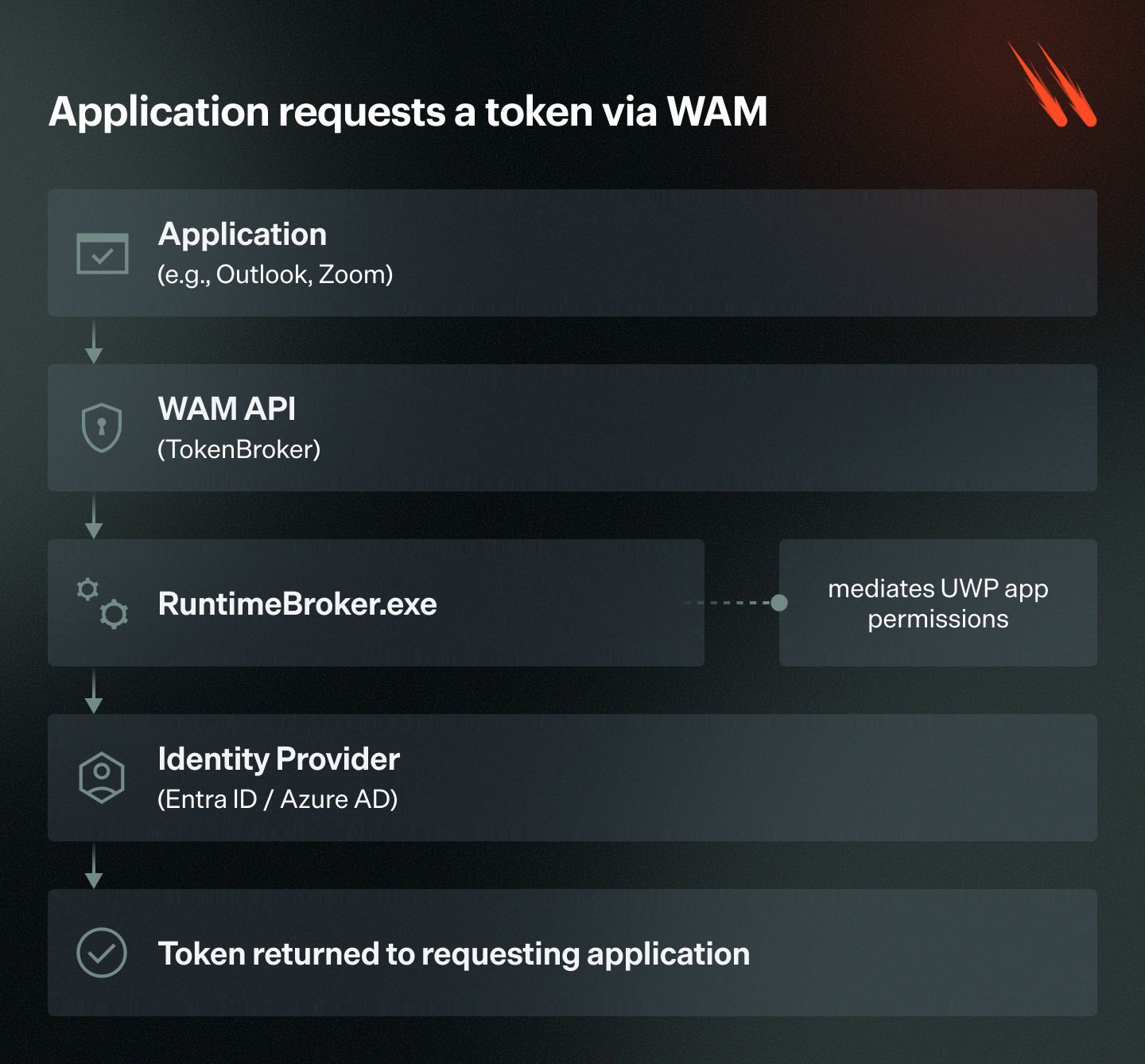
At each stage of this flow, token material may briefly — or not so briefly — exist in process memory. The token passes through multiple process boundaries, and each process that touches it becomes part of the token exposure surface.
How same-user processes can reach token memory
In a typical enterprise user session:
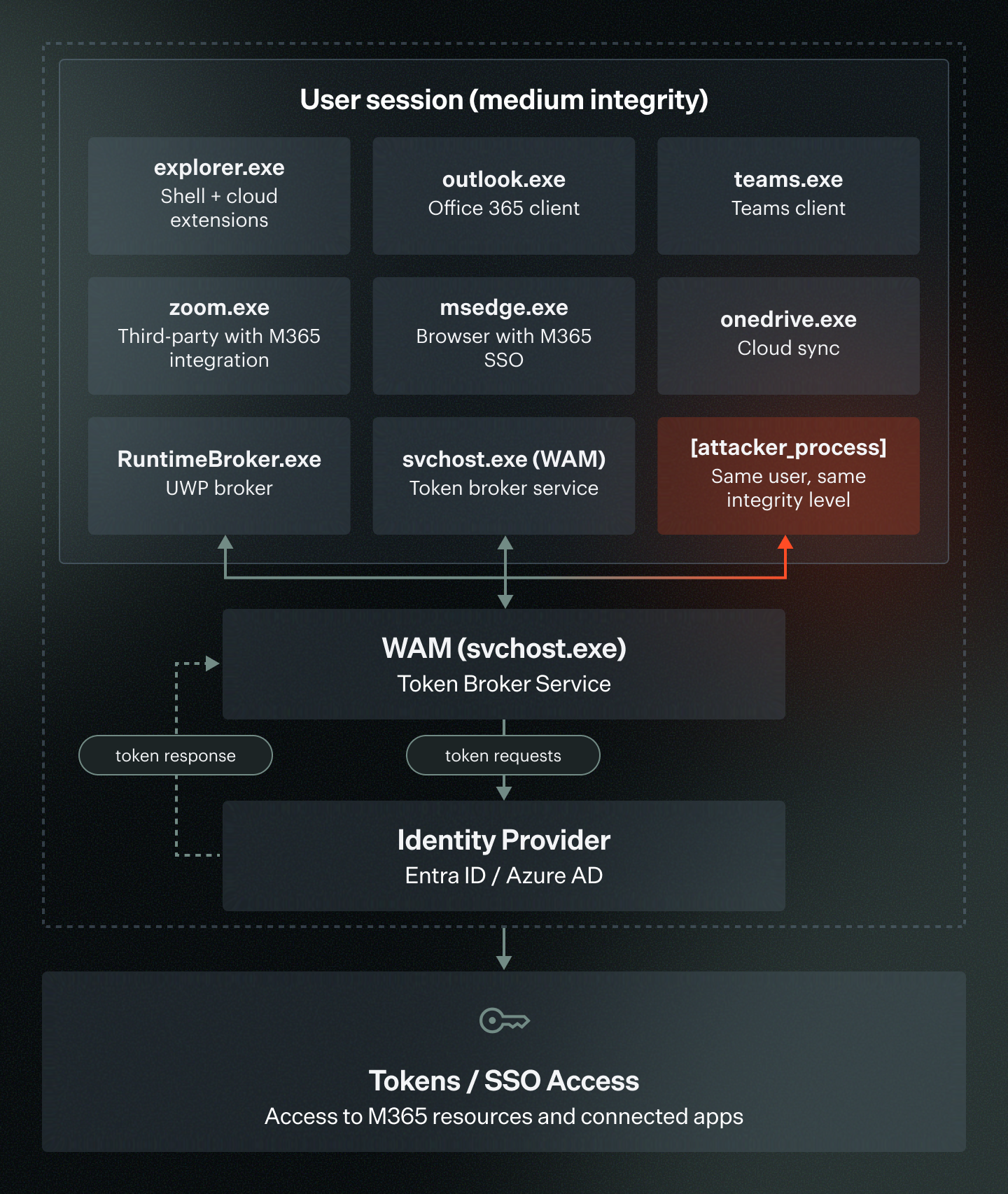
An attacker process running in the same user context can potentially call OpenProcess() with PROCESS_VM_READ on any of these targets. If successful, it can enumerate memory regions and scan for JWT patterns. No privilege escalation is required — just same-user, same-integrity-level access.
What does a JWT access token look like in memory?
In memory, JWT access tokens appear as contiguous ASCII/UTF-8 strings with a recognizable structure:
eyJ0eXAiOiJKV1QiLCJhbGciOiJSUzI1NiIs...  ← Header  (Base64URL)
.
eyJhdWQiOiJodHRwczovL2dyYXBoLm1pY3Jvc...  ← Payload (Base64URL)
.
SflKxwRJSMeKKF2QT4fwpMeJf36POk6yJV_adQ...  ← Signature(Base64URL)
The payload, when decoded, contains claims that reveal the token's purpose:
JSON

{
  "aud": "https://graph.microsoft.com",
  "iss": "https://sts.windows.net/{tenant-id}/",
  "iat": 1718000000,
  "exp": 1718003600,
  "scp": "Calendars.Read Mail.Read User.Read",
  "upn": "user@contoso.com",
  "tid": "{tenant-id}"
}
A single decoded token reveals the target API, user identity, granted permissions, and expiration time — everything an attacker needs to understand the token's value and plan its use.
Why token replay matters
- No local admin required in many scenarios: Same-user, same-integrity-level process access may suffice.
- MFA bypass: The token was issued after MFA was satisfied; replaying the token does not trigger MFA again.
- Conditional Access bypass: Depending on the policy configuration, token replay from a different process (but on the same device) may not violate CA policies.
- Short-lived ≠ safe: Default Microsoft access token lifetimes are typically 60–90 minutes; that is a meaningful window for an attacker.
- Refresh artifacts: While refresh tokens are increasingly protected (e.g., bound to the device via FOCI or PRT mechanisms), some applications may still hold refresh-adjacent material.
How to detect Azure token theft from process memory
This research suggests defenders should expand hunting logic beyond the classic credential-dumping targets (LSASS, SAM, browser credential stores).
KQL Detection Query (Microsoft Sentinel / Defender for Endpoint)
KQL

// Suspicious process access to token-bearing processes
let tokenBearingProcesses = dynamic([
    "zoom.exe", "explorer.exe", "runtimebroker.exe",
    "uihost.exe", "svchost.exe", "outlook.exe",
    "teams.exe", "onedrive.exe", "msedge.exe",
    "chrome.exe", "officeclicktorun.exe"
]);
let suspiciousSourceProcesses = dynamic([
    "powershell.exe", "cmd.exe", "wscript.exe",
    "cscript.exe", "python.exe", "python3.exe",
    "rundll32.exe", "regsvr32.exe", "mshta.exe",
    "certutil.exe"
]);
DeviceEvents
| where ActionType == "OpenProcessApiCall"
| where FileName in~ (tokenBearingProcesses)
| where InitiatingProcessFileName in~ (suspiciousSourceProcesses)
    or InitiatingProcessFolderPath has_any ("temp", "tmp", "appdata\\local\\temp")
    or InitiatingProcessSignatureStatus != "Valid"
| project
    Timestamp,
    DeviceName,
    InitiatingProcessFileName,
    InitiatingProcessFolderPath,
    InitiatingProcessCommandLine,
    FileName,
    InitiatingProcessSignatureStatus,
    AccountName
| sort by Timestamp desc
Correlating with outbound cloud API traffic
A process access event becomes significantly more suspicious when followed by outbound traffic to Microsoft cloud APIs from a non-standard process:
KQL

// Correlate process access with subsequent Graph API calls
let processAccessEvents =
    DeviceEvents
    | where ActionType == "OpenProcessApiCall"
    | where FileName in~ ("zoom.exe", "explorer.exe", "runtimebroker.exe", "outlook.exe")
    | where InitiatingProcessSignatureStatus != "Valid"
    | project AccessTime = Timestamp, DeviceName,
              SourceProcess = InitiatingProcessFileName,
              TargetProcess = FileName;
let networkEvents =
    DeviceNetworkEvents
    | where RemoteUrl has_any ("graph.microsoft.com", "outlook.office365.com",
                                "login.microsoftonline.com", "management.azure.com")
    | project NetworkTime = Timestamp, DeviceName,
              NetworkProcess = InitiatingProcessFileName,
              RemoteUrl;
processAccessEvents
| join kind=inner (networkEvents) on DeviceName
| where NetworkProcess == SourceProcess
| where NetworkTime between (AccessTime .. (AccessTime + 5m))
| project AccessTime, NetworkTime, DeviceName, SourceProcess,
          TargetProcess, RemoteUrl
How to detect stolen Azure token misuse after sign-in
Varonis helps defenders detect stolen token misuse by looking beyond the authentication event to behavioral and data-centric telemetry. It correlates identity activity, SaaS usage, cloud events, and data access to flag abnormal token use, using built-in threat models and customizable rules. Varonis detections such as “Suspicious Azure token activity” are intended to flag potential unauthorized use of Azure tokens when accessed from unusual locations or devices, or reused in abnormal ways.
This type of behavioral approach is especially important because a stolen token may already represent a post-MFA session, but the attacker still has to interact with Microsoft 365, SaaS applications, and sensitive data in ways that often deviate from the legitimate user’s normal baseline.