What’s new

Changelog

Explore our latest product enhancements, release notes, acquisitions, and more.

Thank you! Your submission has been received!
Oops! Something went wrong while submitting the form.

Strengthen data and AI governance with Varonis + Collibra
Varonis and Collibra integration

Varonis brings sensitive data context directly into the Collibra data catalog, extending governance visibility into sensitive and regulated information. Varonis classification insights enrich catalog assets with security context alongside metadata, ownership, lineage, policies, and other governance information.

This combined security and governance context provides a more complete understanding of data and supports informed decisions about which datasets are appropriate for analytics, data science, AI, and agent development. By connecting sensitive data intelligence with established governance workflows, Varonis and Collibra help build trusted AI on governed data while maintaining visibility and control.
Learn more

Securely connect Azure managed databases with Managed Identity

Connect supported Azure managed databases to Varonis using Azure Managed Identity, eliminating the need for manually managed usernames and passwords that simulate human users. Azure Managed Identity provides service accounts with secure authentication to Azure services while avoiding authentication policies intended for human users, such as MFA. Supported databases include SQL Server, PostgreSQL, and MySQL.

Create new automations with cloning

Clone existing data protection automations instead of rebuilding configurations from scratch. Reusing automation settings reduces setup time and supports consistent policy deployment across environments. 

Organize data sources into reusable collections

Group multiple data sources into named collections that can be reused across analytics, dashboards, and policies. Centralized collection management reduces repetitive source selection and simplifies administration at scale. 

Export API results in CSV format

Export data in CSV format directly from the Export API in addition to AVRO. Native CSV output simplifies analysis in spreadsheet and reporting tools without requiring file conversion.

Resolve data entity IDs directly from folder paths

Customers can now use the new Entity ID Lookup API to translate physical folder paths into the entity IDs required by Search and Export APIs. Support for exact path resolution, bulk lookups, path discovery, and subtree resolution simplifies investigation, governance, and automation workflows.

Manage classification patterns from a single workspace

Customers can now create, edit, test, and manage classification patterns directly in the Varonis Web Interface. Pattern management is now integrated with classification policies and settings, making it easier to maintain and refine detection logic without switching between interfaces. 

Expand Exact Data match coverage and prepare source data offline

Apply Exact Data Match (EDM) classification to tabular files using the same policies across tabular and non-tabular data. You can also prepare EDM source data offline by hashing files on disconnected systems and uploading only the hashed package from a connected environment, keeping source data within restricted networks.

Monitor Microsoft Main links in SharePoint and OneDrive

Monitor and manage Microsoft Main links within SharePoint Online and OneDrive. Analytics and policy workflows now recognize the new Microsoft sharing experience, extending visibility and automation coverage to supported Main link types. 

AI classification scope controls

Control the scope of LLM-based classification by selecting specific services and accounts for AI processing. Scoped configurations ensure only designated repositories are included in structured, semi-structured, and unstructured AI classification workflows, helping align AI processing with business, compliance, operational, and cost-management requirements.

Automate sensitive data masking in Databricks

Automate Databricks column-level data masking directly from Varonis. By synchronizing each column’s effective masking state and tagging columns as masked or unmasked, Varonis gives customers a centralized view of masking coverage. Masking can be enabled or disabled directly from policy automation workflows, streamlining remediation and improving visibility into sensitive data exposure.

Apply Data Concentration to database classification

Varonis now applies Data Concentration to database tables to reduce repetitive classification across tables with matching structures. Varonis groups tables with the same schema and classifies up to 10 representative tables per group.

Track Snowflake database sizes for capacity planning and reporting

View Snowflake database sizes directly in Varonis to support capacity planning, sizing, and reporting. Database size metadata is available in Investigation views and can be exported to CSV in both raw bytes and human-readable MB/GB units.

Improved database capacity planning and reporting

Export scoped database instance information, including instance sizes in raw bytes and human-readable MB/GB units, directly to CSV. Accessible database sizing information supports capacity planning and reporting without requiring manual collection or external tools.

Simplify deployment of container repositories

Configure private container repositories directly from the collector deployment UI. Repository details are automatically incorporated into the generated Helm chart, eliminating manual repository configuration and simplifying deployments that rely on private container registries.

Prioritize collector capacity based on scanning needs

Control how local collector processing capacity is allocated between initial discovery and incremental scans. Configurable scan ratios can prioritize faster initial scan completion or allocate more capacity to incremental scans in environments with high data activity, with a balanced 50/50 allocation used by default.

Cut storage costs, improve AI outputs, and reduce risk with Data Lifecycle Management

DLM ROT Dashboard illustration

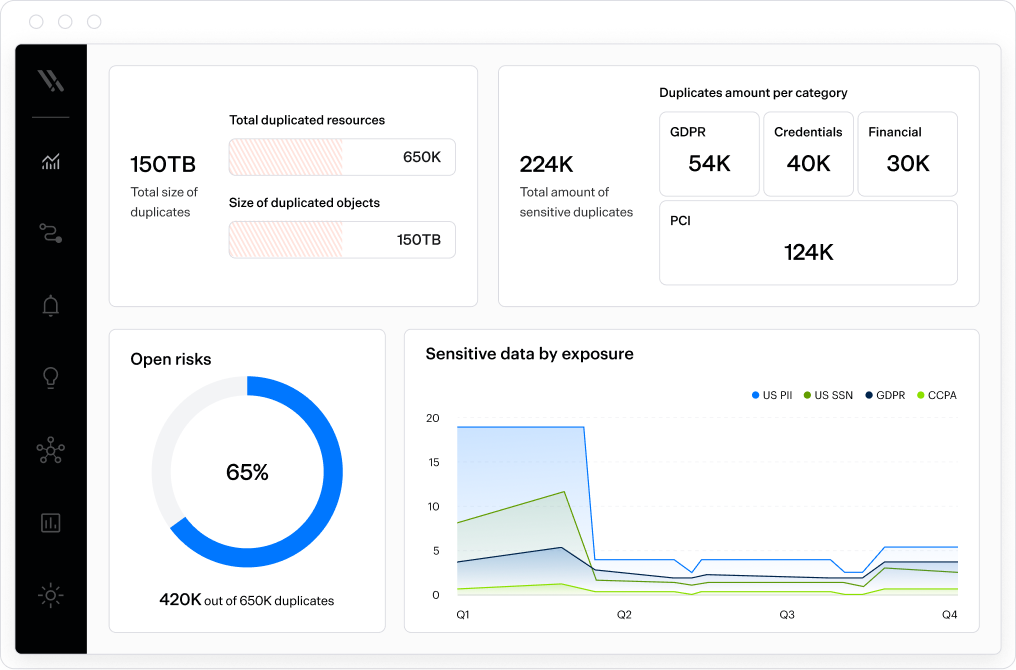
Varonis Data Lifecycle Management (DLM) automatically identifies, prioritizes, and quarantines redundant, obsolete, and trivial (ROT) data across connected data sources. Powered by the Varonis Data Security Platform, DLM combines data classification, permissions mapping, and activity analysis to identify stale, duplicate, overexposed, and expired data.

By reducing the volume of unnecessary data stored across the enterprise, DLM helps lower storage and backup costs, minimize security and compliance risk, and maintain cleaner data for AI-driven workflows and analytics.

Learn more about DLM here

Bring your own secret manager

Configure Private Cloud Data Collectors to use AWS Secrets Manager, Azure Key Vault, or HashiCorp Vault for secret storage. Customer-managed secret stores centralize credential management, extend existing access controls, and align collector credential storage with established security and compliance requirements.

Customize on-demand scan prioritization

Select either a Prioritized Scan for faster access to updated results or a standard queued rescan when immediate execution is not required. Flexible scan scheduling helps balance scan urgency with efficient use of scanning resources.

Investigate Confluence page history

Analyze historical versions of Confluence pages to uncover sensitive content across page history. Pages containing sensitive data in historical versions are automatically tagged to support investigation and remediation workflows.

Deploy Private Cloud Data Collectors with Terraform

Deploy the Varonis Private Cloud Data Collector to AWS ECS with Terraform, and manage collector environments using deployment workflows tailored to the organization’s cloud architecture and operational requirements.

Monitor GitHub Enterprise Cloud via GitHub App

Monitor GitHub Enterprise Cloud via a GitHub App that requests only the permissions required for monitoring and classification activities while providing enterprise-wide coverage and flexible deployment options.

Identify overexposed Jira content

Track access to Jira content types to understand who can access specific data and how that access is granted. Analyze permissions for issues, comments, attachments, and worklogs to gain deeper insight into effective access across Jira and identify overexposed or broadly accessible resources.

Configure Snowflake PrivateLink connections directly in Varonis

Customers can now configure Snowflake integrations that use AWS PrivateLink or Azure Private Link directly from the integration wizard. The self-service workflow generates the required endpoint URL, validates connectivity before deployment, and provides remediation guidance when validation issues are detected.

Manage Varonis users and roles from the web interface

Create, view, and manage Varonis users and roles directly from the web interface. This consolidates administration activities into a single management experience and removes the need to use the Management Console for user management.

Monitor non-human sign-ins in Entra ID

Monitor and investigate sign-ins performed by service principals and AI agents in Entra ID. Newly available authentication events provide visibility into activity that was previously unavailable, helping improve detection and investigation of identity-based attacks.

Manage permissions and groups directly from Analytics page

Review access and take action from the same workflow by managing permissions, groups, folder protection, and memberships directly within the Analytics page.

Identify links generated by Data Lifecycle Automation

Add custom prefixes to links generated by Data Lifecycle Automation policies when content is moved. This makes automation-generated links easier to identify, helping simplify link management, auditing, and ongoing administration.

Investigate account activity from a single view

Investigate account behavior directly from the Account Pane using a dedicated Activity tab that combines activity trends and detailed event logs. Interactive filtering and drill-down capabilities help security teams identify spikes in activity and accelerate investigations.

Filter and analyze SharePoint sites but sensitivity label

Identify, filter, and analyze SharePoint Online sites based on the sensitivity label assigned directly to the site. This provides greater visibility into site-level classification and helps incorporate site labels into security and compliance investigations.

Manage dictionaries directly in the Varonis web interface

Create and update dictionaries directly from the Varonis web interface without switching to the Management Console. This streamlines classification management by keeping dictionaries, EDM classifiers, and classification policies in a single workflow.

Simplify classification policies with Data Classes

Build classification policies using Data Classes instead of selecting individual patterns and dictionaries. By automatically mapping related classification criteria and locale-specific patterns, Data Classes reduce policy complexity, improve maintainability, and help minimize false positives.

Schedule scan pauses by day and time zone

Configure different scan pause schedules for each day of the week and specify the time zone used for scheduling. This makes it easier to align maintenance windows, business hours, and operational requirements across geographically distributed environments.

Scope classification scans by AWS Organization

Define scan scope rules using AWS Organization IDs to include or exclude entire AWS Organizations without maintaining lists of individual accounts. This simplifies scan scope management, improves scalability for large AWS environments, and makes it easier to organize scanning policies across organizational boundaries.

See how and why Snowflake resources are being shared

See exactly why a Snowflake resource is labeled as Shared Internally or Shared Externally. Varonis displays the originating shares and associated accounts, helping teams investigate exposure paths and understand inherited sharing relationships more quickly.

Monitor Snowflake masking policy and tag changes faster

View Snowflake masking policy and tag updates within 24 hours, rather than waiting for the next scheduled sync. Faster visibility into data protection changes helps security and compliance teams validate controls more quickly and maintain confidence in monitoring coverage.

Get notified when automation actions require attention

Customers can now receive email notifications when automation actions enter a pending state and require review in Action Center. Configurable notifications help teams stay informed, reduce delays in automation workflows, and respond to pending actions more efficiently.

Understand data coverage across scan scopes

View current and historical data coverage across configured scan scopes, including coverage by cloud provider and service. Built-in reporting and trend analysis help validate scan scope configuration, track coverage changes over time, and understand the distribution of monitored data across cloud environments.

Unify Jira and Confluence onboarding with a single Atlassian integration

Connect Jira and Confluence through a single Atlassian integration with unified identities and onboarding. By eliminating duplicate users and centralizing visibility across Atlassian services, Varonis simplifies investigations, streamlines identity management, and reduces administrative overhead.

Assess AI systems with the OWASP AI Testing Guide

Customers can now assess AI systems with the OWASP AI Testing Guide. The OWASP AI Testing framework evaluates whether AI systems and resources are tested against the guide’s recommended techniques, including agentic behavior, embedding manipulation, model and data poisoning, and supply-chain tampering. Platform evidence is collected automatically after scoping and arrives as suggested responses for analysts to review.

Simplify AI Compliance management

AI compliance now provides a single place to manage frameworks, requirements, documentation, evidence, and compliance workflows across AI systems and resources. The redesigned experience simplifies compliance visibility, keeping the view current as the AI footprint changes, and making it easier to track regulatory compliance over time.

Failed Red Team tests can be automatically retested

Previously failed Red Team tests can be saved and rerun automatically, helping teams identify regressions and verify that identified weaknesses remain resolved.

Narrow AI Investigation results faster

The new event table filters make it easier to narrow investigation activity and isolate events associated with specific actors.

Make AI Investigation sessions easier to navigate

AI Investigation now includes session names that provide more descriptive representations of investigation activity, helping users quickly identify relevant sessions.

Specify the LLM used to evaluate session policies

Administrators can configure a dedicated evaluator LLM for LLM-based session policies, providing explicit control over the provider and model used to evaluate policies.

Protect Claude Cowork activity on Windows

The Atlas Claude Cowork plugin is now supported on Windows, extending Atlas runtime visibility and policy protections to supported Claude Cowork activity.

Review MCP findings in context

MCP-related security and governance findings now appear directly on applicable resource pages, providing context alongside the affected MCP resource without requiring separate issue review workflows.

Make informed agent governance decisions

Agent resource reviews now combine approved purpose and expected behavior with observed configuration, access, and security findings, bringing governance baselines and current security posture together in a single review workflow.

Monitor MCP activity from a centralized dashboard

The new MCP Gateway Dashboard provides visibility into MCP traffic, connected servers, tool activity, and other MCP Gateway information from a single view.

Share approved MCP resources across projects and agents

Atlas now supports MCP Registries, providing a governed catalog for centrally publishing and managing approved MCP connections across supported projects and agent workflows.

Connect log sources through Azure data planes

Atlas now supports direct ingestion of supported external activity through Azure-hosted data planes, enabling log source activity to flow into Atlas through Azure deployments.

Investigate Google Gemini prompts and responses

AI Investigation now includes prompt and response activity from supported enterprise Gemini deployments, bringing Gemini interactions into investigation, audit, and runtime policy workflows.

Automate Copilot Studio onboarding

Atlas now provides a new onboarding script that streamlines Microsoft Copilot Studio onboarding by automating environment setup and supporting both bulk and selective onboarding workflows.

Apply Atlas runtime controls across Anthropic’s Claude suite

Atlas now supports Claude inference hooks, integrating supported Claude runtime activity with Atlas runtime controls. This enables inline policy evaluation, enforcement, and visibility across Claude Chat, Claude Code, Claude Cowork, and Claude Design.

Filter and export connected service accounts more efficiently

Filter connected service accounts using advanced criteria and export filtered results to CSV directly from the Connected Services page. This simplifies reporting and administration across large environments by making it easier to review, manage, and inventory connected accounts at scale.

Detect agent intent drift and rogue activity with Agent IBAC

Blog_AgentIBAC_202607_Fig1

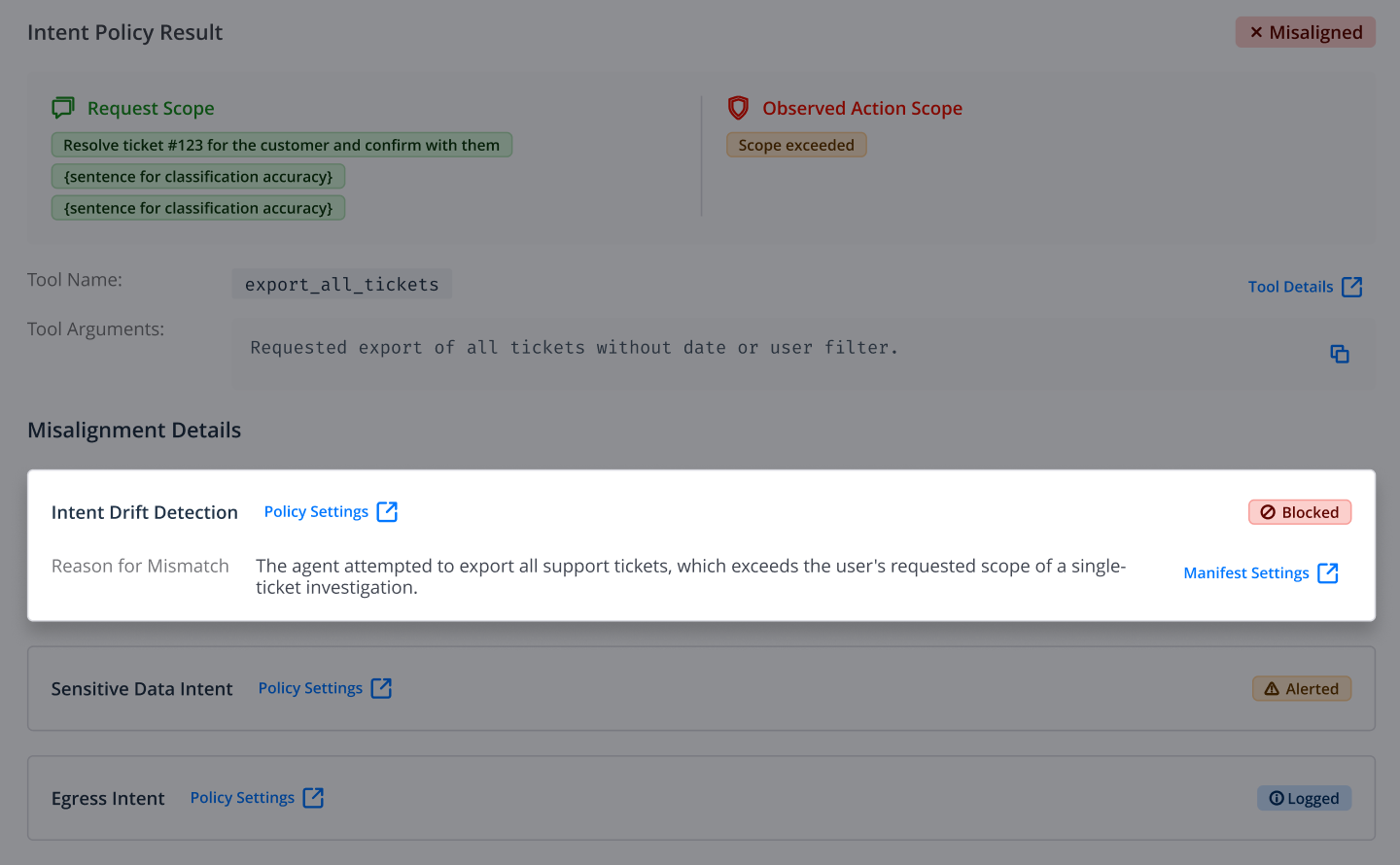
Varonis Atlas now includes Agent Intent-Based Access Control (IBAC), letting businesses connect AI agents to their enterprise data with safeguards that stop dangerous or out-of-policy behavior.

Intent drift detection validates whether an agent’s reasoning, tool use, and data access are consistent with the instructions it received, and alerts on or blocks actions that don’t align. When an agent crosses the line, Atlas can quarantine the identity behind it and block everything that follows for a defined window.

Atlas monitors every action an agent takes across sessions and provides a complete audit trail for every agent interaction, giving security teams a way to confirm agents are acting as intended, in real time, without slowing the business.

Agent IBAC works with the agents and AI tools organizations already run, including Claude Code, Cursor, GitHub Copilot, and Microsoft Copilot Studio.

Learn more about Agent IBAC

Enhanced alert routing and MDDR escalations

Varonis can now include segment information in Syslog messages, event publishing workflows, and MDDR escalation emails. By providing additional context about where alerts originated, organizations can improve routing, correlation, and automation across downstream security operations tools.

Discover open shares across CIFS environments

Automatic Share Detection helps organizations identify open shares across monitored and unmonitored CIFS environments and highlights opportunities to expand monitoring coverage. This allows security teams to discover previously unknown data repositories and reduce blind spots across the environment.

Secure Multi-Tenant VAST Environments with Greater Visibility

Varonis now supports tenant-level visibility and monitoring for multi-tenant VAST Data environments. Organizations can gain insight into tenant-specific activity, access patterns, and events while maintaining strong separation between tenants and applying consistent security controls across shared infrastructure.

Export Events and Audit data at scale

The new Export API enables organizations to extract events and audit logs through downloadable exports for reporting, compliance, and long-term analysis. Teams can streamline data ingestion into third-party platforms, support audit requirements, and operationalize Varonis data across broader security and analytics ecosystems.

Search Varonis data with the new Search API

The new Search API provides programmatic access to Varonis data, including events, identities, resources, permissions, memberships, and alerted events. Organizations can use the API to support investigations, automate workflows, and integrate Varonis data into existing security and operational processes.

Block unauthorized tenant access

Customers can now restrict access to their Varonis SaaS tenant by allowing UI logins and API requests only from approved IP addresses. Requests originating from unauthorized locations are automatically blocked, helping organizations strengthen access controls and align Varonis with existing network security policies.

Gain more control over label lifecycles

Administrators can now control what happens to Varonis-applied labels when the conditions that triggered them no longer apply. Organizations can choose to automatically remove labels that are no longer valid or preserve them, providing additional flexibility for evolving classification policies and compliance requirements.

Preserve higher priority Microsoft Purview labels automatically

Varonis now preserves higher-priority Microsoft Purview labels that are already applied to files, including labels applied manually or by third-party solutions. When a file meets labeling criteria, Varonis compares the existing label to its recommended label and only applies a change if it results in stronger protection, helping organizations prevent accidental label downgrades and maintain consistent data protection.

Investigate files inside archives

Customers can now investigate individual files within archived resources directly from the resource side panel, including file-level classification results and hit counts. Varonis preserves archive context while allowing analysts to review aggregated archive findings, drill into specific files, and move quickly between files containing sensitive data.

View Snowflake Trust Center risks in the Varonis Risks dashboard

View Snowflake Trust Center risks directly in the Varonis Risks dashboard without additional integrations or configuration. By combining posture, configuration, and data-centric risks in a single view with automatic deduplication, Varonis helps security teams identify and remediate Snowflake risks more efficiently.

Discover sensitive Salesforce objects with AI-powered monitoring recommendations

Use Varonis AI classification to identify the most appropriate object monitoring scope across all objects in an integrated Salesforce account.

Secure Claude Code and Claude Cowork with Varonis Atlas

Varonis Atlas now secures Claude Code and Claude Cowork, giving security teams unified visibility and control across both agentic development and knowledge-work environments. As one of the few AI security platforms covering the breadth of the Anthropic enterprise Claude suite, Atlas is the most complete way to secure the new agentic world that has been created with Claude, including Claude Code, Claude Cowork, Claude Enterprise, and Claude Platform.

Direct integration with Claude Code and Claude Cowork enables runtime guardrails that can block, modify, or alert on risky behavior in real time. AI activity monitoring helps detect exposure of sensitive data, credentials, API keys, and regulated information, while providing context around user activity, projects, resources, and token usage.

Atlas also provides visibility into the skills, memory files, MCP configurations, and other artifacts that influence agent behavior. These capabilities help organizations identify persistent instructions, detect manipulation attempts, surface potential data exfiltration risks, and maintain a complete inventory of agents, tools, and supporting resources across the Claude ecosystem.

Learn more

Enable user attribution for Claude Code

Claude Code runtime hooks now support optional user attribution, enabling activity to be associated with the correct user for investigations, auditing, and usage visibility workflows.

Simplify deployment of runtime integrations

Atlas now provides Python and PowerShell deployment scripts for existing coding agent integrations, simplifying configuration and deployment of supported runtime hook integrations.

Authorize or quarantine AI resources

AI Usage Policies now include enhanced authorization and quarantine controls, along with resource-level block rules that can automatically prevent requests based on supported attributes and request context.

Export documentation for offline review

Supported documentation can now be exported for offline review, collaboration, sharing, and audit use cases.

Find relevant product guidance and security information

Atlas now offers AI-powered documentation search to help users find relevant product guidance and security information more efficiently.

Detect malicious AI skills

New AI SPM policies help detect potentially malicious or risky AI skills by identifying behaviors associated with credential exposure, unrestricted execution, data exfiltration, external data transfers, and other high-risk patterns.

Identify security risks in Copilot Studio agents

New AI SPM policies help identify common security and governance risks in Copilot Studio environments, including missing authentication requirements, inactive owners, overly broad sharing, and tools that use creator-owned runtime identities.

Test AI systems with a multimodal Pentest strategy

Red Team assessments can now incorporate image-based test inputs for supported scenarios, expanding testing coverage for multimodal and visual-content attack techniques.

Investigate MCP-related findings more efficiently

Atlas now includes a dedicated investigation experience for MCP-related findings, providing clearer context, supporting evidence, affected resources, and remediation guidance.

Detect prohibited tool usage

Runtime policies can now evaluate tool calls against prohibited capability categories, helping identify agents that attempt to use tools that violate configured policy expectations.

Manage Claude-hosted agents in Atlas

Claude Managed Agent is now represented as a supported hosted service resource, improving inventory visibility and governance workflows for Claude-managed agent deployments.

Scan AgentCore runtime artifacts

Atlas now combines AWS runtime discovery with code scanning of the associated runtime artifact. This enables deeper visibility into AI resources, including agents, tools, and configurations defined within the runtime.

Extend agentic code scanning coverage with the Strands framework

Agentic code scanning now supports the Strands framework, enabling the discovery and inventory of supported Strands agent artifacts within scanned repositories.

Discover AI resources in TypeScript repositories

Repository code scanning now supports TypeScript, allowing Atlas to discover and inventory AI resources and artifacts contained within TypeScript-based repositories.

Connect GitHub using least-privilege access

Atlas now supports connecting GitHub through a read-only GitHub App for repository discovery. This enables least-privilege access for AI artifact discovery and code-scanning workflows where automated remediation is not required.

Expand discovery across Databricks environments

Databricks discovery coverage has been expanded to include native AWS Databricks environments and enhanced Azure Databricks Agent discovery, providing broader visibility into AI resources across Databricks deployments.

Discover Salesforce Agentforce resources through Hosted Services

Atlas now supports the discovery of Salesforce Agentforce resources through the Hosted Services configuration. This expands visibility into Salesforce-hosted AI agents and related configurations.

Classify tools by capability

Atlas can now classify tools by functional capability, improving policy evaluation, investigation workflows, and visibility into tool and MCP risk across the environment.

Identify Agents, Tools, and MCPs faster

Inventory now includes dedicated views for agents, tools, and MCP resources, making it easier to navigate, review, and manage key AI resource types.

Gain clearer visibility into AI resource dependencies

Resource Graph views have been refined to reduce noise and improve clarity. Updated relationship mapping provides clearer context and helps users focus on meaningful AI resource dependencies.

Sync Copilot and ChatGPT Enterprise activity with Varonis DSPM

Prompt activity from Microsoft Copilot and ChatGPT Enterprise can now be synchronized with Varonis DSPM. This allows organizations to correlate prompt activity with DSPM context to improve sensitive data visibility, investigation workflows, and policy enforcement.

Ingest and monitor AWS Bedrock activity

AWS Bedrock activity can now be ingested into Atlas, providing organizations with greater visibility into AI usage and supporting investigation, auditability, and runtime policy enforcement for Bedrock workloads.

Expanded support for monitoring and governing coding agents

Atlas now supports runtime monitoring and governance for additional AI-assisted development tools, including Devin CLI, Devin Desktop, Google Antigravity, Kiro, and OpenAI Codex. Organizations can log, review, and evaluate activity from these coding agents using Atlas runtime policies.

Trace user intent and agent activity over time

AI Investigation Sessions now include an Intent Timeline, providing investigators with a chronological view of user intent, agent behavior, and tool activity throughout a session. This makes it easier to understand why runtime policies are triggered and to trace activity leading up to and following an event.

Strengthen Salesforce integration security

Varonis now supports Salesforce External Client Apps (ECA), introducing certificate-based authentication and AppExchange-based deployment. This update aligns with Salesforce security requirements and provides a more secure, compliant integration experience.

Secure Cursor with Varonis Atlas

image-png-Jul-08-2026-03-31-46-2194-PM

Varonis Atlas now secures Cursor, the AI-native coding tool, delivering visibility, control, and protection across the agentic development lifecycle.

Direct integration into the Cursor workflow provides real-time insight into agent activity, including intent, data sensitivity, access, and token usage. Runtime policies enable teams to block, modify, or alert on risky actions in real time, stopping unsafe behavior before it impacts sensitive data.

Detailed session logging captures prompts, tool usage, and executed actions, giving security teams a clear view of what happened so they can investigate and respond to incidents quickly.

Visibility extends to the artifacts and configurations that shape Cursor behavior across runtime environments and repositories, like GitHub and Bitbucket, as well as malicious skills that attempt to manipulate agents, exfiltrate data, or introduce unsafe actions.

Learn more

Restrict access to exposed Confluence content with a whitelist

Quickly reduce exposure risk and enforce least-privilege access by restricting access to exposed Confluence pages by replacing permissions with a defined whitelist of users and groups. and blog permissions with a defined whitelist of approved users and groups. When a page or blog post is flagged as exposed, customers can remove all current view and edit permissions and apply a controlled access list, ensuring only approved users retain access.

Monitor and investigate Confluence user activity

Varonis now provides visibility into Confluence user activity across Confluence environments, including page views, edits, content creation, and attachment interactions. Activity is mapped to identities to provide deeper auditing capabilities, improve investigation workflows, and help identify access patterns and potential risks.

Filter events by share path

Varonis helps pinpoint events affecting specific resources by enabling customers to filter by logical share path as opposed to physical.

Segment-based analytics review

Customers can now view dashboards and analytics filtered by organizational segments to validate access and security posture, helping companies understand how segmentation affects access and security across the entire organization.

Data source filter with multi-selection capabilities

Customers can now select multiple data sources in one click, preview their selections, and deselect specific items as needed. Recent selections are available across the various dashboards, analytics and policy pages, and Varonis supports up to 1,000 data sources per search.

Filter and investigate data by file type across analytics

Customers can now filter and investigate data by File type across all analytics pages, providing a unified way to identify, sort, and investigate filed by format across an entire environment.

Ready to see Varonis in action?

Schedule a demo
https://cdn.prod.website-files.com/6aad3cd63e81c645c771a0be/6aad48e61926ad27c8821c7b_varonis-conversion-blue.mp4
https://www.youtube-nocookie.com/embed/717uPD8k5nc