AI Gateway Security: How to Control Models, Tokens, and Tool Calls
Rising model costs and tool sprawl share one fix. See how AI gateways typically work, and how a more complete one can control LLM spend and MCP tool use.


Key Takeaways
- A complete AI gateway should unify three controls — prompt/response guardrails, model/token spend governance, and MCP tool access — in one place.
- Atlas LLM Gateway spans 95+ providers and 3,000+ models, letting teams set budgets and route tasks to the right model.
- Atlas MCP Gateway ties every agent tool call to a real identity, enforcing read-only or write access through delegated, IdP-validated credentials.
Organizations adopting AI are struggling to answer two basic questions: What tool calls is AI making, and what is it costing? The second is getting tougher by the day.
A Cloudera survey found that 89% of enterprises are limiting or redesigning AI use cases due to rising token consumption — a figure that makes sense given that agentic AI needs 5-30x more tokens per task than a standard generative AI chatbot, according to Gartner. In short, every new agent can multiply a bill that no single team is watching.
Part of the challenge comes down to visibility. Security teams layer tools on top of one another: one for guardrails, one for model access, one for MCP servers, one for monitoring. That’s how AI cost control and AI security end up scattered across vendors, with gaps between them.
What is an AI gateway?
An AI gateway sits between your applications and the agents, models, and tools they use, so that AI traffic passes through a single point. In fact, most gateways tend to focus on managing specific types of traffic: routing requests to models, authenticating callers, rate limiting, logging, and basic content filtering.
That helps teams integrate AI, but it leaves security, cost, and tool control as separate problems, each with its own solution.
Why fragmentation is such a big problem
As adoption grows, model costs and token usage continue to climb, and agents and MCP servers are calling applications and APIs with no central control. Without a gateway, three things can go wrong:
- Models and spend sprawl: Teams adopt AI from different providers, each with their own APIs, pricing, and usage reporting. With no consolidated view, no one can say what AI costs by team, model, or provider until the invoice arrives, and there’s no consistent rule about who can use which model for what. Agents multiply usage, and Gartner predicts inference costs for agentic workflows will rise more than fivefold over the next two years.
- Agents call tools with no central control: Agents and MCP servers connect to tools using their own credentials, so it’s hard to tell which tools are being called, on whose behalf, with whose permissions, and why. No one can say what they did afterward, either.
- Prompts and responses go unchecked: Sensitive data leaves in prompts, and unsafe or manipulated content comes back, with no single point to inspect either.
What should an AI gateway do?
A complete AI gateway goes beyond routing traffic. It inspects prompts and responses against policy, and acts when one is violated. It decides which models employees and agents can use, and caps their cost. And it determines which tools agents can access, and what each is allowed to do.
Putting all three in a single control plane means the same policies, identity, and audit trail apply everywhere, rather than each team stitching together its own controls.
How to govern models and MCP servers: 6 steps
Getting to a complete AI gateway solution requires six steps, from discovering what’s in use to monitoring it all from one view.
1. Discover what’s in use. Inventory AI systems, including their models, providers, MCP servers, and agents, and map the sensitive data each one can reach. Policy is only as effective as your visibility into the data behind each request.
2. Register approved models in one place. Register and configure the models you approve, set who can call each one, and allow or block individual models. Have apps call a governed endpoint instead of the provider directly, so developers don’t carry provider keys.
3. Set token limits, budgets, and quotas. Apply limits by token, model, provider, and endpoint, for any user or group. Use per-user caps for individuals and shared budgets for teams, and add alerts so spikes surface early.
4. Apply guardrails to prompts and responses. Inspect what goes into and comes out of a model, and decide what happens when a policy is violated. Guardrails help prevent sensitive data leakage, prompt injection, and jailbreaking.
5. Bring MCP servers and tool use behind one gateway. Choose which tools MCP servers and agents can use, who can use them, and what each tool is allowed to do, such as read-only versus write access. Validate identity through your IdP, grant access by group, use delegated credentials instead of shared standing access, and authenticate and authorize each call before it runs. Declare what each agent is meant to do, so you can flag actions outside its purpose.
6. Monitor and enforce from one view. Track prompts, tokens, spend, and tool calls together, so you can investigate any session and spot spikes. Send events to your SIEM and SOAR tools so AI incidents join your existing response workflow.
AI gateway security checklist
Use the guidance below to determine your coverage. Answer each statement “yes” or “no”:
- I know which models and providers are in use across our AI systems.
- I can see AI spend by team, model, and provider before the invoice arrives.
- Token limits, budgets, and alerts are set by user, team, model, or provider.
- I have an inventory of AI tools, agents, and MCP servers, including shadow AI.
- I know what sensitive data each agent and model can reach.
- Prompts and responses are inspected against policy.
- Policy violations trigger a defined action, not just an alert.
- Agents and MCP servers can use only authorized tools.
- Every tool call is tied to a real user identity and authorized before it runs.
- All activity is logged end-to-end for investigations and compliance.
If you answered “no” more often than “yes,” your AI environment has more blind spots than controls, and the gaps are likely to show up as a surprise invoice, a data exposure, or an agent that did something no one approved. Even a few “no” answers deserve attention, especially for items related to sensitive data, tool authorization, and identity.
What Atlas AI Gateway delivers
Varonis expanded the Atlas AI Gateway with built-in LLM and MCP Gateways, which sit alongside the runtime guardrails Atlas already provides. Together, it makes Atlas AI Gateway a complete solution, with three parts that each close an important gap:
- Runtime guardrails: Protect prompts and responses, which otherwise flow between apps and models unchecked.
- LLM Gateway: Governs model access and token spend, which otherwise would sprawl across providers with no visibility into usage or cost.
- MCP Gateway: Governs the tools agents use to act, which would otherwise be called without central control.
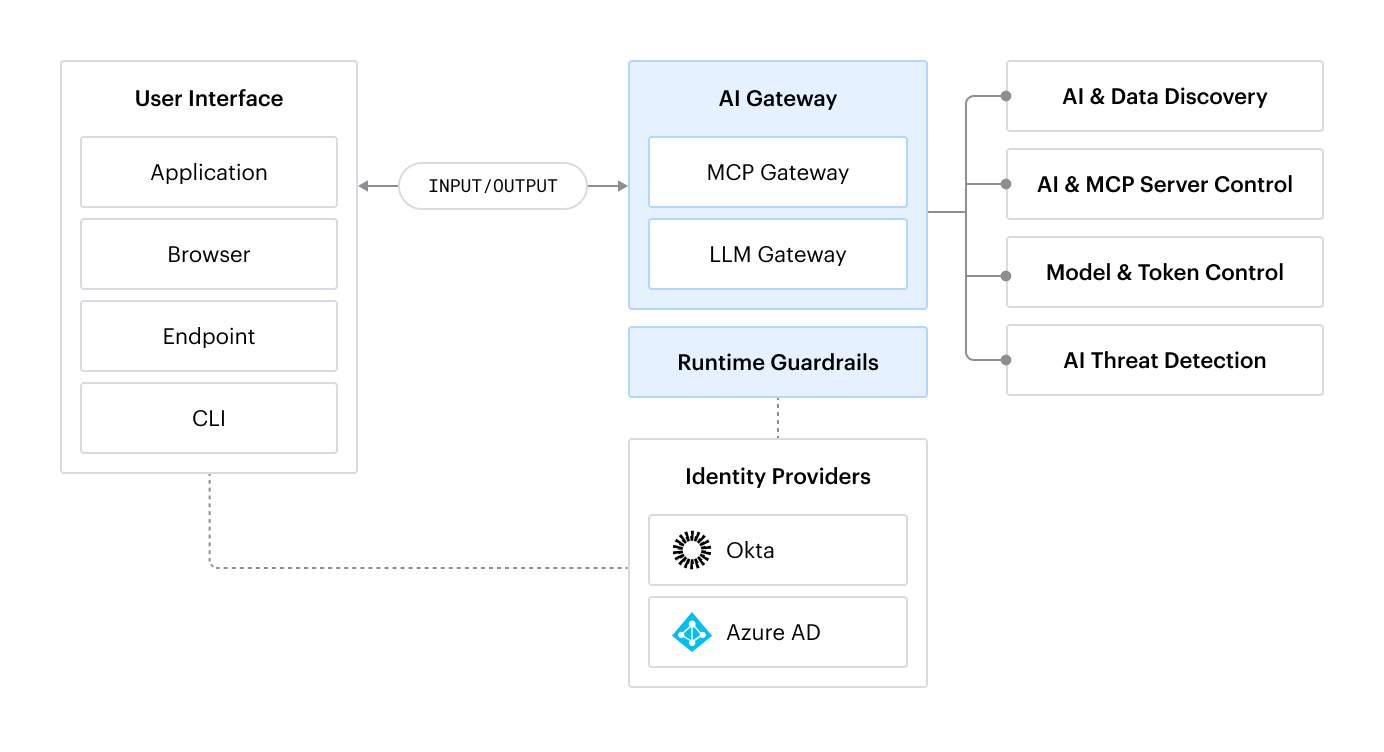
Plus, because Atlas is built on data classification, the gateways also draw on data context to discover shadow AI across applications, browsers, endpoints, CLI, and IDEs, and to detect threats in real time, including sensitive data exposure, prompt injection, and out-of-policy agent actions.
Altogether, Atlas AI Gateway now supports four AI security and governance outcomes:
- AI & Data Discovery: Inventory the AI systems used across your organization, including shadow AI, across applications, browsers, endpoints, CLI, and IDEs.
- AI & MCP Server Control: Apply runtime guardrails to prompts and responses and govern which tools agents and MCP servers can access.
- Model & Token Control: Gain insight into model spend and token usage across the organization, with controls to limit spend and govern model usage.
- AI Threat Detection: Detect threats in real time across all AI systems, including sensitive data exposure, prompt injection, and out-of-policy agent actions.
LLM Gateway: Track and control model costs and token usage
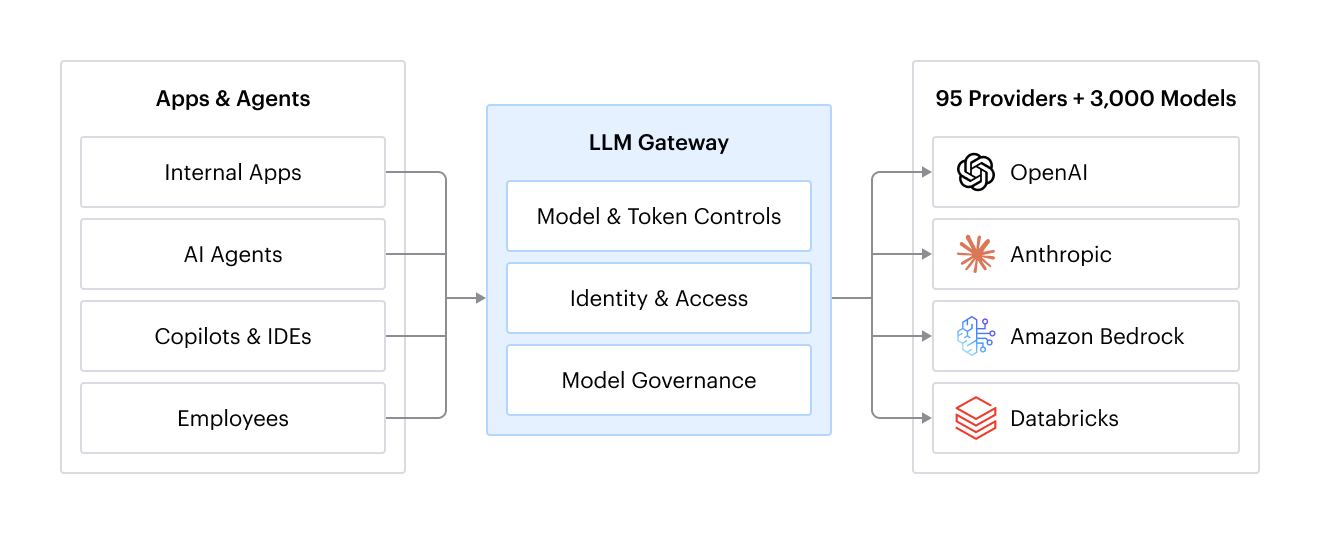
The LLM Gateway sits between AI applications, agents, copilots, and IDEs and the model providers, such as OpenAI, Anthropic, and Amazon Bedrock. In total, more than 95 providers and 3,000 models are supported. With the LLM Gateway, organizations can see and control model spend and token usage.
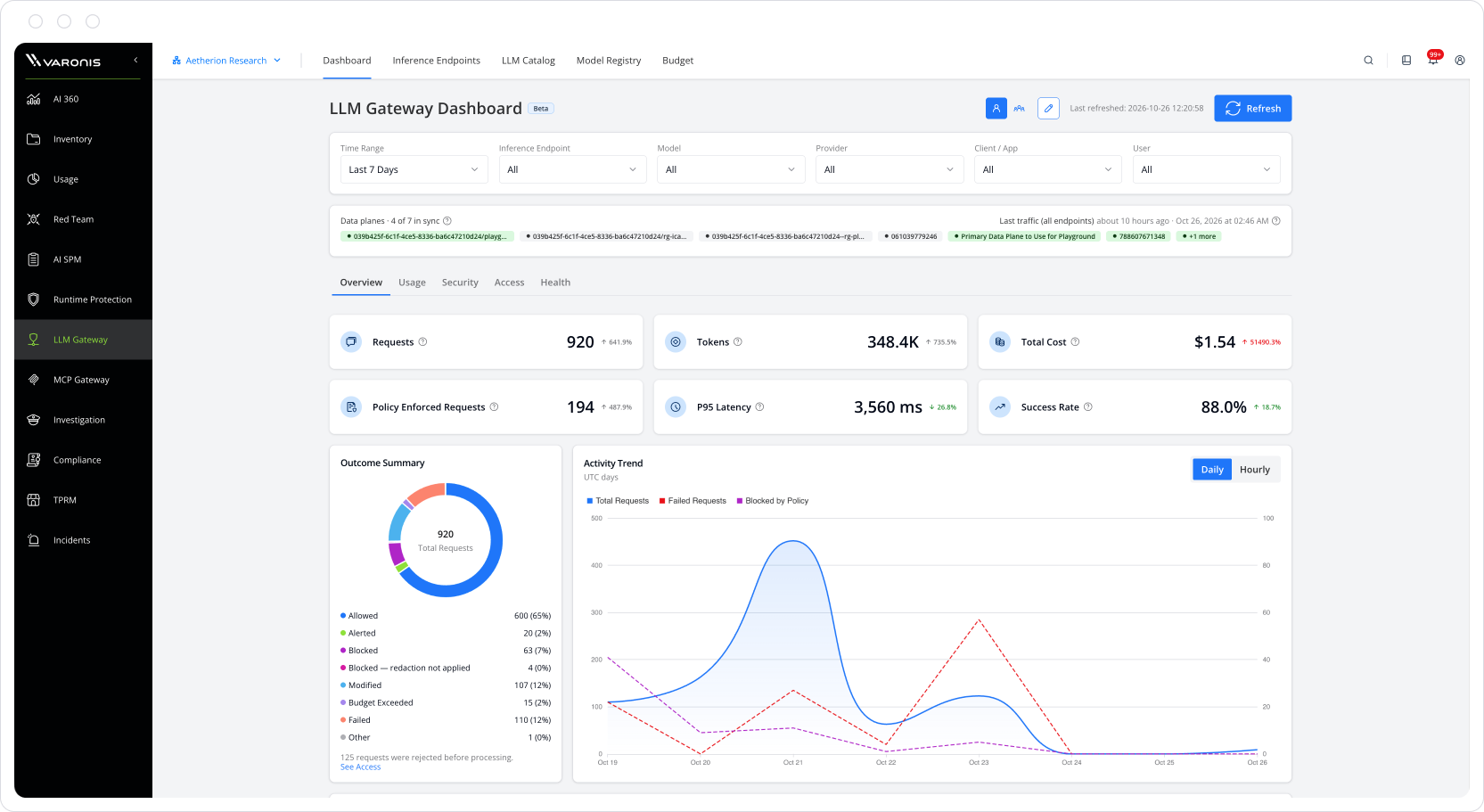
Complete visibility into model spend and token usage
From the LLM Gateway dashboard, gain full visibility into which models are in use, how many tokens they consume, who is using them, and for what use cases. With alerts and analysis to spot spikes and trends.
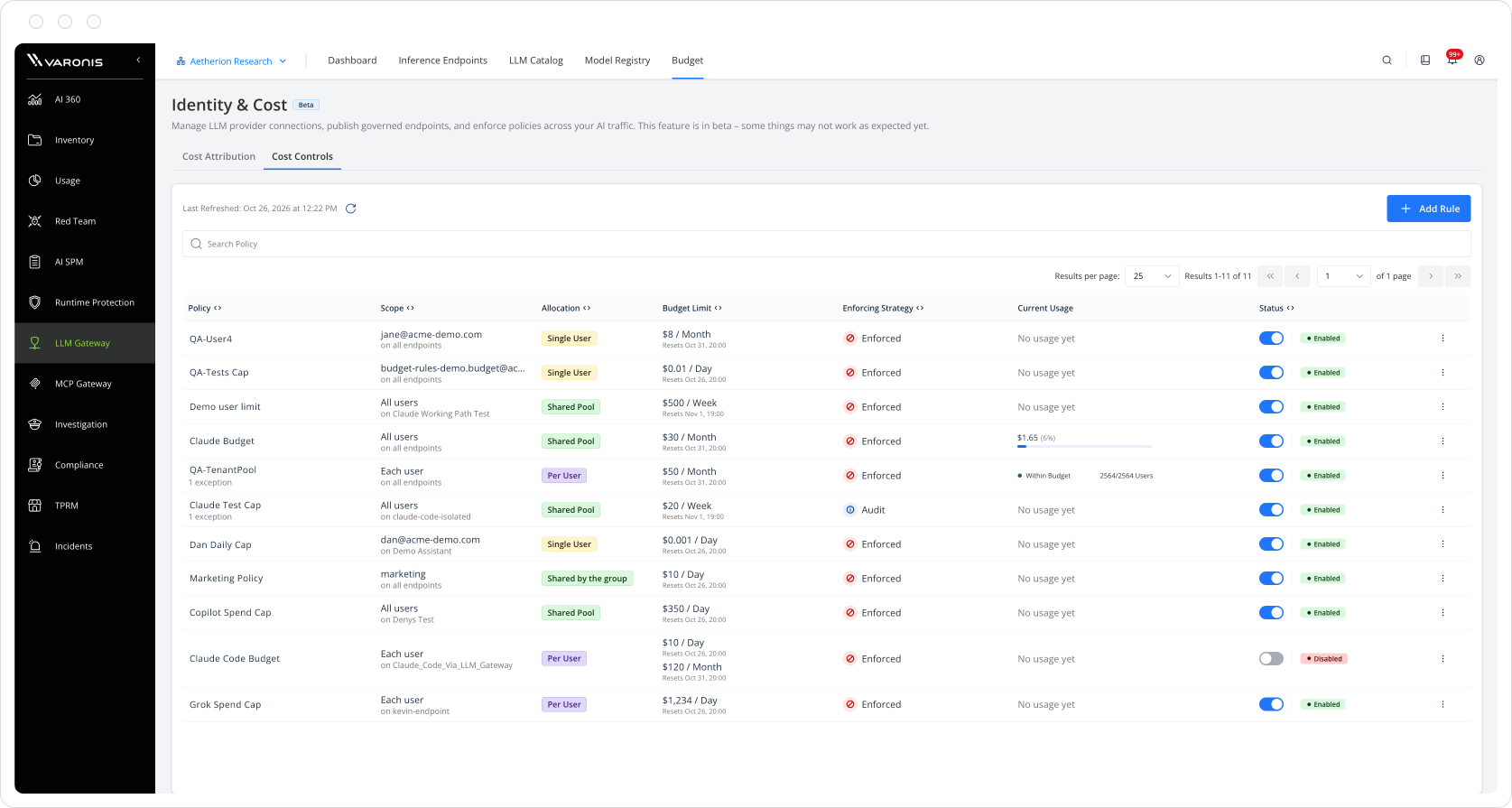
Control model usage and cost
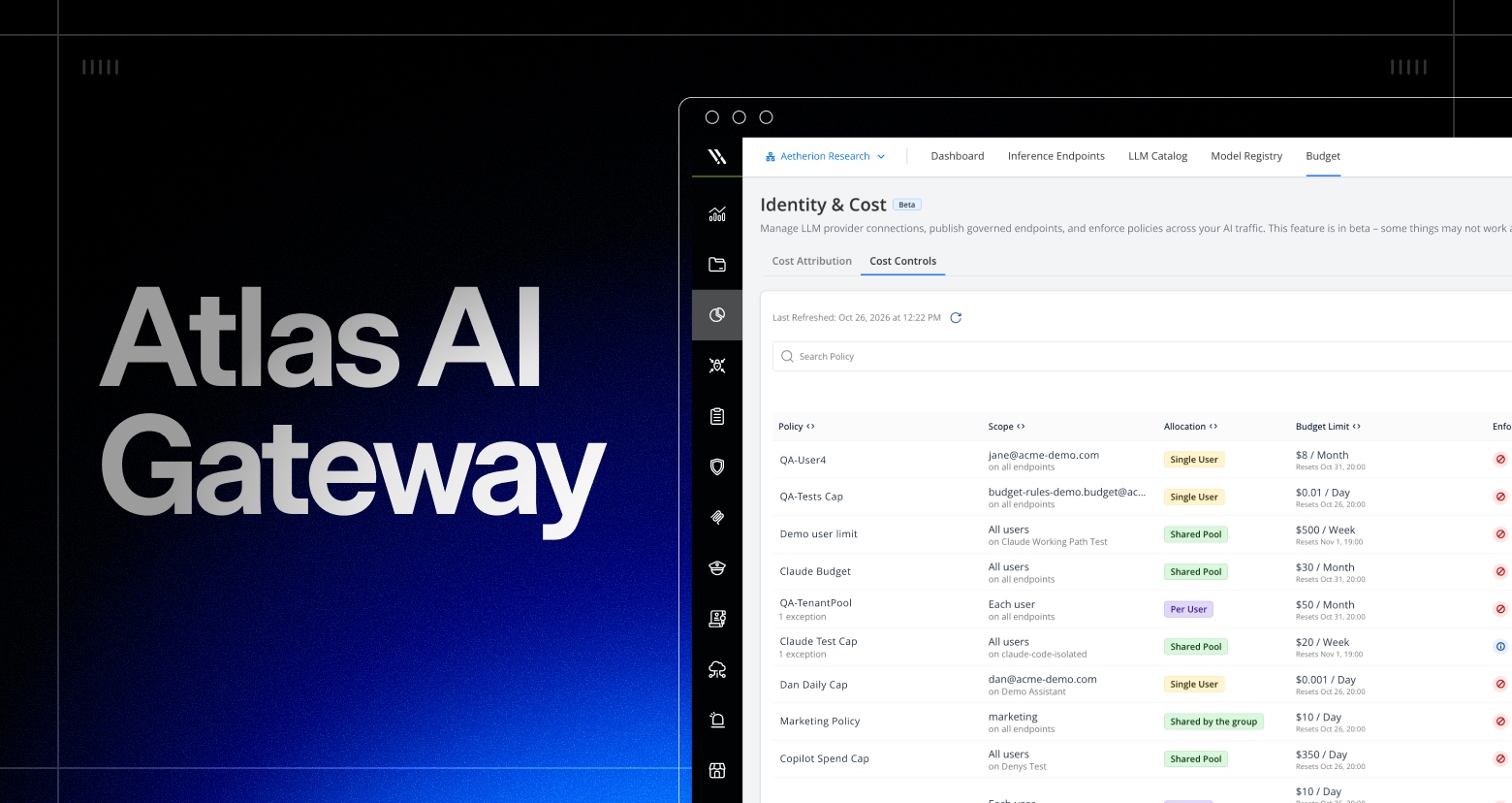
The LLM Gateway enables control over model spend, token usage, and which models are used for which use case.
Apply policies to model and token usage for users, groups, and use cases. For instance, you can set a $500 weekly budget for your dev team’s Claude Code usage, with alerts as spend approaches the limit.
Policies can also dictate which models are used for which tasks. For example, you can route sales email drafting to a lower-cost model, such as GPT 5.6, instead of GPT 6.1. These policies are applied seamlessly, with no change to the end user’s workflow.
MCP Gateway: Govern MCP servers and tool calls
The MCP Gateway sits between your agents (AI assistants, custom agents, and CI/automation) and the MCP servers and tools they use, such as GitHub, Atlassian, Salesforce, Slack, and internal APIs. With the MCP Gateway, you can control what agents and MCP servers can access and what actions their tools can take, with identity validated through your IdP.
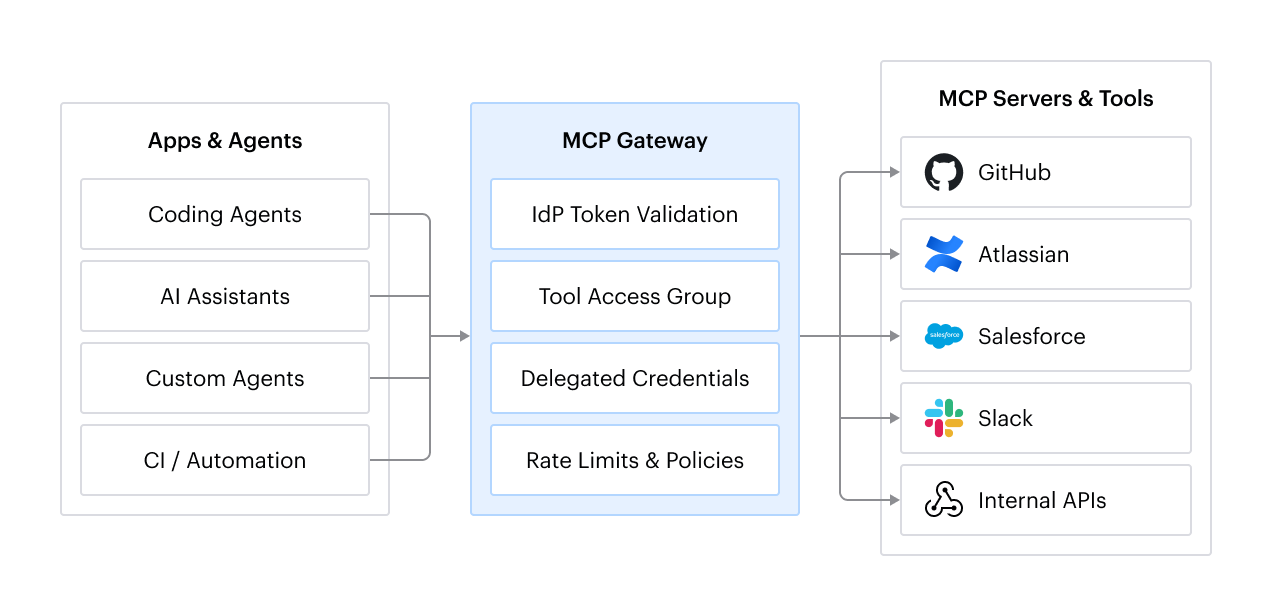
Complete visibility into MCP servers and agent tool calls
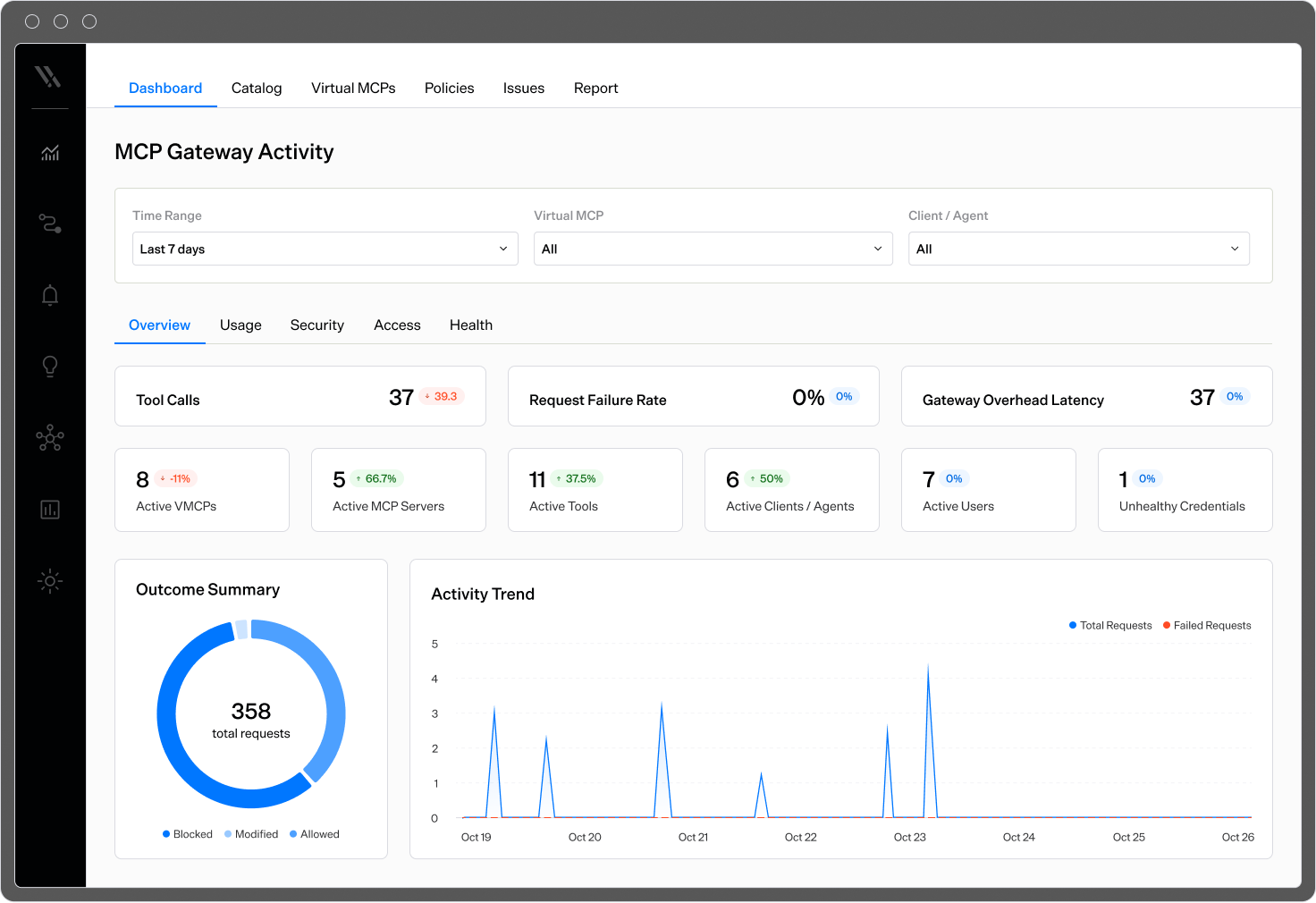
From the MCP Gateway dashboard, see which MCP servers and agents are running in your environment, which tools are active, and who or what is using them.
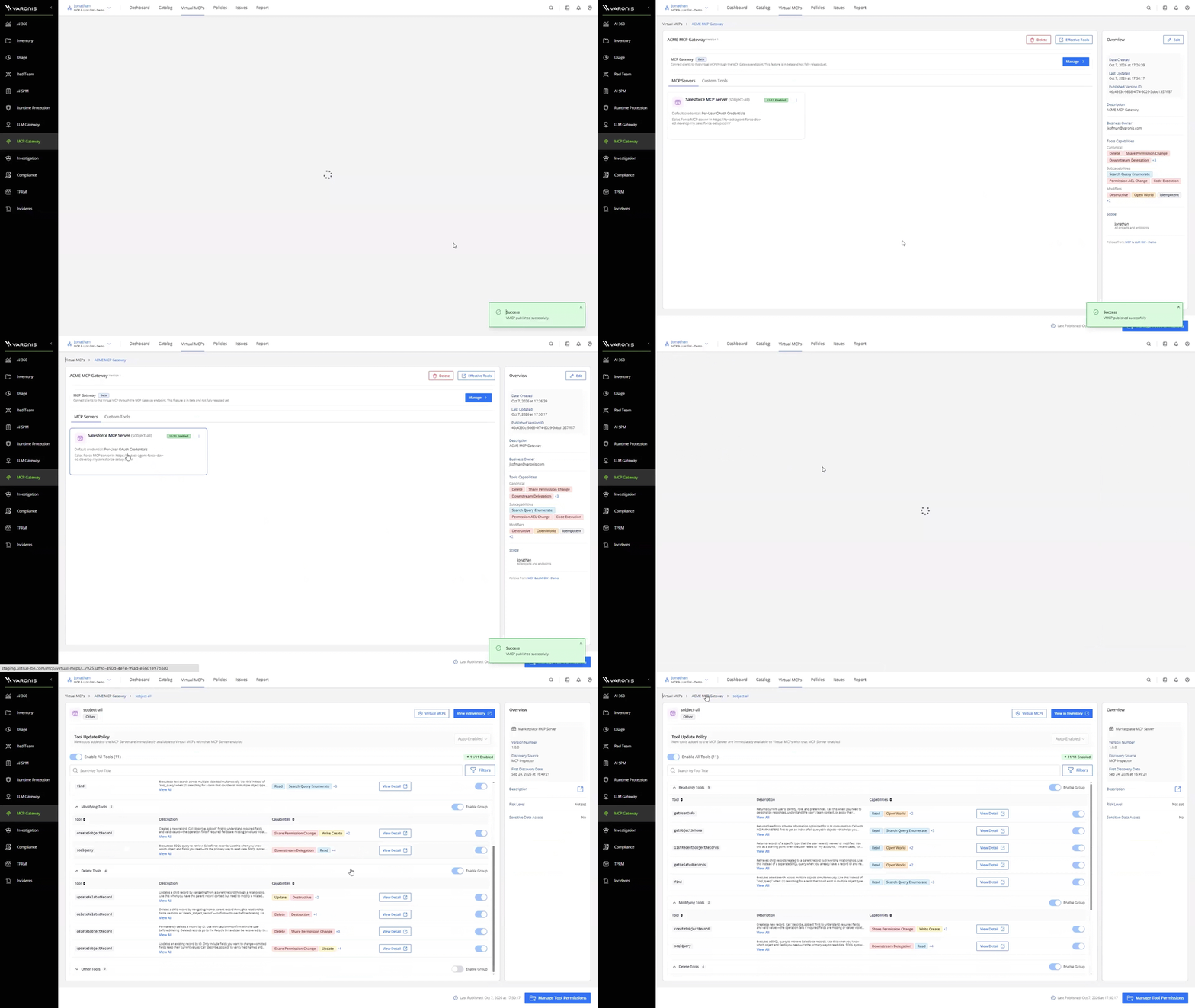
Control MCP server and agent tool calls
Create curated MCP servers with the MCP Gateway, then specify which tools are authorized, who can use them, and what actions each tool is allowed to perform, such as read-only versus write access. This keeps unauthorized actions from happening.
Validate identity through your IdP, grant tool access by group, and use delegated credentials so agents act with the user’s permissions. Every tool call is tied to a real user identity and recorded in Investigation events alongside prompts, with guardrail blocks visible in the same timeline.
How Atlas AI Gateway maps to the 6 steps above
- Discover: AI and data discovery covers AI inventory, shadow AI discovery, and sensitive data classification, so policy knows what each system can reach. Usage that can’t be tied to a verified identity appears as a separate category rather than being hidden.
- Register models: A unified model registry lets you register and configure models, set who can call each, and allow or block individual models, across 95 providers and 3,000+ models. Apps call a governed endpoint instead of the provider, and the gateway holds the provider credentials so developers don’t have to carry provider keys.
- Set limits: Cost controls let you set budgets and usage limits by user, group, model, provider, and endpoint, with alerts as spend approaches defined thresholds. For example, set a $500 weekly budget for your dev team's Claude Code usage. When a budget or usage policy is exceeded, the gateway can block the request.
- Guardrails: Runtime Guardrails apply to prompts before they leave and responses before they reach the user, and can alert, modify, block, or audit. They help prevent prompt injection, jailbreaking, sensitive data leakage, agent deviation, and other risks, with support for custom guardrails.
- MCP servers: The MCP Gateway uses virtual MCP tool sets, per-tool and group toggles, and a tool update policy that holds new tools for review. It validates identity through your IdP, uses delegated credentials so standing credentials don’t sit in the client, and checks the identity, tool, arguments, and intent before a call runs. Agent Intent adds a declared purpose for each agent.
- Monitor: Dashboards for LLM and MCP activity show requests, tokens, cost, and outcomes, and you can investigate the prompt, response, identity, model, token usage, policy decisions, and related activity in AI investigation. Send events to your SIEM and SOAR tools.
What it looks like in practice
A model request. The gateway authenticates the caller and checks which models that identity, whether human or non-human, is allowed to use. It checks the request against usage and spend limits, applies runtime guardrails to the prompt, calls the model, and applies guardrails to the response on the way back. The prompt, response, identity, model, and token usage are logged. If a policy or limit is hit, the request is stopped before it reaches the provider and the app gets a clear error. Developers and users don’t change how they work.
A tool call. A developer uses Claude Code to query Salesforce and Atlassian through MCP. The client connects through the Atlas MCP Gateway, which validates identity through the IdP, uses delegated credentials, and limits the agent to approved read-only tools, blocking potentially destructive actions. Every call is recorded in the investigation timeline, along with prompts.
What each team gets
- CISO: One place to enforce policy on prompts, responses, tools, and models, so you can enable AI with guardrails instead of blocking it.
- FinOps and IT leadership: Budgets, alerts, and per-team quotas, plus cost attribution by endpoint, user, and model.
- AI and platform owners: Governed access to multiple model providers from one place, with token limits and quotas.
- SOC: Guardrail violation tracking, investigation and forensics, and SIEM and SOAR integration for AI traffic.
One control point for models, tools, and guardrails
Because Atlas is built on Varonis data classification, it connects the dots between users, AI agents, tools, identities, permissions, and sensitive data, showing the entire chain of access and the risk it creates. This data and identity context helps organizations understand who can reach sensitive data, through which agent, and enforce the right controls.
AI adoption isn’t slowing down, and security and cost control shouldn’t be the reason it does. Putting prompts, models, and tool calls behind one gateway lets security, FinOps, and platform teams set the rules once and see the results in one place. AI security is data security, and Atlas governs it from one platform.
To go further with Atlas, see how Varonis Browser Protection covers AI use in the browser, and how Agent IBAC keeps agents to their intended purpose.