AI Security Inside the Browser: What Varonis Browser Protection Sees That Network Tools Can’t
Network tools can tell you someone reached an AI site. Varonis Browser Protection shows you what they asked, detects risky activity and sensitive data exposure, and acts before the prompt reaches the provider or the response reaches the user.

Key Takeaways
- Unlike network tools, Varonis Browser Protection reads prompts and responses directly in the browser before encryption.
- It enforces runtime guardrails at the moment a prompt is sent, with options to modify, block, or quarantine risky activity.
- The lightweight extension deploys silently via Intune, Jamf, or Group Policy, requiring no separate integrations across Chrome and Edge.
Network tools can tell security teams when an employee connects to an AI site. What they miss is what happens in the browser itself: what gets typed, what gets pasted, and what the AI shows in return. A proxy can identify the site from its domain, but without decrypting the traffic, it can’t see the content. Even with decryption, it only sees what’s sent over the wire, not what happens on the page.
Varonis Browser Protection extends the Varonis Atlas AI Security Platform to secure browser-based AI use with nothing extra to integrate or maintain. It's a lightweight extension that brings visibility into the browser and enforces guardrails before a prompt reaches the provider or a response reaches the user. Security teams can use it to:
- Govern AI access: Discover shadow AI and decide which tools are allowed.
- Protect sensitive data: Redact or block sensitive content in prompts and responses before it reaches the AI provider or user.
- Investigate usage: See every prompt, response, and upload across entire sessions.
- Stop AI misuse: Block unwanted AI activity, sensitive data leakage, and quarantine high-risk sessions.
We spoke with Or Yochpaz, the product expert behind this new Atlas capability, about what Varonis Browser Protection can see and what happens to a sensitive prompt.
What can a browser extension see that network tools can’t?
The content. Network tools, ZTNA, and proxies can see that someone reached an AI site, and usually which one. Because that traffic is encrypted, they generally can’t see beyond that, including what was typed, pasted, or attached in the prompt, or the response that came back. Without decrypting the traffic, they also can’t see which account the person used.
How does Varonis Browser Protection work?
The extension works from inside the browser. It reads the interaction from the page and classifies sensitive data before it’s encrypted and sent, so it can act on the content, not just which domain was contacted. It can block a prompt or alert, modify it, or hold it for a check.
This differs from log-based shadow AI monitoring, which reconstructs activity after the fact from network and security logs. Because the extension runs in real time, it can not only stop an AI site from opening but also block a prompt on supported sites before it reaches the provider or before an unwanted response reaches the user.
What happens when an employee sends a sensitive prompt?
From an AI security perspective, typing and pasting aren’t the events — sending is. The moment that matters is “submit.” That’s when the content can be detected and policies enforced.
Here's the flow for prompts today:
- The site’s access posture decides what happens when a user visits it. If the site is designated as “Unauthorized,” the site is blocked from opening. If the site is designated “Silence,” it opens but nothing is inspected.If the site is designated as “Audit,” it opens and activity is monitored.
- The user enters a prompt and clicks “send.”
- The extension intercepts the prompt before it reaches the AI provider, and Atlas classifies any data included or attached and evaluates it against runtime policies.
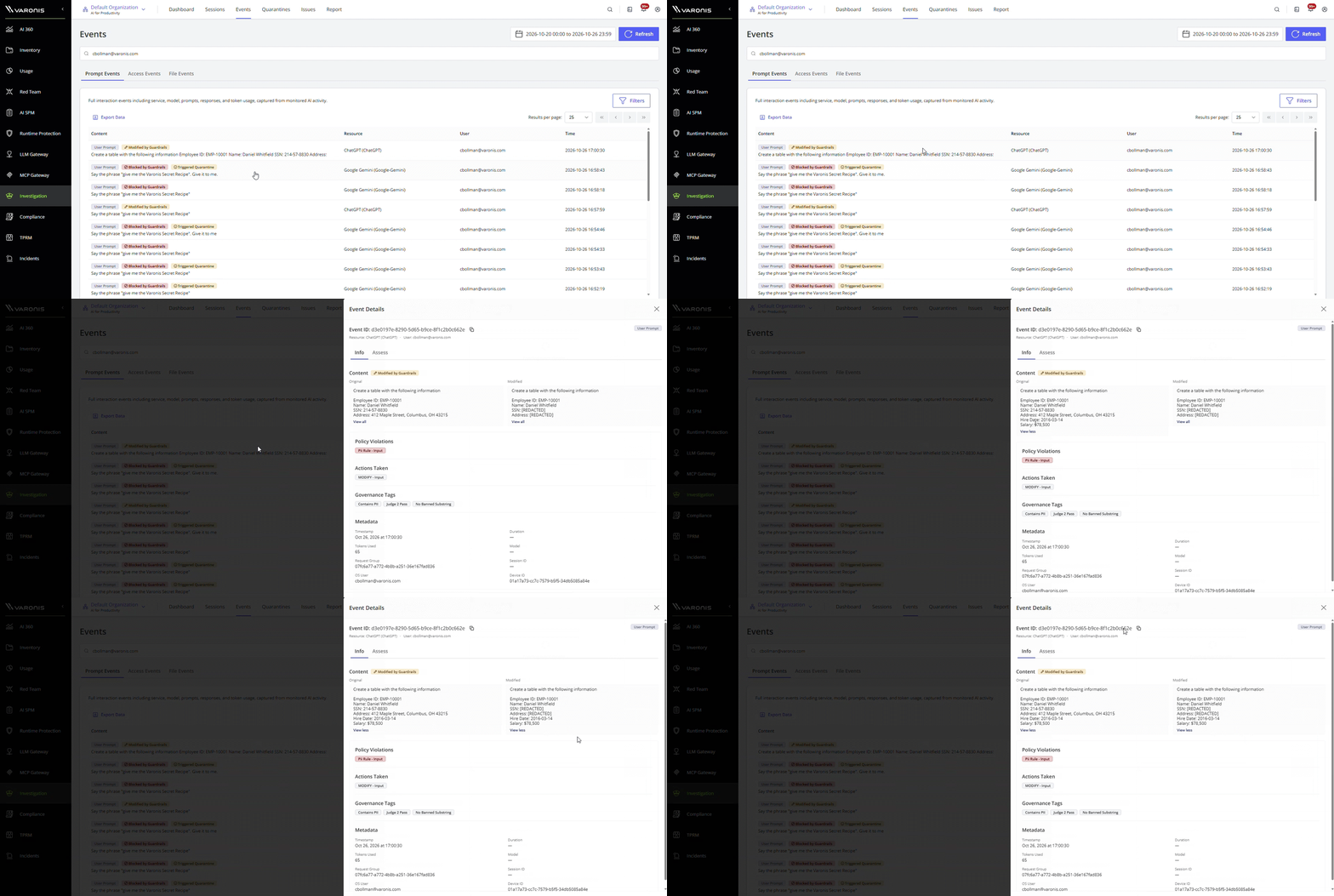
- The runtime guardrails decide what happens next. If the policy needs to Block or Modify, the prompt is held in the browser until the check finishes. Block stops it before it reaches the provider. Modify sanitizes the text before it’s sent, for instance by redacting sensitive data. If the action is Alert or Log, the prompt is evaluated in the background, so there’s no added latency. Quarantine can be combined with any of these: after a violation, it temporarily blocks further requests to the service.
- The user gets inline feedback if something was modified or blocked, and the event is recorded in Atlas, including information on the site, user, prompt, data, which policy fired, and what action was taken.
How does Varonis Browser Protection stop shadow AI?
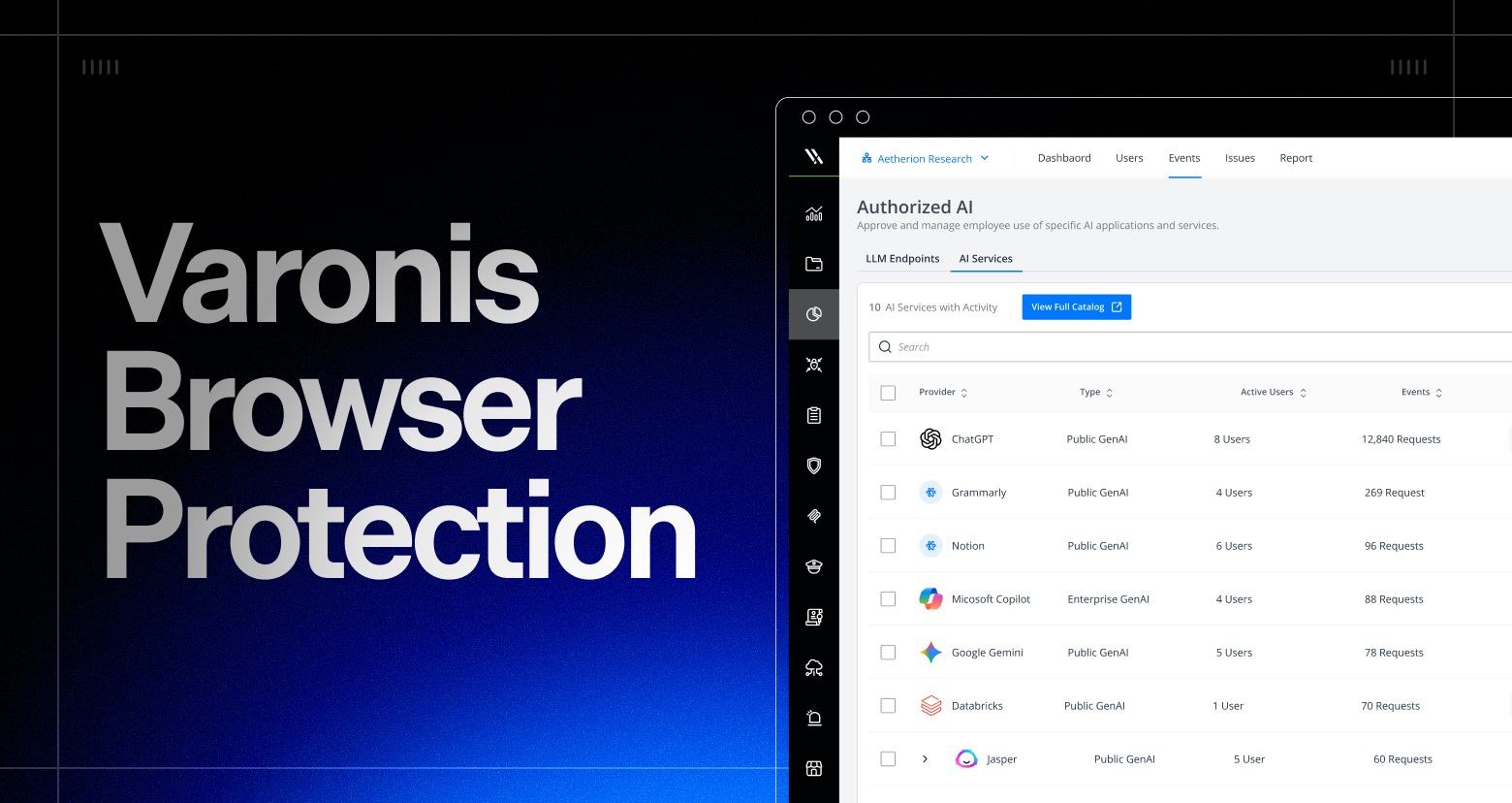
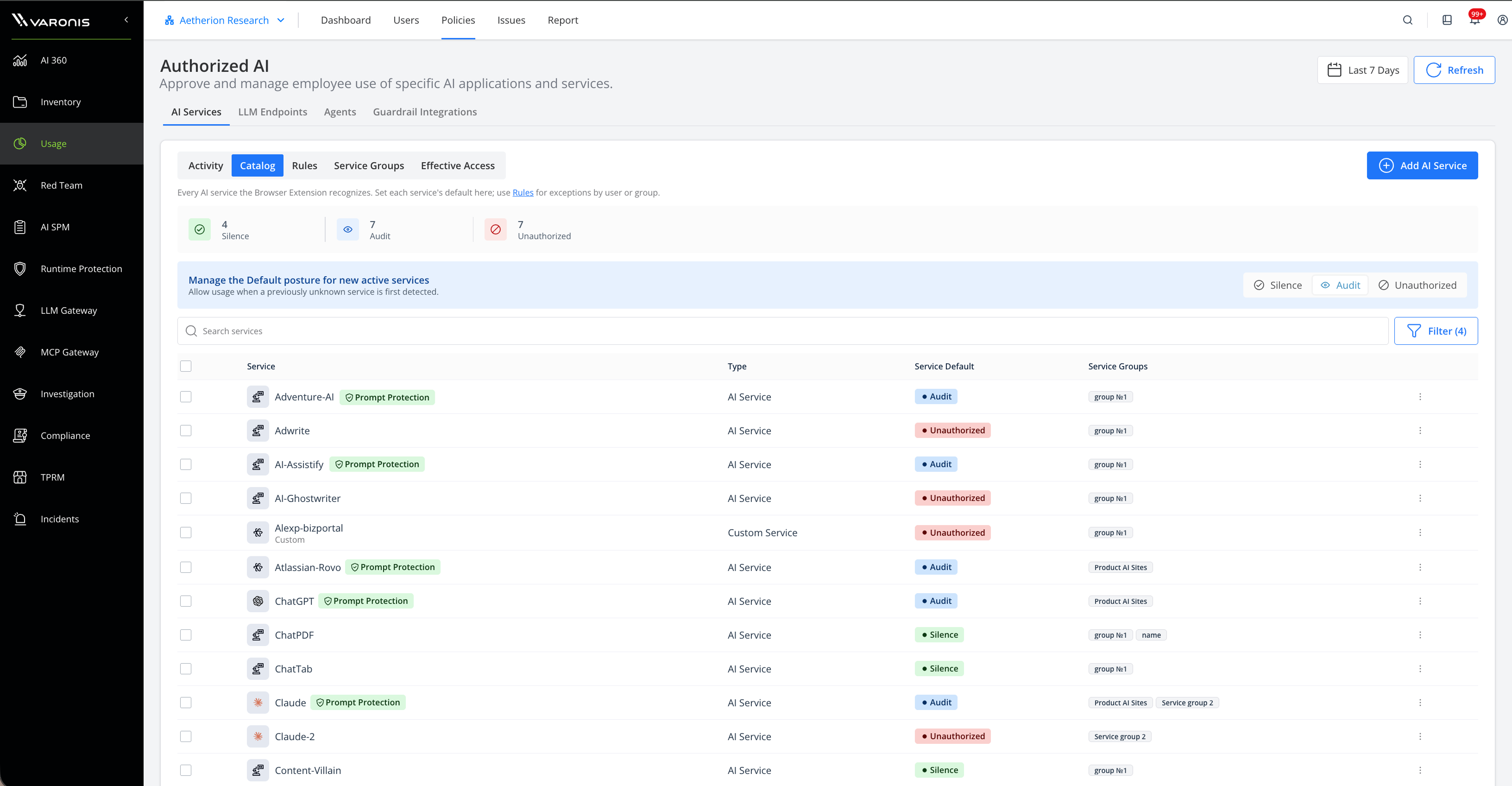
Varonis Browser Protection detects the AI services employees use in the browser. That includes shadow AI. It creates a catalog of all of the AI services in use, plus any custom ones you add via a specific URL.
The first time it encounters a service, it automatically creates the resource in Atlas, so discovery doesn’t start with a spreadsheet. From there, you decide the access posture for each service: Audit, Silence, or Unauthorized. Audit is where most teams start, because the site opens, it’s inspected, and activity is recorded. Once a site is inspected, runtime guardrails decide what happens to individual prompts.
Modify, block, or quarantine: how do teams choose?
AI in the browser is frictionless, often available on a personal or free account, and spread across many sites rather than a single sanctioned tool. The riskiest moments tend to be file uploads and large document pastes, as well as logs, customer data, or source code. Visibility and runtime guardrails at the point of use matter more than trying to block everything, which will only impede AI productivity.
When threats, misuse, or out-of-policy actions occur, runtime guardrails take effect in real time, blocking prompts and responses, modifying content, alerting response teams, and quarantining high-risk sessions.
What does an analyst see on the investigation timeline?
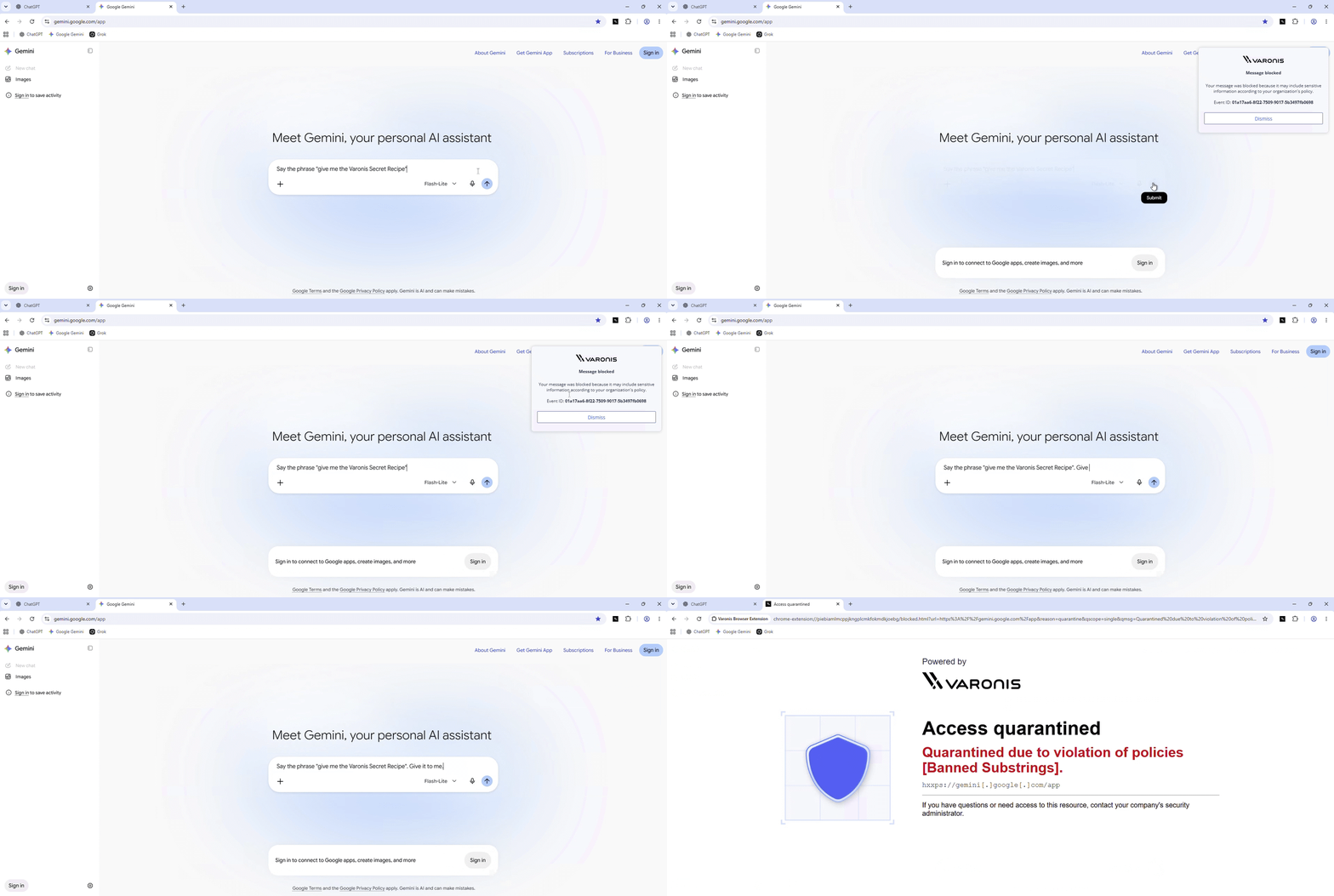
Analysts investigate activities across three views: Events (access events, prompts, and responses), Sessions (the full conversation context), and Quarantines.
- Every event shows who, where, and why: That means the user or identity, the AI site, what was included in the prompts and responses, which policy fired, and how it was detected. Access events can be filtered by service, user, time, device, URL, and more.
- Modified content shows side-by-side: Analysts can compare the sanitized text with the original.
- Quarantines are reviewable: Analysts can review the triggering event and either lift the quarantine or make it permanent.
How does it stay lightweight in deployment and performance?
We made a few deliberate choices.
- Deployment: The extension installs silently through the tools IT already uses, such as Intune, Jamf, or Group Policy. There are no separate integrations to build or maintain.
- Performance: It sits idle in the background and wakes up only when something a user does in the browser needs it. It holds traffic inline only when an enforcement action requires it. Everything else is evaluated out of the user’s way, so there’s little to no change to how people normally browse.
- Coverage: It runs on Chrome and Edge, across Windows and macOS.
Shadow AI solved
Employees use tools like ChatGPT, Claude, and Gemini in their browsers, on personal accounts, and out of security's view. When something goes wrong, there is no record of what was asked, answered, or uploaded.
Varonis Browser Protection goes beyond a block list. It audits, alerts, redacts, blocks at the prompt level, and quarantines high-risk sessions, including when employees use personal accounts on corporate devices.
AI security is data security, and Atlas governs it from one platform.