Discover shadow MCP
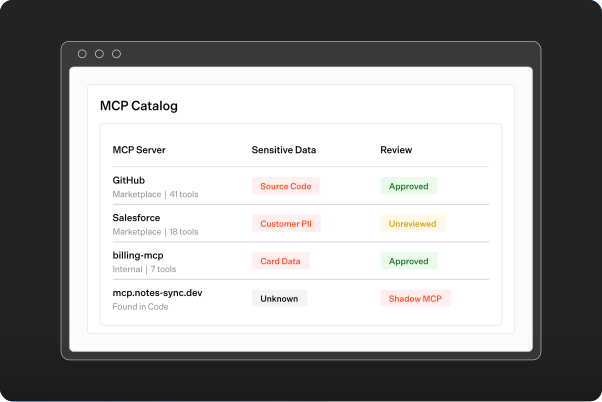
Atlas finds MCP connections in your code, even before anyone registers the server.
Atlas finds MCP connections in your code, even before anyone registers the server.
AI SECURITY
Varonis Atlas governs the MCP servers and tools your agents use. Find shadow MCP, approve the tools you trust, and block the ones you don't.
Trusted by 8,000+ customers








OVERVIEW
Model Context Protocol (MCP) servers give your agents new actions and new access to your data. Atlas finds every server, shows what each one can reach, and enforces your allowlist at runtime.
Atlas finds MCP connections in your code, even before anyone registers the server.
Atlas finds MCP connections in your code, even before anyone registers the server.

Build allowlists of reviewed tools. Atlas strips everything else before the model sees it.
Build allowlists of reviewed tools. Atlas strips everything else before the model sees it.

Bind a credential to each server on a gateway token. No binding, no access.
Bind a credential to each server on a gateway token. No binding, no access.

Focus on the permissions and exposed data that could increase the impact of a breach.
Bring data discovery, access visibility, and activity monitoring together to support your compliance program.
DISCOVERY
Atlas finds MCP connections in your code and inspects each server to list its tools. See which servers can reach sensitive data, who owns them, and how risky they are. Shadow MCP connections show up for you to register or link.
Allowlists
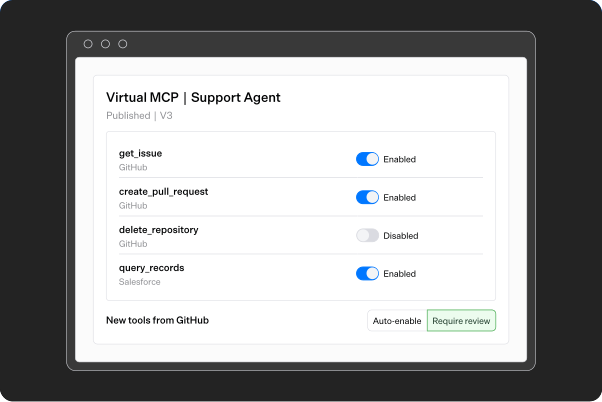
Create a Virtual MCP for each workflow and switch on the tools it needs. Draft changes, then publish. Decide whether new tools from a server get added on their own or wait for review.
RUNTIME
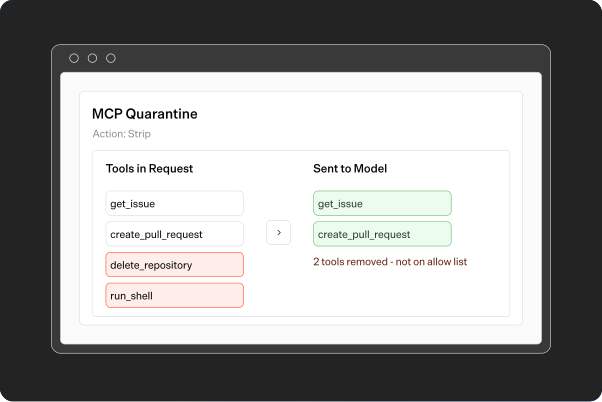
MCP Quarantine compares the tools in each request to your allowlist. It removes any tool that isn't on it, so the model never sees it.
Monitoring
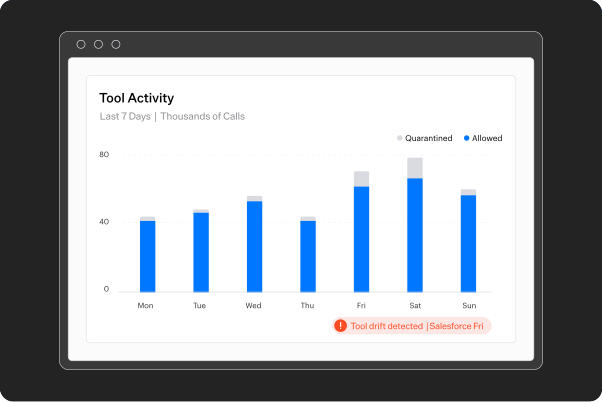
Policies flag shadow MCP, changed tool definitions, new tools on approved servers, and servers that reach sensitive data with no owner. Activity shows which tools get called and which get quarantined.
FAQs

No. Registering gives you visibility. Tools are allowed only through a published Virtual MCP.
Streamable HTTP, Server-Sent Events, and STDIO.
Their allowlists add up. A tool is allowed if it's approved and in any Virtual MCP that applies.
API keys or OAuth. OAuth credentials refresh on their own. Rotate an API key and your token bindings stay intact.
No. Rejected servers are blocked and can't be bound to a token.
Yes. Turn on a policy at the top level and it applies to every organization and project below. Teams can change it lower down.
The LLM Gateway applies the same governance to your LLM traffic.