Automating least privilege continually trims unnecessary access to keep data tightly controlled.
When excessive data access goes unchecked, one compromised user or rogue insider can inflict untold damage on your business.
Reducing the data blast radius is the No. 1 challenge for CISOs today, but it can’t be solved with a one-time cleanup project or manual remediation. At the rate data is created and shared, even an army of admins couldn’t keep up with removing unused or risky permissions.
Now, imagine you had a robot that could intelligently and continually remove unnecessary access and enforce least privilege while you sleep.
Microsoft 365’s native controls aren’t cutting it anymore
Microsoft 365 includes helpful security features, but its native tools cannot maintain least privilege at scale. Entra ID and SharePoint groups show who has access inside M365, yet they offer limited insight across other clouds or into whether permissions are still needed. As data grows, these gaps leave hidden risk.
Manual workflows add more friction. PIM approvals and role reviews slow teams down and cannot keep up with constant changes in group membership, sharing links, and data use. Even with effort, stale access accumulates.
Native audits are also reactive. They surface risk only during periodic reviews. Continuous automation closes this gap by removing unnecessary access as soon as it appears, turning least privilege into an ongoing and sustainable practice.
Least privilege automation for Microsoft 365
Automation helps collaboration in Microsoft 365 flourish without sacrificing security. With automated least-privilege tools, teams can swiftly and safely remove stale group memberships, stale sharing links, sensitive public links, and more. You set the rules and let the automation enforce them.
Intelligent enforcement of least privilege requires all three dimensions of data:
- Sensitivity
- Permissions
- Activity
Without sensitivity, you can’t prioritize. Without permissions, you’re completely blind. Without activity, your only choice is to take a shotgun approach and remove all links or permissions to sensitive data, even if they’re valid and in use.
Windows file systems lack meaningful visibility and control
Windows file systems rely on complex ACLs and broad access groups that often stay in place for years. High-risk groups like “Everyone” and large domain groups commonly remain on shares without review.
Native tools provide little insight into whether these permissions are still used. Admins also lack activity data, so they cannot easily confirm who still needs access. Manual cleanup is slow and risky. New folders and inherited permissions quickly recreate exposure. Automation helps by identifying real usage and replacing broad groups with tightly scoped ones.
How we automate least privilege for Windows and CIFS
Automation can reduce data exposure for Windows file shares and CIFS-based filers with global access group remediation policies. You can effortlessly remove data exposure from excessive permission sets like the “everyone” group and domain users. Varonis determines who needs access to data and who doesn’t, and then automatically replaces high-risk groups with tightly-managed groups — reducing your blast radius without interrupting business.
Quantify data risk and track progress.
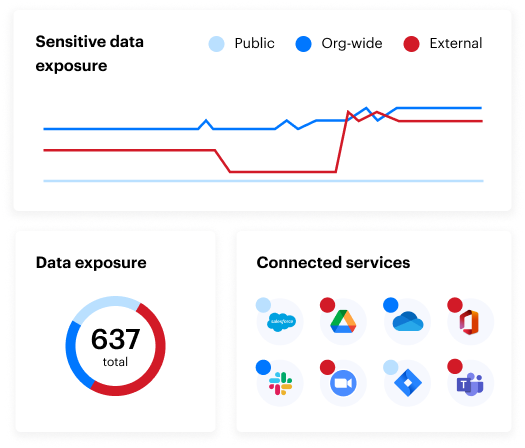
Before you set up an automated remediation policy, it’s important to understand your baseline data risk. Our real-time risk dashboards help you answer critical questions: How much sensitive data do you have in your M365 tenants? What kind of data is it? How much is exposed publicly or to the entire company?
You can trend risk over time and even drill into any widget and see exactly which sites, folders, files, and links are affected.
Don’t just measure data security posture, strengthen it.
Don’t just measure data security posture, strengthen it.
Out-of-the-box policies
Now that you understand your risk, you can leverage our popular out-of-the-box remediation policies to eliminate it. Some of our policies for M365 include:
- Removing collaboration links that expose sensitive data
- Removing any collaboration link that exposes data publicly or externally
- Removing collaboration links that share data with "anyone on the internet"
- Removing collaboration links that share data with "anyone in the organization"
- Removing collaboration links that share data with "specific people" in OneDrive
- Removing non-organization users from "specific people" links
- Removing links that haven’t been used in a certain amount of time
- Removing group memberships
- Removing stale permissions from ACLs
- Removing direct permissions for dynamic groups,
- Removing direct permissions for organization-wide groups
- Removing direct permissions for public groups
- Removing direct permissions for non-organization users
- Removing membership of disabled users from “specific people” collaboration links
- Removing membership of users with a predefined domain from "specific people” collaboration links
- Removing direct permissions for stale users
- Removing direct permissions for disabled users
- Removing direct permissions for users from a specific domain
- Removing membership of public groups
- Removing membership of org-wide groups
- Removing membership of dynamic groups
- Removing membership of disabled users
- Removing membership of non-org users in groups with admin roles
- Deleting empty groups
- Disabling stale users
- Removing stale memberships
You can choose to run least privilege automation on-demand, but the real magic is auto-enforcement. Whenever users violate your data sharing policies, Varonis will fix it without human intervention.
Custom remediation policies
You can easily clone and customize our pre-made policies to fit your organization’s needs. Policies can be customized based on sensitivity, staleness, location, link type, and more.
Varonis lets you preview the results in the UI to see precisely which permissions will be remediated by your policy. This lets you ensure you’ve set the right conditions, tweak criteria, and gain confidence before you commit.
Once you’re happy with your policy, you can select the schedule and approvals, and least privilege automation will take care of the rest.
Create a new policy or edit an existing one. Preview results before committing.

Create a new policy or edit an existing one. Preview results before committing.
Box provides weak least-privilege guardrails
Box makes collaboration easy, but its native controls do little to limit oversharing. Users can create public links and external shares faster than admins can monitor them.
Box does not combine sensitivity, permissions, and activity into a single view, so teams cannot tell which access is necessary. Manual reviews fall behind as new folders and cross-team projects grow. Automated enforcement closes this gap by removing stale links, trimming unused access, and applying consistent least-privilege rules.
Google Drive creates broad and persistent exposure
Google Drive’s sharing model often leads to public links, organization-wide access, and lingering external collaborators. Native tools show who can access data but offer little help determining whether that access is appropriate or used.
Inherited permissions across nested folders make cleanup difficult. User-driven sharing grows faster than manual reviews can keep up. Automation reduces this risk by analyzing sensitivity, exposure level, and activity to remove unnecessary access and maintain least privilege.
Automating least privilege for Box and Google Drive
Countless Varonis customers are multi-cloud organizations — storing sensitive data across a multitude of cloud apps and infrastructures. The dev team uses M365 and Azure. Marketing uses Box. HR uses Google Workspace. What does the CISO want? Unified visibility and policy enforcement across all of the above.
Varonis customers can now continually eliminate overexposed data in Box and Google Drive.
Like our offerings for Microsoft 365, our out-of-the-box remediation policies for Google Drive and Box can automatically eliminate org-wide sharing links, stale links, or links shared publicly.
Surface your permissions risk with reports.
Least privilege automation for Google and Box starts with reports. Use our powerful reporting filters to identify the data risk you want to remediate. You can filter based on specific criteria to remove links shared publicly or to the whole organization such as:
- Data sensitivity and sensitivity type (PII, PCI, etc.)
- Exposure level — organization-wide and publicly shared data
- Data marked as stale
Select criteria for automated sharing link removal.
Select criteria for automated sharing link removal.
Along with remediating org-wide and public access at scale, you can take a more precise approach and remove users’ direct permissions to folders and files.
You can filter direct permissions removal by:
- Data sensitivity and sensitivity type
- User type: external, privileged, and personal accounts
- Stale permissions (permissions not used over an extended period)
- Stale users
- Permission type (CRUDS)
- Specific users
Filter criteria for direct permissions removal.

Filter criteria for direct permissions removal.
Once you’ve defined your scope, you can turn your report into a policy that Varonis will continually enforce with least privilege automation!
Automatically revoke access to sensitive data in Box and Google Drive.
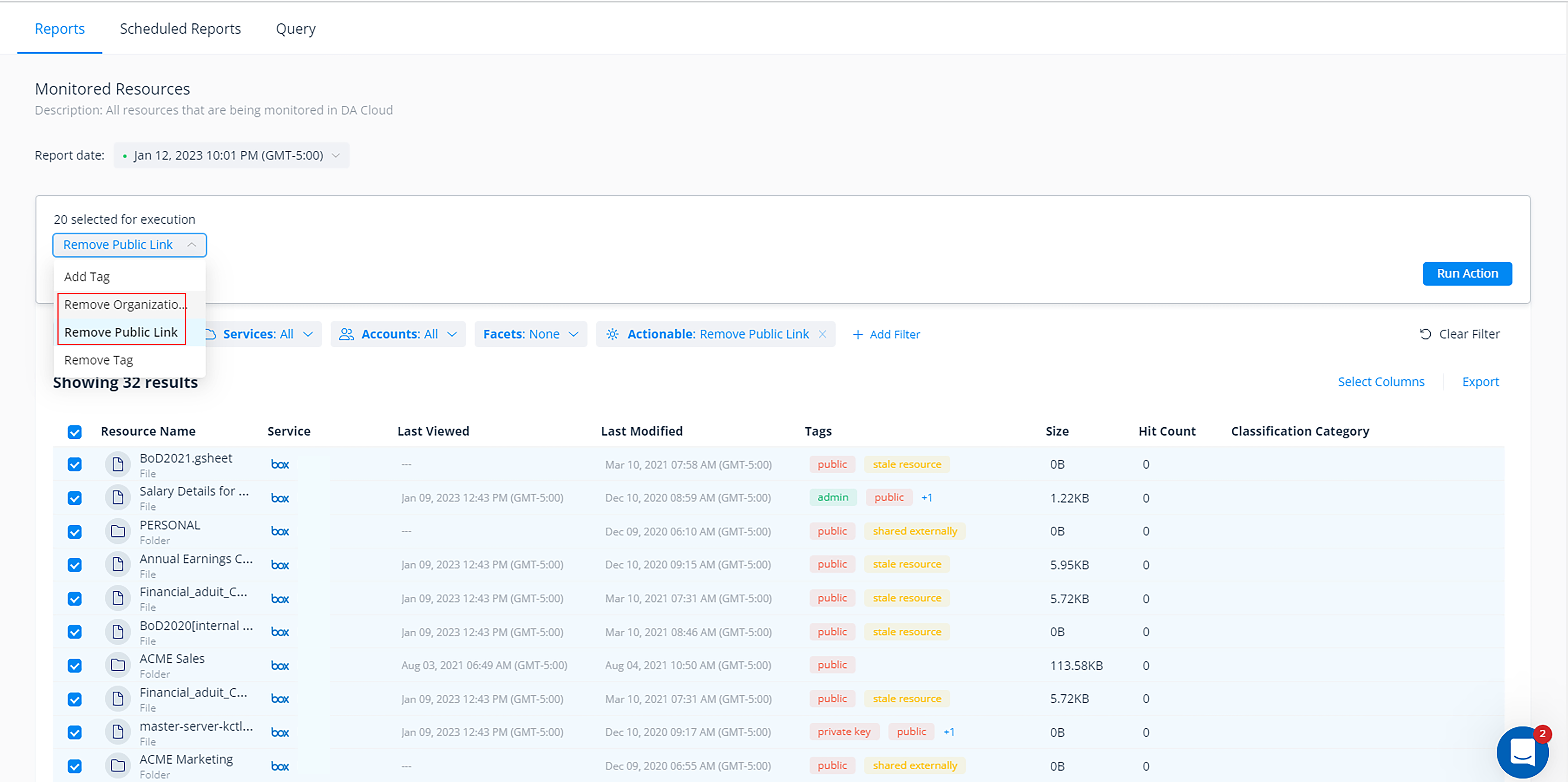
Automatically revoke access to sensitive data in Box and Google Drive.
Much like within Microsoft 365, you can use our built-in Box and Google policies or build custom ones with unique selection criteria and actions that fit your organization's various sharing policies.
For example, you could build one policy to automatically remove all public links in HR’s Google Drive folders, regardless of data sensitivity, and create another policy for Marketing that only removes org-wide and external sharing links to data marked sensitive.
You can configure each policy to either execute automatically (and continually with a customizable schedule) or require them to be reviewed and approved by your admins before they execute.
Customize your least privilege automation jobs.
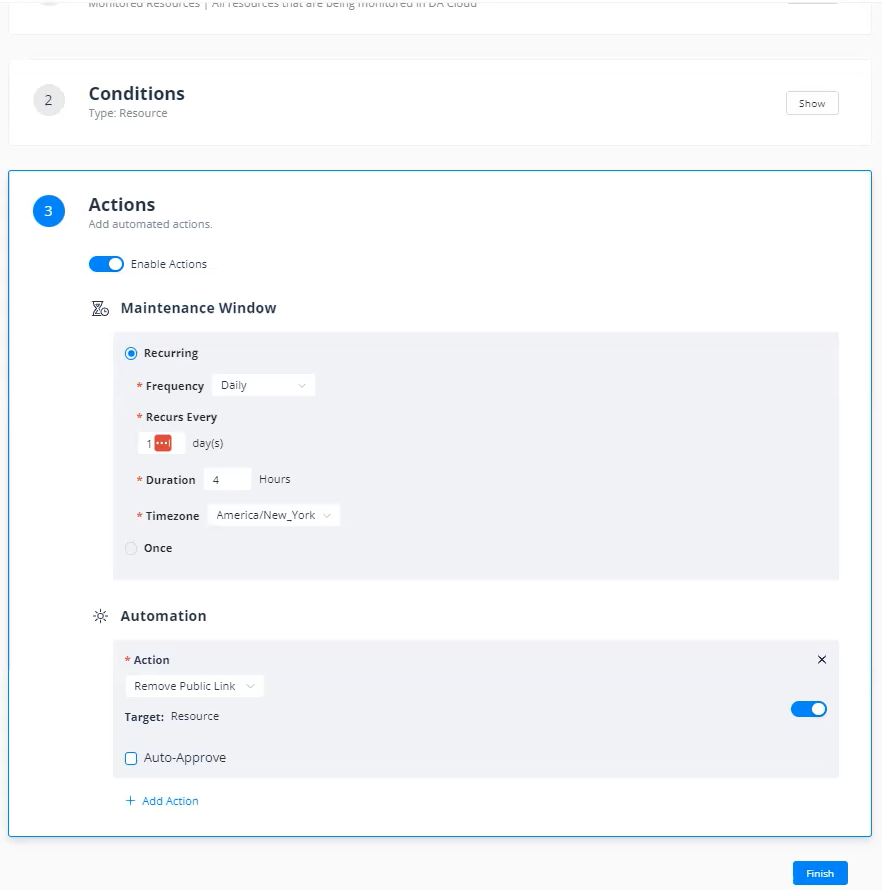
Customize your least privilege automation jobs.
Share risk reduction progress with your exec team and auditors.
Your executive team will be thrilled to receive concise reports that show meaningful risk reduction week after week. Most customers see a big drop-off in exposure after the first remediation job runs and then subsequent reports prove that they’re keeping risk low.
Create a scheduled report to track your risk reduction.
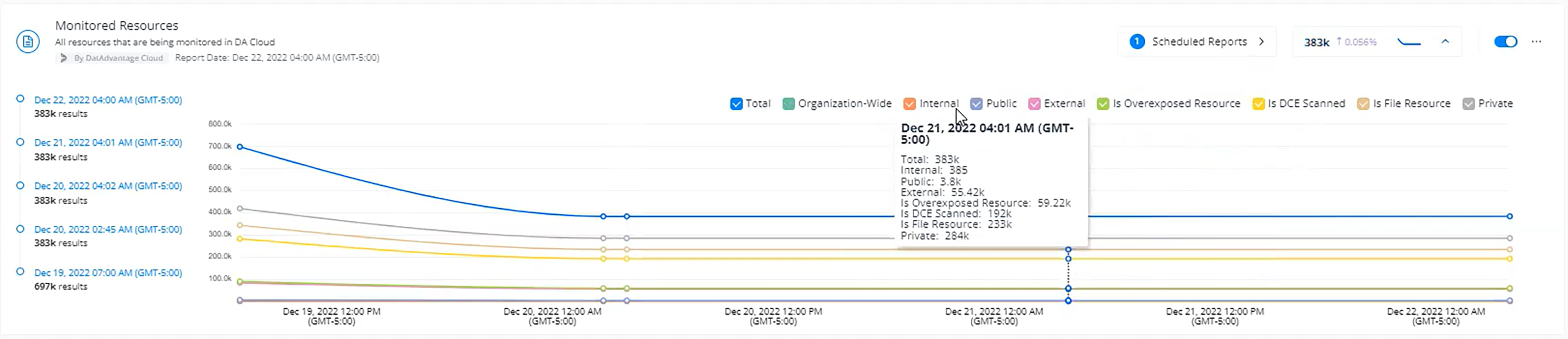
Create a scheduled report to track your risk reduction.
Get to least privilege with Varonis.
With an ever-increasing amount of data today and a projected 100 zettabytes to exist in the cloud by 2025, IT teams are simply not set up to proactively reduce their organization’s attack surface.
Varonis is on a mission to provide effortless outcomes for our customers using automated, set-it-and-forget-it data security. Our cloud-native Data Security Platform takes a few minutes to install and delivers instant insights. Improve your organization’s ability to withstand security attacks through an adaptive, agile, and highly automated approach to data protection.
FAQs about least privilege automation
How does least privilege automation strengthen Microsoft 365 security?
Least privilege automation reduces an organization's attack surface by removing unnecessary access rights on a continuous basis. It identifies stale group memberships, excessive global access, and unused sharing links, then remediates them automatically. Users keep only the permissions they need. This limits the impact of compromised accounts or insider threats while preserving normal workflows.
What data dimensions are critical for enforcing intelligent access policies?
Effective enforcement requires insight into data sensitivity, permission structures, and user activity. These three dimensions show which access is legitimate and which is risky. They also help ensure that valid permissions remain and that unsafe or unused ones are removed. Without this context, IT teams often guess, which can create operational issues.
Why is manual remediation insufficient for managing cloud permissions?
Cloud environments change too quickly for manual reviews to keep up. Automated remediation works in real time and fixes violations as they appear. This creates a consistent security posture and prevents the buildup of unmanaged access between scheduled audits.
How can organizations manage risky collaboration links without hindering productivity?
Use automated policies that target high-risk sharing. Automate the removal of links that are open to everyone. Try setting expirations for links after periods of inactivity or revoke public access to sensitive files. This allows teams to collaborate freely while tightening access when it is no longer needed.