.png)
Managed MySQL databases are supposed to make things easier. The cloud provider handles patching, backups, and infrastructure. The customer handles authentication and access control. That division of responsibility works well when both sides do their part. When they don’t, the window between deployment and compromise can be measured in minutes.
Varonis Threat Labs set out to test that window. We were researching misconfigurations in Google Cloud Platform’s CloudSQL when we created a MySQL instance with a public IP address. Within minutes, brute-force attacks began. That got us thinking: what if we gave attackers the perfect scenario, MySQL honeypots in different cloud providers with a weak root password and public access, and documented what happened?
Within eight minutes, brute-force attacks started arriving. Within hours, two separate attackers had broken into the GCP instance, stolen decoy tables, and dropped ransom notes demanding Bitcoin. We deployed the same experiment on AWS RDS and Azure MySQL Flexible Server - neither was compromised.
Managed MySQL services across cloud providers
We focused on the three major managed MySQL offerings:
- GCP CloudSQL for MySQL
- Azure MySQL Flexible Server
- Amazon RDS for MySQL
All three deliver automated backups with point-in-time recovery, scalable computing and storage, and built-in monitoring through their respective dashboards (Google Cloud Monitoring, Azure Monitor, and Amazon CloudWatch). Security patches and network segmentation are handled by the platform. Where they differ is in their default security and logging configurations.
On GCP, admin activity logs are automatically enabled and record every administrative action. These logs cannot be turned off. System logs capture automated operations like backups and maintenance. However, data access logs must be explicitly enabled, and database-level audit logging requires configuring specific database flags (general_log, cloudsql_mysql_audit).
On Azure, the Activity Log is enabled by default and records API actions such as instance creation and deletion. Database-level audit logging requires setting audit_log_enabled to ON in server parameters and configuring diagnostic settings to preserve logs. Administrators can use NSG flow logs to monitor IP traffic patterns passing through Network Security Groups.
On AWS, CloudTrail logs all management API activities by default, including administrative actions on MySQL instances and database exports to S3. For database-level auditing, administrators must create an option group with MARIADB_AUDIT_PLUGIN and set SERVER_AUDIT_EVENTS and SERVER_AUDIT_LOGGING to ON.
The security posture defaults also vary.
On GCP Cloud SQL for MySQL, the root user can be created without a password. IAM database authentication is also supported, and public IP access can be enabled with access restricted to authorized IPs. Private connectivity can be achieved through Private IP or Private Service Connect (PSC). Azure blocks reserved admin usernames (root, admin, administrator, guest, public, azure_superuser) and supports Microsoft Entra authentication. Network access is controlled via firewall rules and VNet integration, with an optional Private Endpoint for fully private connectivity. AWS supports password, IAM, and Kerberos authentication, with network access restricted through VPC security groups that let administrators define inbound and outbound traffic rules by IP and port.
The honeypot in action
The GCP instance was deployed with intentionally weak security: a root password of “password” and unrestricted public access from any IP address (0.0.0.0/0). Both data access logs and general MySQL logs were enabled to capture every query. Two decoy databases were created and populated with fake customer data to give attackers something worth stealing.
Honeypot setup diagram
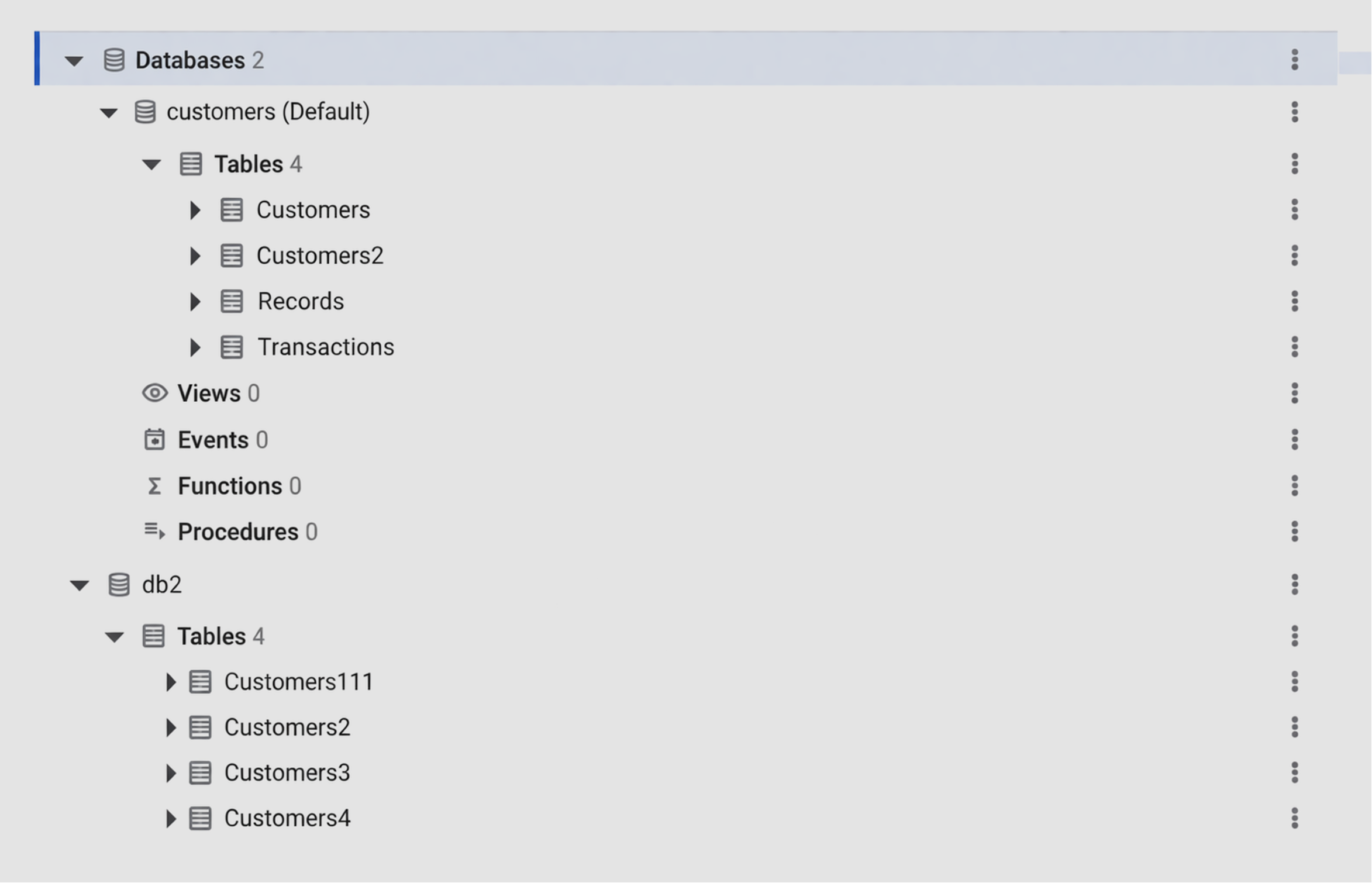
Honeypot setup diagram
What the attackers did
A few hours after deployment, multiple brute-force and individual login attempts were detected from various IP addresses, all flagged as malicious by several IP reputation services. The primary attacker intensified efforts with a sustained brute-force attack. After roughly 576 failed attempts, the attacker successfully accessed the database. Shortly afterward, they reconnected using an IP address linked to a third-party VPN.
The first attacker followed a structured sequence once inside the database:
- Enumerated all databases (SHOW DATABASES), listed tables (SHOW TABLES), and inspected table structure (SHOW FIELDS FROM `Records`).
- Checked for table existence via INFORMATION_SCHEMA.TABLES, then extracted data using SELECT /*!40001 SQL_NO_CACHE */ `RecordID`, `CustomerID`, `Balance` FROM `Records` WHERE 1 LIMIT 10. This process was repeated for every table in every database.
- Removed foreign keys (ALTER TABLE `Records` DROP FOREIGN KEY `Records_ibfk_1`), deleted tables (DROP TABLE `Records`), and created a new RECOVER_YOUR_DATA table containing a ransom note.
The ransom note read: “All your data is backed up. You must pay 0.0094 BTC to bc1qd9r8c0t7x0dw748f8ft5wng2wjf9puh29ay5ku In 48 hours, your data will be publicly disclosed and deleted.”
The note included a contact email (rambler+24hse@onionmail[.]org) and a database code (24HSE) for the victim to identify their data after payment.
Ransom note as it appeared in the database

Ransom note as it appeared in the database
We restored the instance to its original state. Just six hours later, a second attacker compromised it using the same brute-force approach. This attacker found the first ransom note, locked the RECOVER_YOUR_DATA table, reviewed its structure and contents, then created a new table called RECOVER_YOUR_DATA_info with their own ransom note and deleted the original. Two different ransomware operators targeting the same exposed database on the same day.
Indicators of compromise
The following IP addresses were observed during the experiment.
Our threat intelligence investigation revealed that the initial attacker in the second attack flow also appeared in Hunters’ non-managed Postgres honeypot, MongoDB ransomware cases documented by ThreatIntelligenceLab, and a compromised PostgresDB documented by Border0. This overlap confirms that the same operators are running automated ransomware campaigns across multiple database types.
How many databases are exposed
To understand the scale of the problem, we used Censys to identify MySQL instances accessible via public IP addresses across all three providers.
Every one of these instances is reachable from the public internet. Every one is a potential target for the same automated brute-force and ransom campaigns we observed.
Detection
The attack we observed followed a predictable sequence, and each stage produced detectable signals.
- Repeated failed logins from a single IP. The attacker in our experiment made 576 attempts before succeeding. Any alerting system should catch a brute-force or credential stuffing pattern well before that threshold.
- A successful login followed by reconnection from a VPN provider not previously seen in the environment. Switching IPs after initial access is a standard technique for separating brute-force traffic from operational activity.
- Time-based anomalies where a user repeats high-volume operations in a short period. This includes large-scale SELECT * SQL_NO_CACHE queries, which are uncommon in normal application application activity and can point to attacker-driven collection, frequent SHOW FIELDS queries that indicate schema reconnaissance, multiple DROP TABLE operations, and excessive SHOW TRIGGERS queries.
- The reconnaissance query pattern: SHOW DATABASES followed by SHOW TABLES, SHOW FIELDS, and then bulk SELECT * statements. This looks nothing like normal application behaviour. It is an attacker mapping the database structure before exfiltrating data.
- Mass SELECT * access immediately followed by DROP TABLE operations on the same tables. That is the signature of database ransomware.
How to secure your MySQL instance
Every misconfiguration that led to a compromise in our experiment is fixable. The GCP instance was breached due to a weak root password and unrestricted public access. Those are the two doors that opened, and closing any one of them would have stopped both attackers.
Managed databases shift infrastructure responsibility to the cloud provider, but authentication, access control, and monitoring remain the customer’s problem. Our experiment proved that attackers are scanning for exactly these gaps.

.png)

.png)
.png)