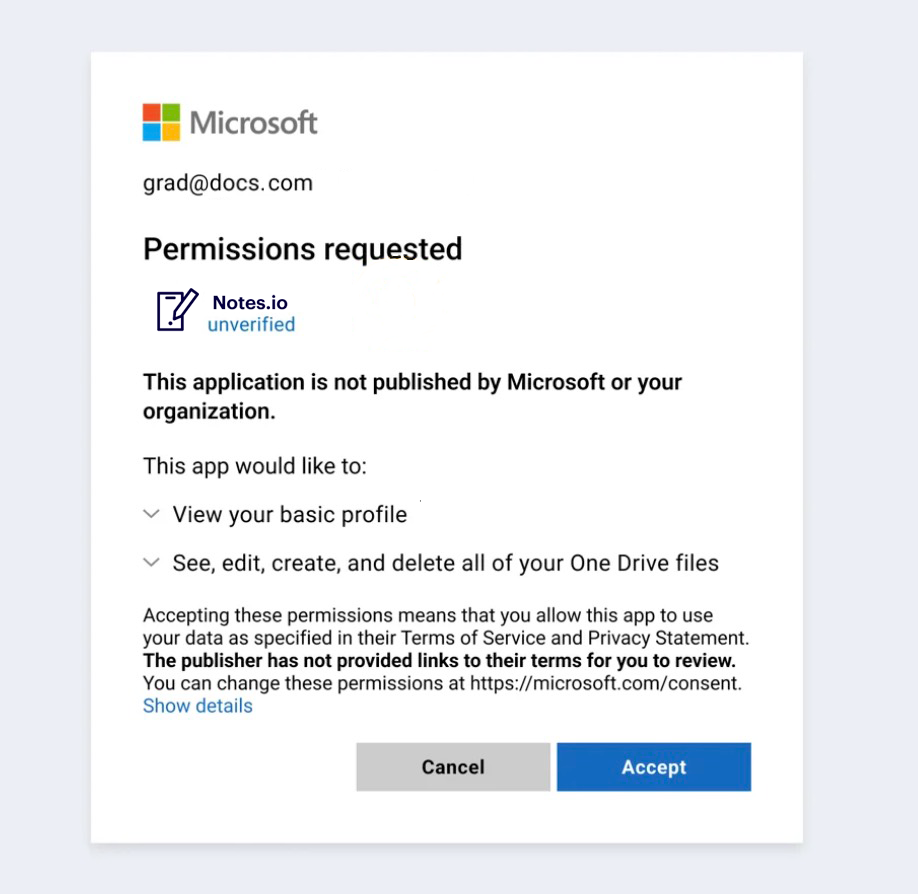
Third-party apps add a lot of value to end users and are easy to connect to corporate SaaS platforms (think of an Outlook plug-in for Salesforce, for example). The problem is that end users can grant third-party apps permissions to corporate applications and data without the security team’s oversight or approval.
Third-party applications are incredibly vulnerable
An employee can grant an app access to email, files, CRM records, or other business data in just a few clicks — often without security review or approval. Over time, these unmanaged connections can quietly expand an organization's attack surface and introduce security, compliance, and operational risks.
Security risks
Unsupervised access to sensitive data
Many third-party apps request broad permissions, such as the ability to read, modify, or sync data from core SaaS platforms. Once granted, these permissions often persist in the background. If an app is poorly secured, compromised, or intentionally malicious, it can use this access to quietly exfiltrate sensitive data, replicate it into another cloud environment, or expose it to unauthorized parties.
SaaS-to-SaaS supply chain exposure
Third-party apps frequently create SaaS-to-SaaS connections that sync data from a sanctioned platform into the provider’s own cloud. This effectively extends your environment into another vendor’s infrastructure. If that vendor has weak security controls, limited visibility, or unpatched vulnerabilities, attackers may target them as an easier path to your data.
Privilege misuse and configuration tampering
Some integrations are granted high-level permissions that go beyond what they need to function. If such an app is compromised or behaves maliciously, it can abuse its privileges to access sensitive information, hijack privileged accounts, or make dangerous configuration changes in cloud environments. These changes can be difficult to trace back if app activity is not centrally monitored.
Stale or dormant app connections
Applications often remain connected long after they are no longer actively used—or after the original user leaves the organization. These stale integrations still hold valid access tokens and permissions. If a vulnerability is discovered in one of these unused apps, an attacker can exploit it to gain a foothold in the environment and pivot toward sensitive data. Because no one is paying attention to these apps, they can become long-lived blind spots.
Compliance and governance risks
Uncontrolled data sharing with third parties
When users connect third-party apps directly to corporate SaaS accounts, they may be granting external providers access to sensitive or regulated data without going through normal approvals. If those providers lack clear security practices, data-handling policies, or retention controls, organizations may find themselves out of step with their own internal policies or external obligations around how data is stored, processed, and accessed.
Limited auditability and oversight
Without a central view of which apps are connected and what they are doing, it becomes harder to answer basic governance questions: Which third parties can access specific datasets? How long have they had that access? What actions have they taken? Gaps in logging and visibility can make investigations and audits more complex and time-consuming.
Operational risks
Unpredictable behavior in critical environments
Third-party applications that can modify settings, automate actions, or interact with privileged accounts can introduce instability if they are misconfigured or behave in unexpected ways. Changes made by an app—rather than a human admin—may be harder to spot and troubleshoot, especially if teams don’t realize the integration is in place.
Accumulated complexity and overhead
As more apps are connected over time, organizations can end up with dozens or hundreds of integrations across email, collaboration, file storage, CRM, and other SaaS platforms. Without central oversight, this “integration sprawl” increases complexity, makes it harder to understand which tools are actually in use, and complicates efforts to manage risk, reduce costs, and maintain a stable SaaS environment.
A framework for managing third-party app risk
An effective third-party app risk management program requires clarity, consistency, and continuous oversight. The following framework is grounded in the lifecycle your draft already describes — discovering apps, understanding permissions, right-sizing access, and monitoring activity — expanded slightly to reflect standard best practices.
Discovery and inventory
Organizations can’t evaluate risk until they know which apps are connected to their SaaS platforms. Discovery should identify:
- All third-party applications connected through OAuth, API tokens, or marketplace installs
- Both active and stale integrations
- Apps granted access by current and former employees
- The scopes and permissions each app has received
Assessment and analysis
Once discovered, each app should be reviewed for its potential impact. Evaluation typically includes:
- Permission analysis. Breaking down what the app can actually do — your source’s CRUDS model fits directly here.
- User access patterns. Whether the app is widely used, rarely used, or tied to a single user.
- Risk indicators. High-risk permission scopes, unknown vendors, or apps with vague security practices.
- Sensitivity of accessed data. What types of files, records, or settings the app touches.
Remediate and enforce policy
With a risk profile established, organizations can begin reducing exposure by:
- Removing unused or high-risk apps
- Revoking unnecessary user permissions
- Restricting apps that have overly broad access
- Setting internal approval requirements for new integrations
- Establishing guardrails around which apps are allowed or disallowed
Monitor and alert
SaaS environments change continuously, making ongoing monitoring a critical part of risk management.
Organizations should watch for:
- Newly connected apps
- Sudden changes in app usage
- Unusual or high-risk actions performed by apps
- Connections to sensitive or privileged accounts
- Dormant apps that become risky over time
Gain a clear overview of third-party application risk with Varonis.
Our third-party app risk dashboard provides a complete overview of the apps connected to your environment. You’ll see the total number of apps in your environment, whether active or stale, the level of risk they pose, and if they have been verified by admins — along with other key risk indicators.
Gain a centralized view of third-party app risk across your environment.
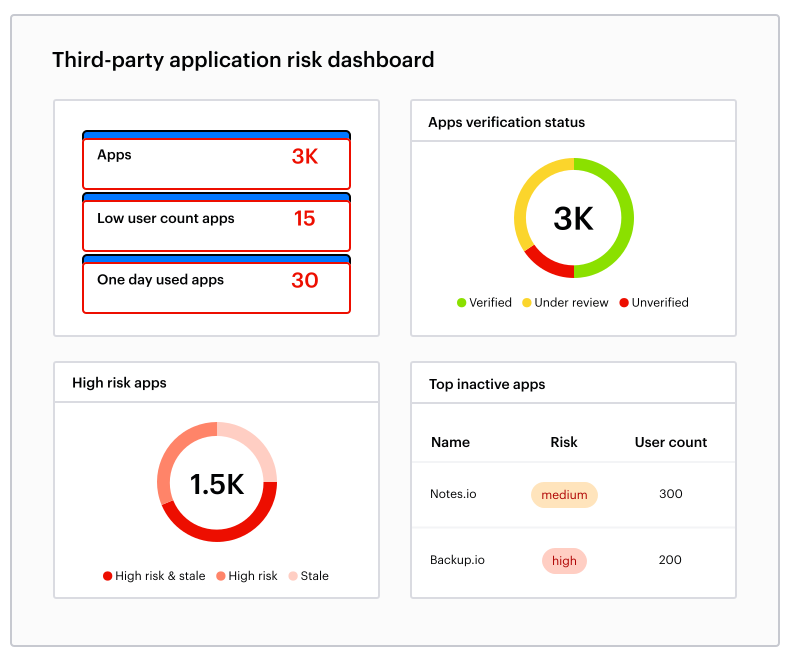
Gain a centralized view of third-party app risk across your environment.
From this dashboard, admins can drill down into each application to understand the scope of their access and the risk they may pose.
Analyze the scope of application permissions
When you potentially have dozens of applications connected to each corporate SaaS product, analyzing permissions is a near-impossible task using native security tools alone.
Varonis gives you a clear picture of the effective permissions of each third-party app. We break third-party app permissions down to a simple to understand CRUDS (Create, Read, Update, Delete, and Share) model — just like we do for end users — making it simple to understand an app’s effective permissions and the risk they pose to sensitive data.
Drill down to view each app's permissions.
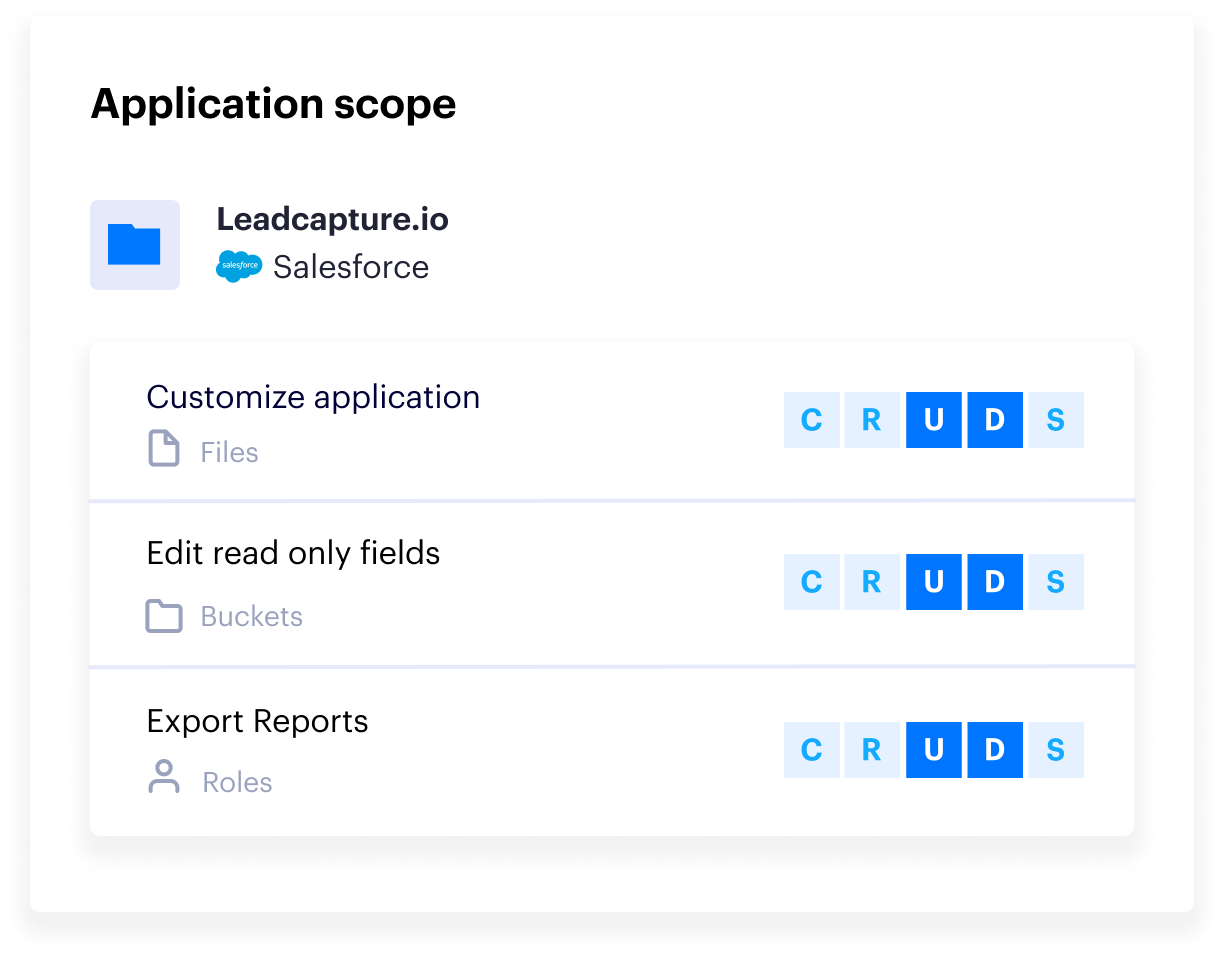
Drill down to view each app's permissions.
With our bi-directional permissions view, you can also see all the users using a single app or click a user and see every application they have connected.
You may have applications that only a single user uses (and we’ll call this out in the dashboard), or there may be a popular app with hundreds of users connected to it.
This view lets you measure third-party app usage, so you can right-size access and remove stale apps entirely. Reduce risk and your license costs at the same time!
You’ll see which admins and other privileged users have third-party apps connected to their accounts. Since Varonis monitors the activity performed by each app, we can detect suspicious behavior and answer the question: “Did this app abuse its privileges or access sensitive data?”
Remove third-party app access.
Varonis can revoke an app’s access to your environment entirely if you have deemed it unnecessary or too risky to leave connected.
Remove app connections directly from the Varonis interface.
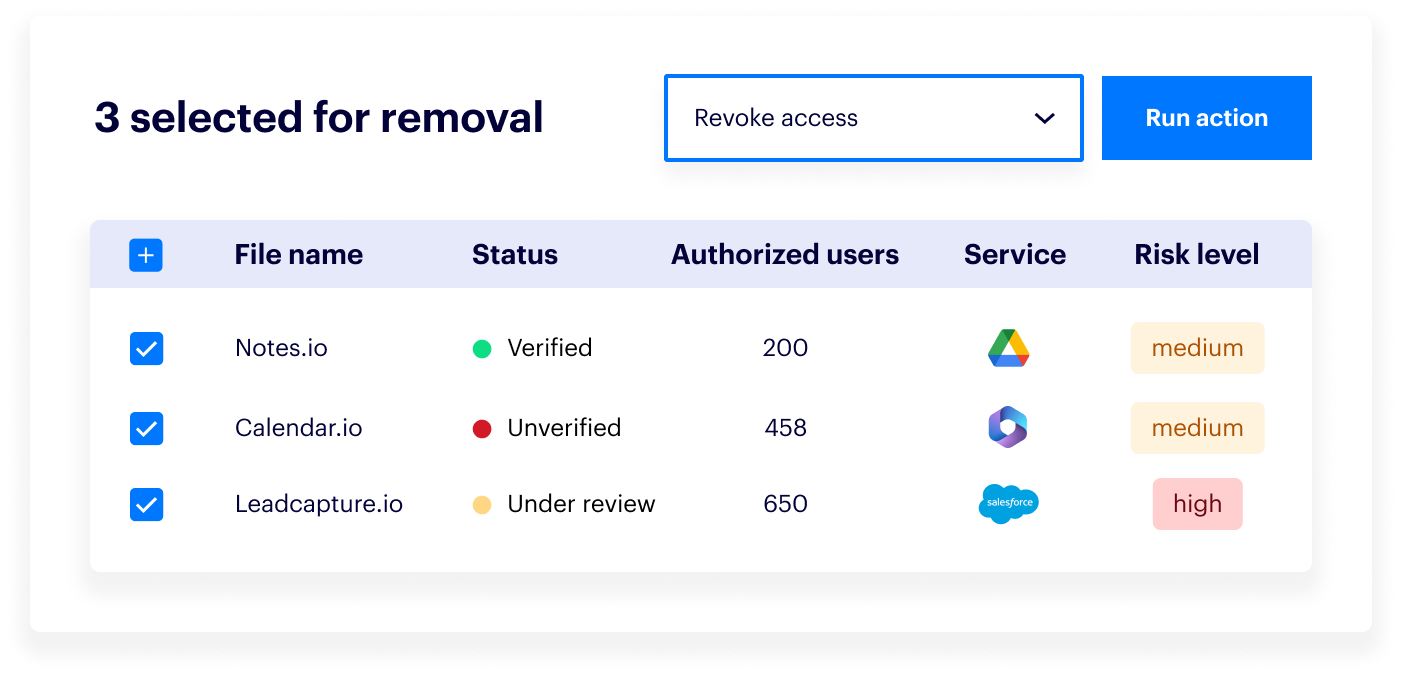
Remove app connections directly from the Varonis interface.
Leaving stale applications in your environment opens you up to the chance that a vulnerability is discovered within it. A malicious actor could use that vulnerability to gain access to your environment and sensitive data.
Reduce costs
Along with reducing risk, Varonis’ remediation capabilities can help organizations reduce costs and save money. If you have a third-party app that charges per user, you can easily find the users that do not use the app and remove their access to reduce costs.
Additionally, you may find that you’re paying for an app that almost no one uses, so you can decide if you want to renew your contract with the vendor.
Monitor application activity and detect risky actions
Not all applications are created equal. While most major platforms with app marketplaces vet new apps, they can still have vulnerabilities that could one day be exploited to gain access to your environment.
There is also the chance that a malicious actor hid malware in an otherwise legitimate-looking app, and it could begin accessing and exfiltrating sensitive data right under your nose. A malicious app could even hijack a privileged account and make dangerous configuration changes in your cloud environments.
Just like with human users, Varonis tracks the activity of all your third-party applications and provides a complete and easy-to-read audit trail of cross-cloud events. We’ll detect any unusual or risky activity and alert you in real-time, so you can immediately investigate and remove the offending third-party app.
Detect and investigate risky third-party app activity.
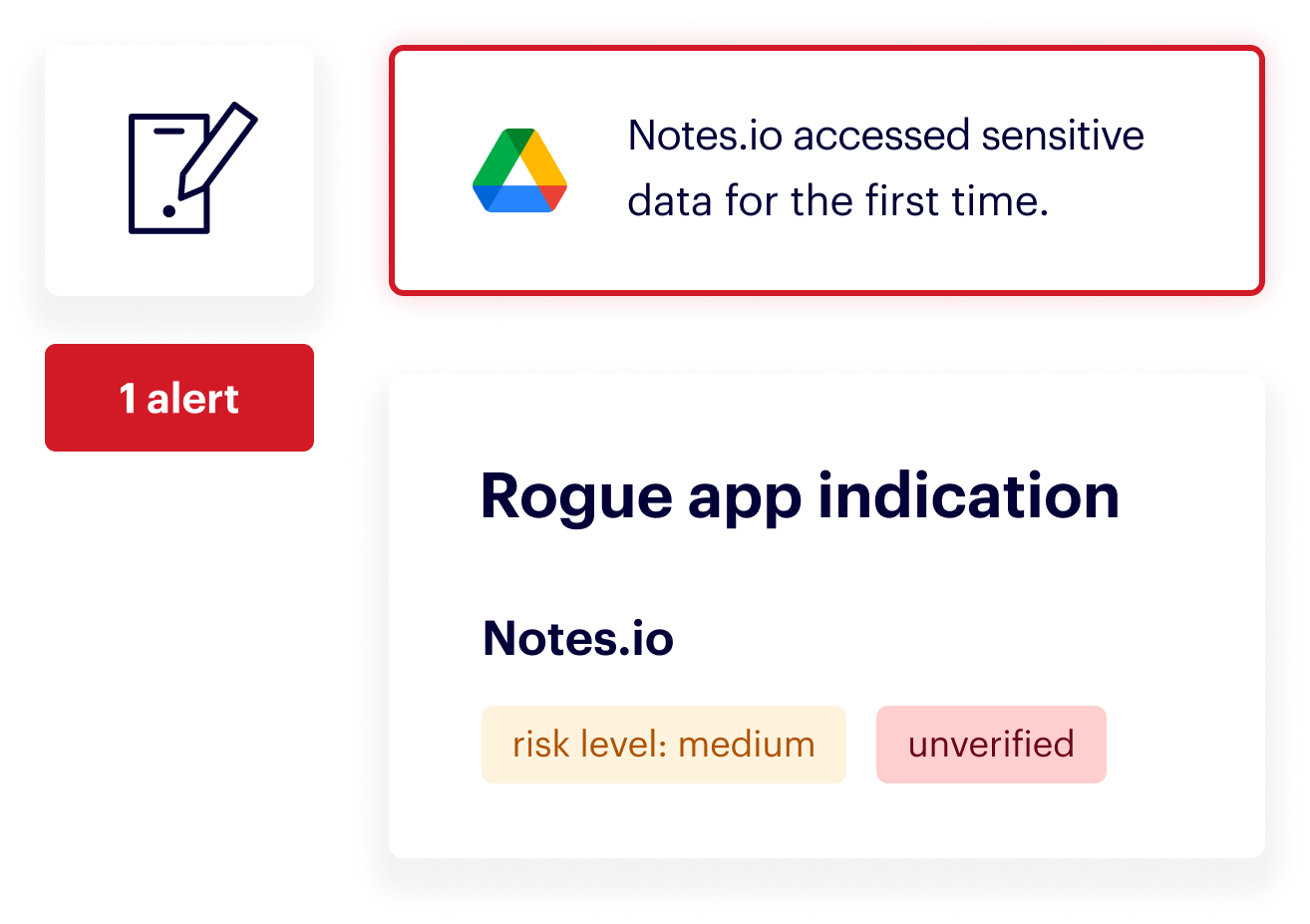
Detect and investigate risky third-party app activity.
We can also monitor user activity related to third-party apps to detect risky actions, such as when many users connect to a high-risk app, significantly increasing your attack surface.
Ready to get started?
It only takes 15 minutes to start discovering and managing third-party app risk with Varonis. Sign up for a free risk assessment today!
FAQs about third-party app risk management
How do third-party apps pose a security risk to SaaS environments?
Third-party apps often receive permissions to access, modify, or sync data from corporate SaaS platforms. When employees connect these apps without security review, organizations may unintentionally grant external providers broad and persistent access to sensitive information. If an app is vulnerable, poorly secured, or misused, these permissions can be exploited. Attackers will exfiltrate data, manipulate configurations, or move laterally within the environment.
How can an organization identify risky third-party app connections?
Use a centralized management tool to gain visibility into all connected applications across their SaaS environment. This process involves analyzing the specific permissions each app has, such as the ability to create, read, update, or delete data. Monitoring app activity is also crucial for any team that wants to identify stale or unused apps and discover which users have connected them.
What are the main benefits of remediating third-party app risks?
Enhanced security and potential cost savings. By revoking access for stale, unused, or overly permissive applications, you reduce your organization's attack surface and prevent potential data breaches. Additionally, identifying and removing apps with low usage or redundant user licenses can help lower subscription costs and optimize your software budget.