
Varonis Threat Labs uncovered a vulnerability in Azure Cosmos for PostgreSQL, leading to remote code execution (RCE). Due to an improperly validated server configuration value, it was possible to edit arbitrary PostgreSQL configurations through the Azure management API, including those managed by Azure and controlling sensitive server functions.
RCE, in this context, allows arbitrary commands to be run on the underlying operating system of the database server, possibly leading to data disclosure and/or destruction. Therefore, a threat actor with sufficient management privileges to edit parameter values on the cluster could gain unrestricted data access to the cluster, and compromise cloud-managed infrastructure.
Whenever cloud-managed infrastructure is compromised, there is the risk of a threat actor escalating privileges, either within the tenant or to cross-tenant access. In this case, we were unable to test for these issues. Let’s explore this vulnerability in more detail.
Background
Azure Cosmos for PostgreSQL
Azure Cosmos for PostgreSQL is a managed PostgreSQL service expanded with the Citus extension to allow for distributed tables. Clusters are made up of one or more PostgreSQL servers called nodes, and with one node being the coordinator.
Both the coordinator and worker nodes can be configured through the Azure management API, where certain PostgreSQL configurations can be set.
PostgreSQL configuration
It is possible to modify PostgreSQL parameters in a few different ways. Understanding the configuration file format is important, as this is how the parameters are managed in Cosmos DB.
The Postgres configuration file is a newline delimited list of parameters, where strings are defined with a single quote (‘). For example, the following configuration file sets two parameters: log_line_prefix and archive_command.
Code snippet:
The vulnerability
Our investigation started by looking for interesting configuration values that Azure allows us to set to arbitrary values. We were about to shift our focus when something caught our eye.

Whereas most of the editable parameters either have a list of allowed values or allow a closed set of characters, log_line_prefix was unique in the way and allowed any character apart from a single quotation mark.
The reason that they are interested in limiting that character is apparent from the Postgres config file format. If we could insert a single quote, we would be able to close the value string and start a new parameter in a new line.
The forgiving limitation gave us some room to get creative and insert characters that the original developers hadn’t thought of, and try to get unexpected results.
Surprisingly, trying to insert the control characters supported by the JSON format did not raise any problems, and after a few attempts, we discovered that putting a form feed (\f) in front of the single quotation mark allowed us to bypass the validation and insert the forbidden character.
At this point, the server logs indicate a syntax error related to a single apostrophe while trying to reload the configuration file.
Notice the “message” field:
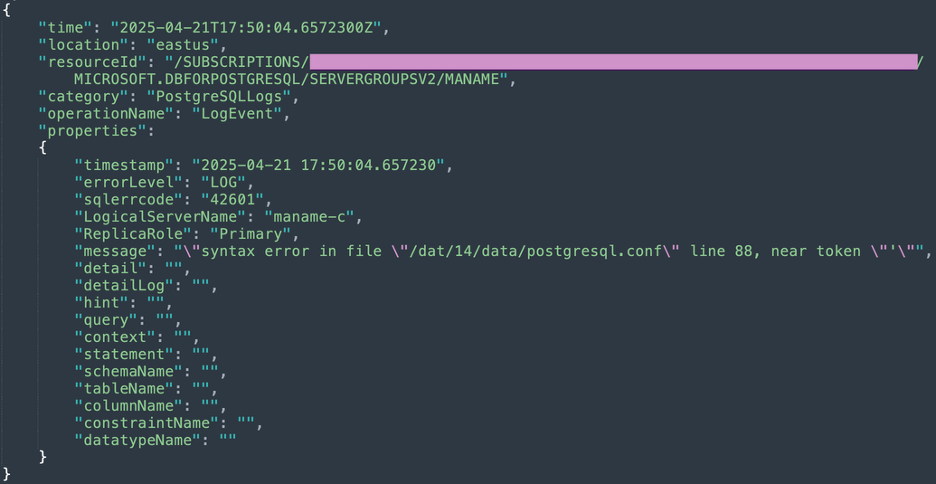
The next step is to insert a new line so that we can inject a new configuration definition. For the proof of concept, we decided to use hello, a variable that does not exist in Postgres.
Getting the API to accept our payload required a double newline, or we would get an error regarding the second single quote. We did not completely understand why this double newline, or the form feed character, allowed us to bypass the server-side check. This new payload caused a new and exciting error, unrecognized configuration parameter, letting us know that we could now inject parameters of our choice.
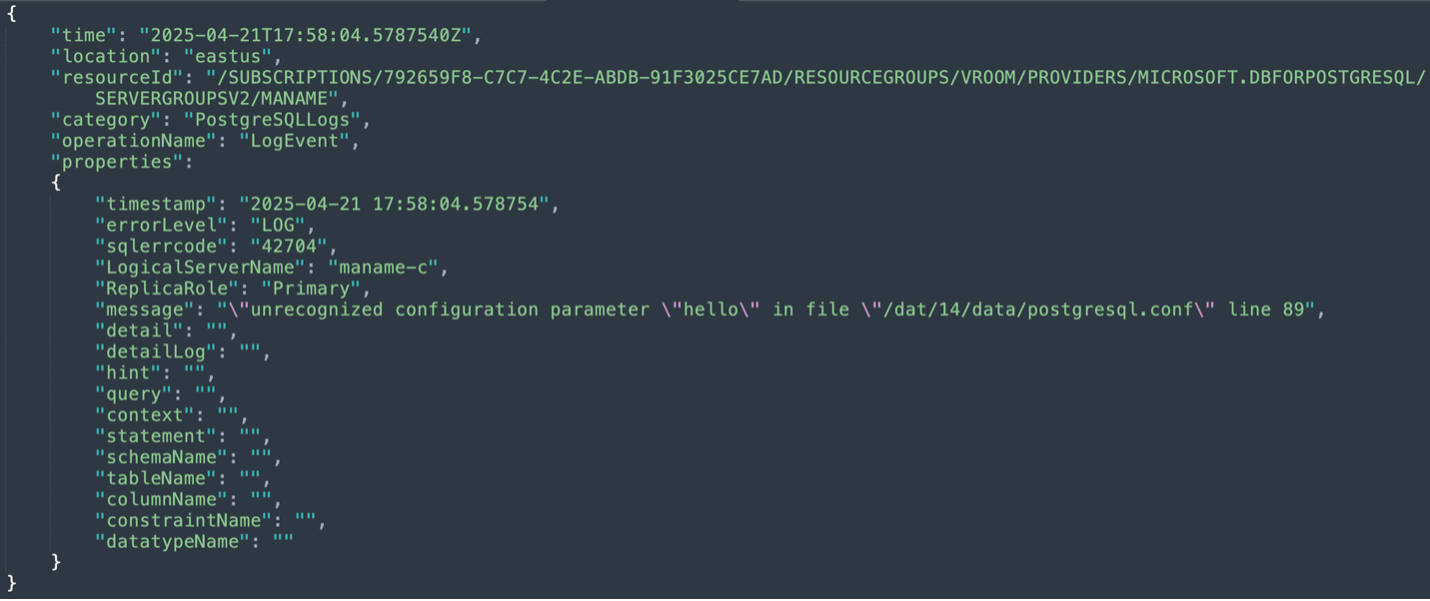
At this point, it is clear that we can execute code with the <code>archive_command</code> parameter, whose value is a command periodically run to archive WAL logs. This would look something like this.
Since we could have been accessing critical infrastructure, we involved Microsoft and requested permission to test code execution before continuing. Our request was denied, but Microsoft tested itself and confirmed the issue as an important RCE.
Best practices for Azure managed databases
Misconfigurations and excessive permissions remain the most common root causes of cloud breaches. Vulnerabilities like Azure Feeding Frenzy highlight the importance of hardening both identity and data layers — not only to prevent exploitation, but also to reduce the blast radius if an issue is discovered in a cloud-managed component.
The following best practices help reinforce defense-in-depth across Azure environments.
Entra ID (Identity layer)
1. Enforce least privilege for all privileged usersRegularly audit all Entra ID roles, especially those with access to compute, data, and management-plane operations. Ensure that administrators, automation principals, and developers have only the exact privileges required for their tasks.
2. Secure common identity entry points- Malicious or over-permissioned applications
- External or guest user
- Highly privileged internal users
Apply tighter restrictions to these identities, review their assignments periodically, and remove any unnecessary access.
3. Require phishing-resistant MFA and conditional accessProtect access to all critical infrastructure, including Azure management, using phishing-resistant MFA options. Combine with Conditional Access to enforce device trust, location rules, and session restrictions.
Database Layer
1. Apply least privilege to database roles and application accountsEnsure database roles map precisely to operational needs. Client-facing or application identities, especially those used by web apps or APIs, should have minimal permissions and never run under superuser or administrative roles. Also avoid enabling extensions, settings, or features unless absolutely necessary.
2. Use federated authentication instead of local credentialsWhere possible, integrate PostgreSQL with Entra ID or other federated identity providers. This centralizes identity lifecycle management and reduces risk from long-lived or hard-coded database passwords.
3. Collect and actively monitor audit logsEnable PostgreSQL and Azure-native audit logs and forward them to a SIEM for anomaly detection. Monitor for:
- Unexpected configuration changes
- Suspicious SQL commands
- Newly created users or roles
Rapid visibility into unusual activity can significantly reduce detection and response time.
4. Use network isolation and private endpointsPlace managed databases behind private endpoints and restrict access to approved VNets, workloads, or identities. Avoid exposing PostgreSQL publicly.
Disclosure timeline and recommendations
We disclosed the vulnerability to Microsoft, and a fix was released in the summer of 2025. No further action is required by customers using Azure Cosmos DB for PostgreSQL.
While no action is required, this is another reminder for security teams to ensure that privileges — especially to data containers such as databases — are properly managed.
This vulnerability required privileges to the management API of a Cosmos DB for PostgreSQL to be exploited in a client environment. If the Azure Cosmos DB for PostgreSQL user had properly managed privileges, there would be a drastic reduction in the probability of the vulnerability being exploited within the user’s environment.
Stay up to date on the latest threats in Azure with Varonis Threat Labs by exploring more of our research.



.png)

.png)

.png)
.png)