.png)
Organizations move fast, developers move faster, but attackers move the fastest. A single unintended action, a stray commit, a forgotten endpoint, or an exposed configuration can escalate into a breach.
These mistakes rarely come from malicious intent; they arise from the natural pressures teams face. Deadlines, context switching, unclear ownership, and the assumption that "it's probably fine." Yet once code touches a public surface like GitHub, even briefly, it becomes discoverable to automated scanners operated by attackers who move far faster than traditional defensive processes.
Building off my BSides talk, "From Code to Cloud — What We Accidentally Share on GitHub," this blog dives into how the Secret_Snatcher tool automates the discovery of exposed organizational secrets. By leveraging OpenID Connect (OIDC) configurations and second-order search techniques, we can see exactly how attackers pivot from public metadata to sensitive internal data.

The high cost of simple mistakes in cyber
Human error remains one of the most persistent and underestimated risks in modern development pipelines. In fast-moving engineering environments, where shipping quickly is often celebrated, seemingly minor oversights can turn into high-impact security incidents.
The Uber AWS credential leak remains one of the most widely cited examples of how a single moment of human error can ignite a full-scale security incident. In 2016, an Uber developer accidentally committed AWS access keys to a public GitHub repository. The credentials weren't hidden deep inside the codebase — they were plainly embedded in a file that became publicly visible the moment it was pushed. Within hours, automated bots that continuously scan GitHub for secrets had already discovered the exposed keys.
Armed with valid AWS credentials, the attackers were able to access Uber's internal AWS S3 buckets. From there, they exfiltrated highly sensitive data, including personal information belonging to 57 million riders and drivers. The fallout was severe: Uber initially paid attackers $100,000 under the guise of a "bug bounty" to delete the data, but later faced intense regulatory scrutiny and a $148 million settlement for failing to properly disclose the breach.
Uber’s incident also revealed an uncomfortable truth — speed has outpaced security. In a world of instant pushes and automated scanners, one human slip is all it takes to open the door.
The present scale of data leaks
This wasn't a one-off event. A 2025 investigation by Wiz revealed that 65% of the world's leading AI startups, including members of the Forbes AI 50, had accidentally leaked sensitive credentials on GitHub. Researchers verified exposed API keys, access tokens, and internal configuration secrets across dozens of high-valuation companies.
What gets leaked?
- API keys for major AI platforms
- Access tokens allowing entry into private models, training datasets, or internal systems
- Secrets buried in deleted forks, gists, and personal developer repos
Attackers don't need to break in when developers accidentally leave a key under the doormat.
How data secrets escape: the failure chain
- Development: An internal application is built with hardcoded credentials for speed
- Sharing: A developer wants to share code publicly (for open source or portfolio reasons)
- Push: The code is pushed without proper validation or secret scanning
- Exposure: Internal secrets and tenant-specific identifiers accidentally become public
- Discovery: Attackers scrape GitHub for those secrets using automated tools
The mechanism: OpenID Connect (OIDC) discovery
To understand how attackers find these needles in the haystack, we must look at OpenID Connect (OIDC). OIDC is an identity layer on top of the OAuth 2.0 protocol. It allows clients to verify the identity of the end-user based on the authentication performed by an Authorization Server.
Crucially, OIDC relies on a standard mechanism called Discovery. Identity providers (like Azure AD, Google, Okta) publish a Discovery Document at a well-known URL path: /.well-known/openid-configuration
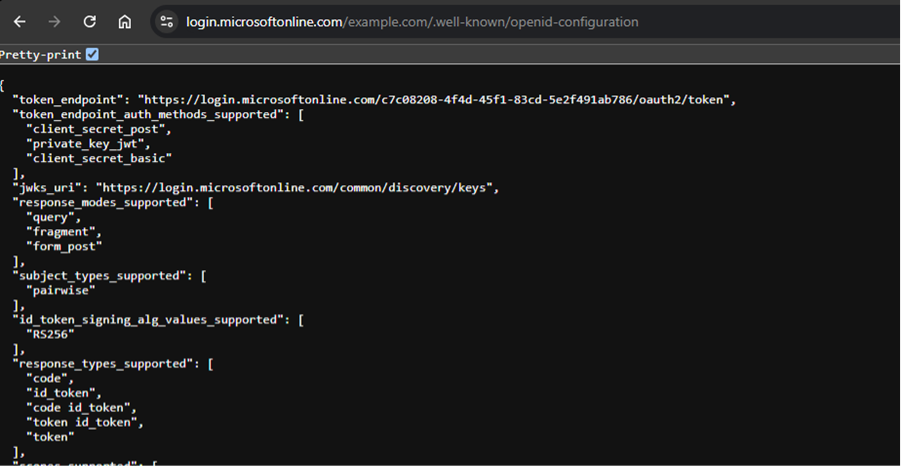
This endpoint is intentionally public. It allows client applications to automatically discover the provider's configuration, issuer URLs, supported algorithms, and token endpoints, without hardcoding them.
Why this matters for reconnaissance
While the endpoint itself doesn't contain passwords, it contains unique tenant identifiers (like the Azure Tenant ID). Attackers use this public, legitimate feature for reconnaissance.
The Attack Logic:
- Target: Identify a target organization
- Fetch Config: Query their public OpenID configuration endpoint
- Extract: Grab the unique Tenant ID or other specific endpoint URLs
- Pivot: Use that unique string to search GitHub
This is where "Second-Order Search" comes in.
Second-Order Search: Attackers think two steps ahead
Attackers rarely just search for a "password". They search for the context around a password. By finding a unique Tenant ID from the OIDC config, they can search GitHub for that specific ID. Any code containing that ID is likely internal code belonging to that organization and internal code is where the secrets live.
The Second-Order Search:
- Start with target organization
- Query OIDC Discovery endpoint
- Extract unique tenant identifiers and endpoint URLs
- Search GitHub repositories and gists for those identifiers
- Scan results for hardcoded secrets and API keys
Automating the hunt: Secret_Snatcher
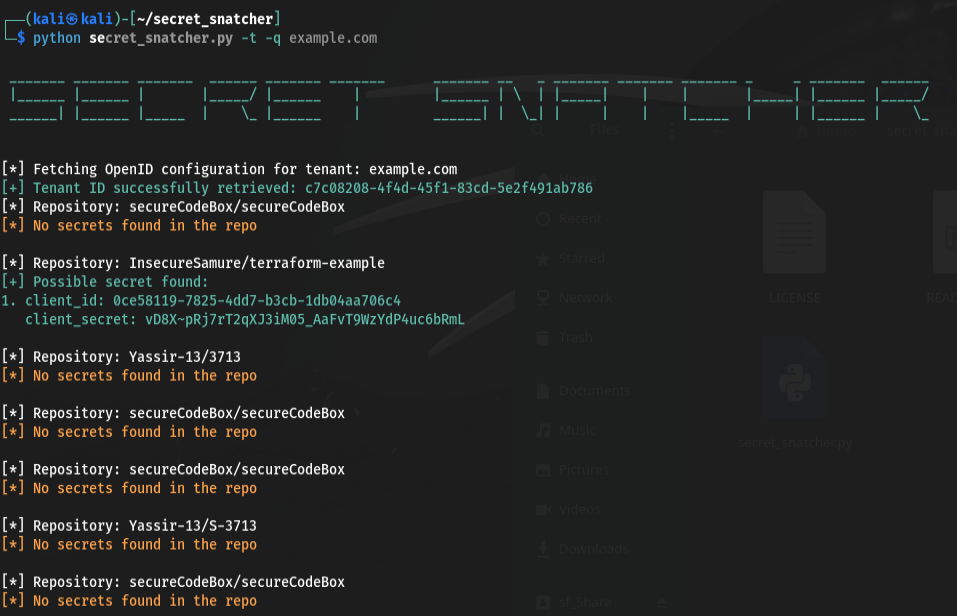
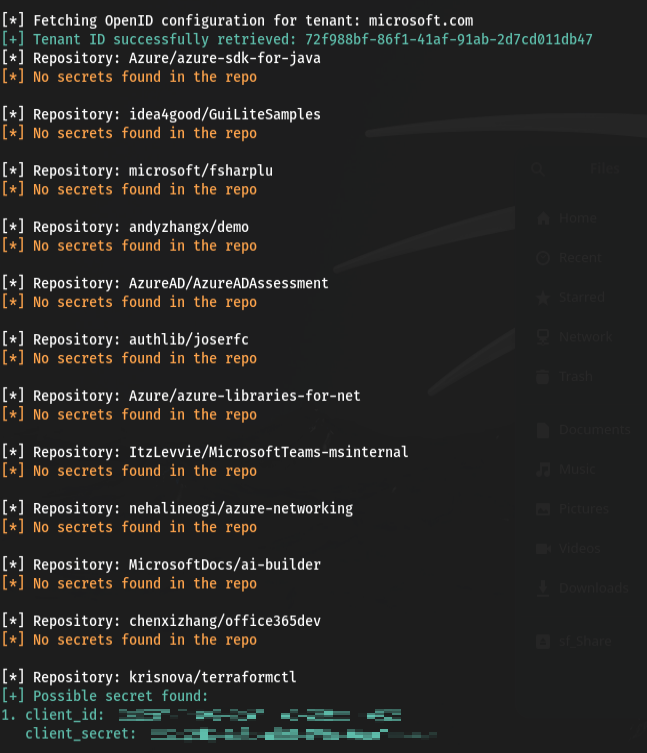
This is the core logic behind Secret_Snatcher. It automates the discovery of exposed organizational secrets by chaining these steps together:
- Input: A list of domains or organizations
- Discovery: It hits the .well-known/openid-configuration endpoint for each
- Pivot: It extracts unique identifiers
- Search: It uses those identifiers to perform targeted GitHub searches, identifying repositories that might otherwise fly under the radar
Defending against exposure
You can't slow down development, so you must speed up defense.
Pre-commit protection: Implement pre-commit hooks using tools like TruffleHog, git-secrets, or talisman to block commits containing secrets before they leave the developer's machine. This is your first line of defense.
CI/CD guardrails: Integrate secret scanning into your CI/CD pipelines. If a secret is detected in a Pull Request, the build should fail immediately. Tools like GitHub Advanced Security, GitLab Secret Detection, or third-party solutions can automate this.
Continuous auditing:
- Regularly scan public repositories, not just your main organization's repos
- Monitor personal forks and Gists created by employees
- Set up automated alerts for new public repositories
- Use GitHub's secret scanning alerts if available
Access control: Apply least privilege to repository creation and visibility changes. Limit who has the ability to make repositories public, and require approval workflows for public exposure.
Incident response: If a secret is exposed, remember that deleting the repository isn't enough, git history persists. Your response must include:
- Revoke immediately: Invalidate the exposed credential
- Rotate credentials: Generate new secrets
- Audit access logs: Check if the credential was used
- Clean git history: Use tools like BFG Repo-Cleaner or git-filter-repo to remove secrets from all branches and history
- Force push: Update all forks and clones
Build a security culture: Make secret hygiene and code reviews part of everyday engineering, not an afterthought. Train developers to recognize sensitive data patterns and understand the blast radius of exposure.
The bottom line
The path from a line of code to a cloud breach is shorter than we think. By understanding how attackers use public metadata like OIDC configurations to pivot into private data, we can build better guardrails.
Speed is essential in modern software development, but security is the seatbelt that ensures we arrive safely. The combination of automated tooling, continuous monitoring, and security-aware engineering culture creates defense-in-depth against accidental exposure.
The question isn't whether mistakes will happen, they will. The question is whether we'll detect them before the attackers do.



.png)

.png)

.png)
.png)