Key takeaways
- Dynamic Data Concentration and Smart Scan work together to cut redundant scanning and surface high-risk data first.
- Automated remediation is what actually closes exposure at scale — in one environment, 3 million overexposed records dropped to 2,000 in two days.
- The real limit on scan speed is usually API rate limits set by the cloud provider being scanned.
Most conversations about data security scanning tend to start with one question: "How quickly can this data security platform scan our data?" It's a fair ask. Long scan times delay visibility and, therefore, the actions an organization can begin taking to reduce risk.
However, the real measure of performance is how much ground a platform covers, how quickly it surfaces the risk that matters most, and whether it features automated remediation to address what it finds.
The Varonis Data Security Platform: scanning capacity
The Varonis Data Security Platform (DSP) dynamically scales scanning capacity based on the customer's data estate. Capacity is measured in scan units, a standard measure that maps directly to compute resources. Performance scales predictably as more units are added, so doubling capacity means doubling throughput without having to guess at the underlying compute and memory requirements.
The best practice is to start small, monitor scan duration, and automatically add units only if performance doesn't meet requirements.
It's worth noting that, at Varonis, customers don't manage this math themselves. Varonis handles capacity planning and scaling in the background, so organizations see the result without needing to calculate compute requirements or provision infrastructure.
The real bottleneck is usually API throttling
Scan units are only half the story. What happens when the data itself is complex, repetitive, or sitting behind a service with its own rules about access? That's where the real gains, and the real limits, show up.
Cloud services such as Google Workspace, AWS, and Box each limit the number of API calls that can be made in a given window to protect their own systems and keep things fair across all customers. Hit that ceiling, and requests get delayed or retried. Scan duration increases, no matter how much compute is idle on the scanning side.
- What that looks like in practice: A Google Workspace scan needs several API calls per file, including to download content, pull metadata, and check permissions. At a typical pace, a single collector generates roughly 342 API calls a minute. If an organization's rate limit with Google is 1,000 calls a minute, that ceiling becomes the real constraint once scanning scales past about three units. A fourth or fifth unit doesn't add speed at that point. It just runs into throttling.
This is exactly why "add more infrastructure" isn't a universal fix, and why Varonis surfaces throttling directly in the product instead of leaving a security team to guess why a scan slowed down.
Where data is being scanned also matters
The other important piece is where a scan actually runs. Some DSPs scan cloud-to-cloud by default, authenticating with an API key and pulling data across the internet into the vendor's cloud environment for scanning. Because there's no infrastructure to stand up, it can be a fast way to get started — but moving that data comes with real costs and data sovereignty concerns that DSPM vendors aren't always transparent about.
In a cloud-to-cloud model, data must cross the network to leave the customer's environment, so scanning is bound by WAN bandwidth rather than compute. It also adds egress costs, since cloud providers charge to move data out. And it means sensitive data is leaving the environment where it originated, which raises data privacy questions that matter in regulated industries.
Varonis supports cloud-to-cloud scanning for lightning fast deployment times, but many customers prefer a lightweight, Kubernetes-based private cloud collector that runs inside the customer's own cloud environment. The data being classified never leaves that environment, and only metadata returns to Varonis. That removes WAN bandwidth as a bottleneck, avoids egress fees, and keeps sensitive data within boundaries the customer already controls.
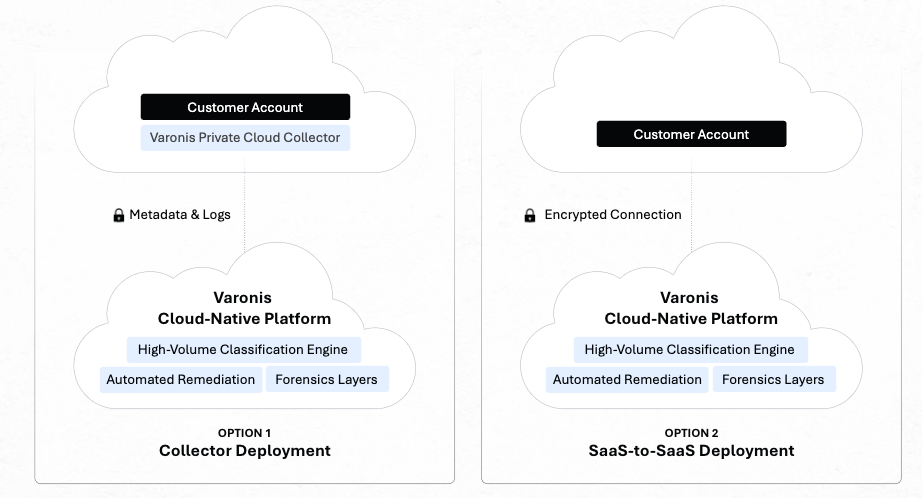
Plus, once it's deployed, the collector runs on its own. In other words, there's no ongoing tuning or manual routing decisions to make — the security and performance benefits of scanning in place are automatic.
In either case, cloud-to-cloud or private collector, scanning is agentless and does not require customers to install anything on the data stores they are scanning.
Turning data repetition into an efficiency advantage
Some of the largest data stores are also the most repetitive. Picture an organization that enables AWS CloudTrail for every account, region, and service. The logs pile up by the millions, and nearly all share the same schema and sensitivity profile.
A scanner that treats each of those files as brand new spends most of its time reconfirming what it already knows. Dynamic Data Concentration (DDC) takes a different approach. It recognizes the repeating pattern, scans enough files to be confident in the classification, and applies that finding across the rest, without reopening files that are already classified.
But let's be clear: this isn't sampling. Sampling scans a subset and extrapolates, risking the omission of rare, sensitive data hidden in the part that went unscanned. DDC still scans the full store. It just stops repeating work it's already done. In an environment where a quarter of the files qualify, that alone can lift effective throughput.
Being upfront about the tradeoffs
A few capabilities expand what a scan can see, at a cost worth knowing about upfront:
- Optical character recognition reads text from scanned documents and images, closing a real blind spot, but it takes significantly more computing than native text.
- Cloud Relay routes requests through a local collector to meet outbound-only connectivity requirements, adding a network hop and increased collector load that a direct connection wouldn't.
- Rich permission structures and detailed metadata take longer to process, but they're also what make the resulting risk analysis trustworthy.
None of these is a reason to skip a capability. Instead, they are reasons to make the tradeoff deliberately, rather than being surprised by it later.
Speed to insight matters as much as speed to finish
Finishing a full scan quickly is nice, but finding the riskiest data sooner is better. Smart Scan prioritizes high-risk data, so the findings that matter most surface early. That means remediation can start before the scan finishes. Paired with DDC, the two work together comprehensively: Smart Scan shortens the time to the findings that matter, and DDC shortens the overall scan takes.
Both run automatically, with no configuration required. That means there's no threshold to set for what counts as repetitive and no priority list to build for what counts as high-risk. Varonis makes those calls in the background, and the customer simply sees a faster scan and the riskiest findings first.
Incremental scanning improves scan speed
Varonis uses real-time incremental scanning to dramatically reduce the time, compute resources, and cost required to classify and monitor data at scale. Rather than repeatedly scanning every object in a data store, Varonis leverages its audit trail to identify exactly which objects have been created or modified since the previous scan and then reclassifies only those changed items. This approach keeps visibility current while avoiding the inefficiency of full rescans.
Many DSP products rely on the underlying data store's delta APIs to provide a list of changed objects. However, those APIs can be inconsistent or unavailable depending on the data store.
When a reliable delta API doesn't exist, vendors are often forced to enumerate every object in the environment and check its last modified timestamp to determine what has changed, creating significant performance overhead and making large-scale scans slower, more expensive, and less reliable.
By using its own audit trail as the source of truth, Varonis maintains continuously updated classification results without depending on the limitations of each individual data store's change-tracking capabilities.
Speed to risk reduction matters most of all
Ultimately, fast scans and insights only matter if the risk they surface gets addressed at equal speed. Without automation, a scan that surfaces millions of overexposed records just creates a backlog. Now factor in AI agents, which can create new exposures faster than any security team can reasonably address, and manual remediation stops working.
Varonis addresses this with automated remediation: policy-driven actions that can close exposure across an entire environment, with scope defined by the organization rather than by the number of people available to click through tickets.
The reality is stark. In one environment, this is what automated remediation looked like:
- Remediate 900,000 sensitive files within one day of a policy going into effect.
- Reduce nearly 64,000 exposed folders to zero within one day.
- Remove 3 million overexposed records within two days.
The scan detects the exposure, but it's automated remediation that actually reduces the risk at scale. A platform that's fast at one and slow at the other has only solved half the problem.
Varonis automatically executes more than 200 million remediation actions every month—securing more than 2 trillion sensitive data records. That’s 770,000 exposed data records protected every second.
Here are just some examples of Varonis customers who achieved rapid time-to-remediation (measured in days) with our automations.
From the first day to full scale
Getting Varonis up and running takes minutes, not days — that's the deployment story. But there's an important second chapter: what happens once data sources are connected and scanning runs continuously, at whatever scale the environment grows to. Fast onboarding helps an organization quickly find its first solution. Efficient, transparent scanning with automated remediation is what keeps that pace up as the data estate expands.
Frequently asked questions
Why factors impact data classification scanning performance?
Scan performance depends on data complexity, network conditions, and API rate limits set by the cloud provider being scanned. In many environments, those external limits constrain throughput more than compute does.
Does Varonis scan all data, or sample it?
Varonis scans the full data estate. Dynamic Data Concentration (DDC) reduces redundant reads across repetitive files while ensuring every file is accounted for. Nothing is skipped or extrapolated statistically.
Does adding more scan units always make scans faster?
Not past a certain point. API rate limits imposed by the source platform can become the binding constraint before compute does. Varonis surfaces throttling indicators directly, so organizations can find the actual bottleneck before adding infrastructure that won't help.