ChatGPT Enterprise is going through significant changes. From hints of a name change to ChatGPT for Business to introducing new connected apps and, most importantly, unveiling how ChatGPT retrieves data from those connected apps, we are looking at a seismic shift in how ChatGPT operates in the commercial marketplace.
ChatGPT's new connectors are designed to bridge the gap between your organization's internal knowledge sources and the ChatGPT platform, enabling you to harness the full potential of your data while maintaining baseline privacy and security. However, the data security and governance implications are concerning if these connectors and their use are left unchecked.
TL;DR
- Connectors link ChatGPT to internal data.
- Security relies on existing permissionstructures.
- Admins must monitor connector usage closely.
- Least privilege access is now critical.
- Automatepermission remediation to ensure safety.
The past and present: Connected apps for ChatGPT Enterprise
It’s ironic and surreal to talk about the ‘old days’ when ChatGPT Enterprise was only announced in late 2023, and the connected apps feature was announced in May 2024. Yet, here we are.
OpenAI also announced last year the ability to select files to upload directly from Google Drive, Microsoft OneDrive, and SharePoint through connected apps. After establishing the connection, users could simply select a file from a drop-down or copy a shared link into the prompt chat box. This ability is still available and will likely continue into the future despite the introduction of new connected experiences. It will remain the lowest degree of integration for organizations that want to limit data access through ChatGPT.
Manually select files to upload directly from Google Drive and Microsoft OneDrive through the legacy connected apps experience
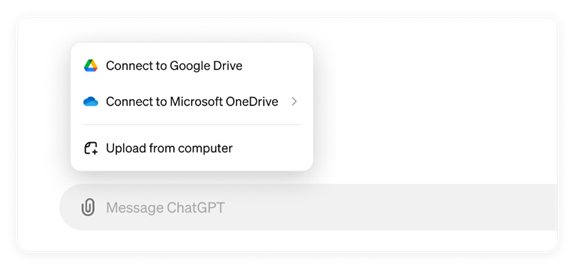
Manually select files to upload directly from Google Drive and Microsoft OneDrive through the legacy connected apps experience
Some governance and protections are in place for organizations using the connected apps feature. The Workspace admin, for example, can restrict users from connecting to their cloud storage services by simply enabling or disabling the feature. Also, the uploaded files are not saved or stored in any way; however, the prompt and response history is preserved for some time.
Restrict users from connecting to corporate cloud storage services by simply enabling or disabling the feature in the admin settings
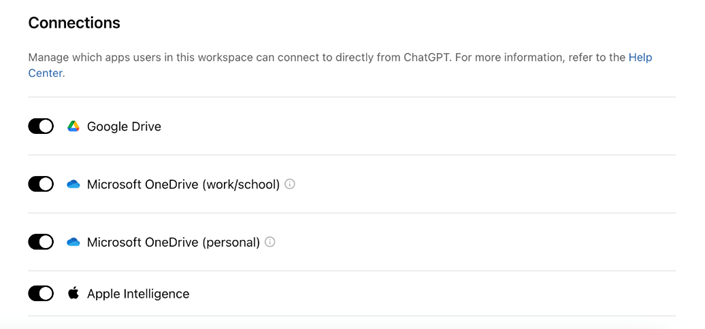
Restrict users from connecting to corporate cloud storage services by simply enabling or disabling the feature in the admin settings
One major gap organizations must solve is visibility and management oversight when enabling connected apps. Security teams need to know when connections are enabled and by which admin. They also need to understand what sensitive data has been selected and uploaded within ChatGPT interactions with full context: user/identity, file name, file type, classification, and more.
This visibility gap persists in the new connectors discussed in subsequent sections and creates an even greater blind spot for teams without a unified platform to monitor ChatGPT Enterprise.
The future: Connectors for ChatGPT Enterprise and how they work
The prior method of connected apps is a manual user experience, which is why OpenAI is looking to expand how ChatGPT accesses internal knowledge and data. ChatGPT Enterprise Connectors are officially out of beta, according to OpenAI for Business.
These Connectors allow ChatGPT Enterprise to act more as a retrieval-augmented generation (RAG) AI agent. Rather than users manually selecting files, ChatGPT Enterprise Connectors will enable the agent to retrieve the relevant data for the user. This is a similar experience for Microsoft 365 Copilot users. Copilot searches all sources in the Microsoft 365 tenant and infers what is accessible and relevant from the Microsoft Graph to retrieve the right information and respond to the prompt.
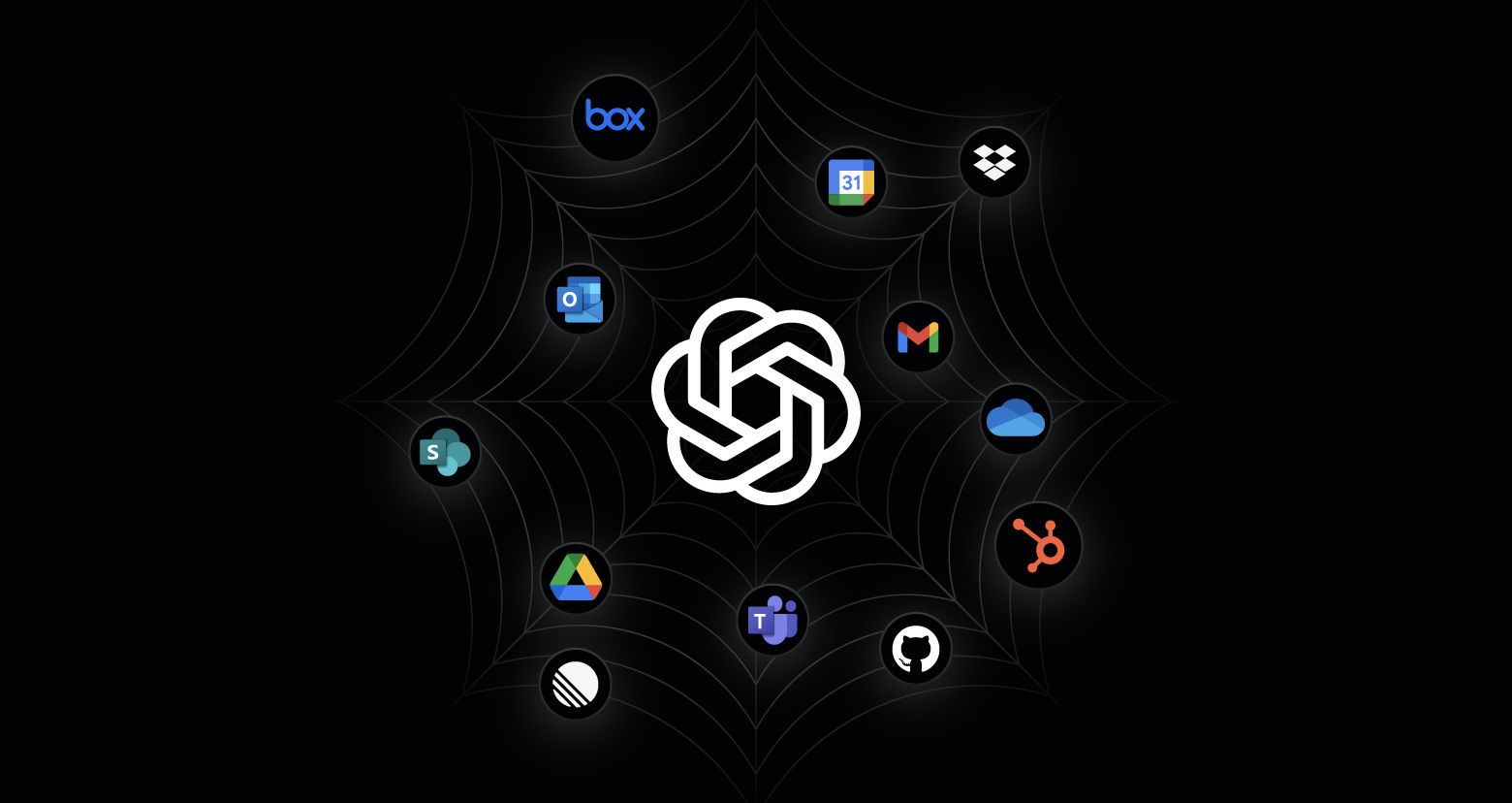
One of the most exciting features of connectors is their ability to integrate with various internal data sources beyond Google Drive and Microsoft OneDrive. Connectors will now include the following applications:
- Box
- Canva
- Dropbox
- GitHub
- Gmail
- Google Calendar
- Google Contacts
- Google Drive
- Hubspot
- Linear
- Microsoft OneDrive
- Microsoft Outlook
- Microsoft SharePoint
- Microsoft Teams
- Model Context Protocol (MCP) Server for Custom Connections
- Notion
Pull data from multiple sources simultaneously via Connectors in ChatGPT Enterprise

Pull data from multiple sources simultaneously via Connectors in ChatGPT Enterprise
This allows users to perform deep research and handle everyday queries related to their work with ease. On top of search and deep research support, organizations can run a full “Sync” to index everything in the environment for speedier prompt and response queries. Sync is only available for Google Drive as of this publication.
Ultimately, ChatGPT will be able to pull data from multiple sources simultaneously to answer complex requests. For example, the new ChatGPT Enterprise experience would enable a user to prompt “Create a Q4 business plan based on company priorities and current pipeline projections,” and the generative AI application would effortlessly scan and cross-reference HubSpot pipeline data and marketing projections, customer data in Salesforce, meetings and discussions in Microsoft Teams, and emails in Outlook to develop a well-researched plan.
The speed and efficiency with which users can retrieve the data they need and create new data will be unmatched. Yet, the risk of users accessing data they shouldn’t compounds exponentially with each Connector that’s greenlit. Organizations will be looking for a holistic approach to ensure each Connector does not open a massive hole in their data security strategy.
Data security risks with ChatGPT Enterprise connectors
Enabling connectors involves many risks that your organization needs to weigh with each resource. Below are select considerations.
- Unauthorized access: Integrating multiple internal data sources increases the risk of unauthorized access. If the data associated with a connector is not properly secured, unauthorized users might gain access to sensitive information stored in platforms like HubSpot, Outlook, Box, and Teams. This could lead to data breaches and exposure of confidential information.
- Data leakage: The ability to query and synthesize information from various sources creates a risk of data leakage. Sensitive data might be inadvertently shared or exposed through the connectors, especially if proper data handling and sharing protocols are not in place. This could result in the unintentional dissemination of proprietary or confidential information.
- Insider threats: The enhanced access to internal data sources could be exploited by malicious insiders. Employees with access to the connectors might misuse their privileges to extract and share sensitive information for personal gain or to harm the organization. This risk is heightened if no robust monitoring and auditing mechanisms are in place.
- Compliance and regulatory risks: Organizations must ensure that the use of connectors complies with relevant data protection and privacy regulations, such as GDPR, HIPAA, or CCPA. Failure to do so could result in legal and financial penalties. To mitigate these compliance risks, the connectors must be deployed with safeguards in place prior to being turned on. Correcting permissions and access in each resource will be paramount.
- Sprawl of connectors: The other challenge for AI security teams will come as more and more cloud solution providers and third-party applications race to be added. For instance, the HubSpot connector was built by the HubSpot developer team and was the first MCP custom connector published in the ChatGPT registry from the June announcement. More and more data resources will be added and organizations should prepare for a future where all major resources in their organization are available in the Connectors admin settings.
By addressing these potential risks through robust security measures, organizations can use the benefits of the new connectors while safeguarding their data and maintaining compliance with regulatory requirements.
Beyond connectivity: AI-specific threats
As ChatGPT Enterprise connectors move beyond manual file uploads into retrieval-augmented, agent-like experiences, organizations face security risks that extend beyond basic access permissions. Even when least privilege is enforced, AI systems introduce new threat vectors that require visibility into how data is accessed, combined, and surfaced in responses.
Prompt injection
Intentionally or accidentally, users will influence an AI model’s behavior through prompts or instructions. In enterprise environments, this can occur when users ask leading questions or when untrusted content in connected data sources affects how the AI responds.
Because ChatGPT Enterprise retrieves data dynamically across multiple repositories, the risk is not limited to what data a user can access. It also includes how that data is interpreted and reused in AI-generated outputs. Without visibility into prompts and responses in context, security teams may struggle to understand how sensitive information is being exposed.
Data poisoning in retrieval-augmented generation
Data poisoning occurs when incorrect, outdated, or manipulated information exists in the data sources an AI system relies on. In retrieval-augmented generation workflows, the AI assumes the underlying data is accurate and trustworthy.
If sensitive repositories contain poorly governed content or excessive permissions, AI-generated responses may confidently surface inaccurate information. This introduces operational risk and undermines trust in AI-assisted decision-making, especially when outputs are used for planning or reporting.Shadow AI and unmanaged usage
Even with ChatGPT Enterprise connectors enabled, organizations must account for Shadow AI. Users may still copy sensitive information into consumer AI tools or browser-based assistants that lack enterprise-grade controls.
This parallel usage creates visibility gaps where sensitive data is accessed or shared without centralized monitoring, increasing the risk of data leakage and compliance issues.
Monitoring beyond permission errors
These risks highlight a key shift: AI security cannot rely on access controls alone. Security teams must also monitor how data is accessed, combined, and referenced during AI interactions. Detecting anomalous access patterns, unusual data usage, and risky prompt behavior is critical for identifying misuse, whether caused by compromised identities, insider threats, or unintended AI-driven exposure.
Data security approaches for ChatGPT Enterprise connectors
OpenAI provides several security and governance features for admins out of the box as an initial foundation. For starters, connectors are disabled by default and can only be enabled by the workspace owner and admin.
Also, the same standards for data encryption provided for ChatGPT Enterprise session data in transit and at rest apply to ChatGPT interactions with connectors. Data accessed via connectors will not be used for training any of OpenAI’s models as well.
Enable and disable ChatGPT Enterprise connectors within the admin settings
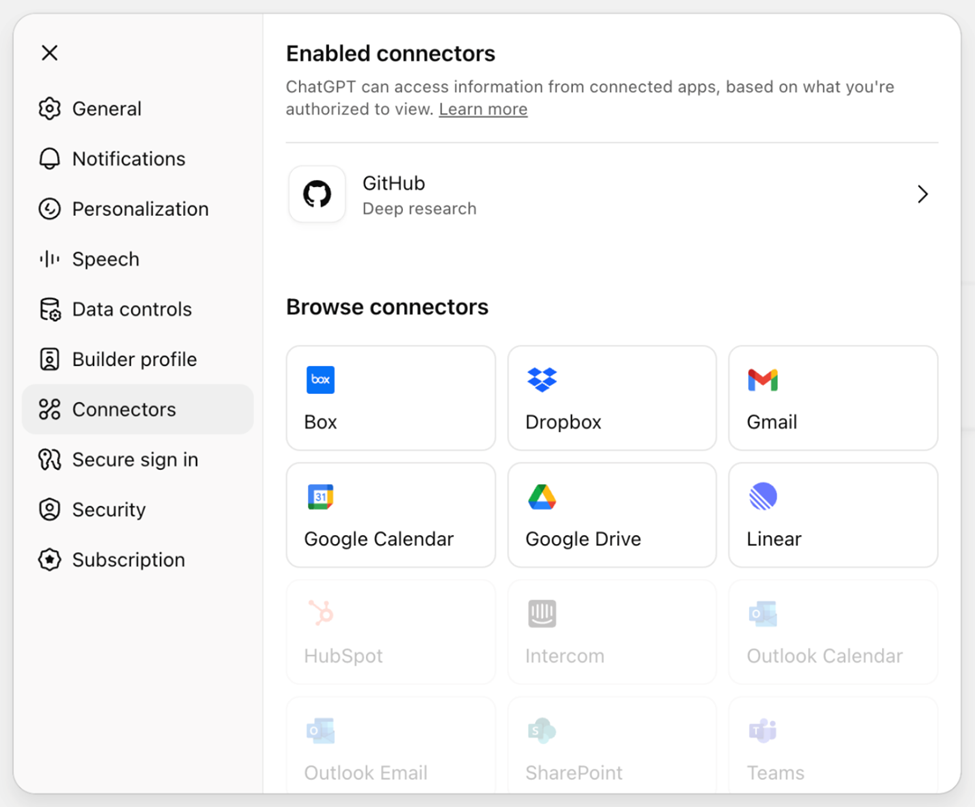
Enable and disable ChatGPT Enterprise connectors within the admin settings
Arguably, the most essential security feature is that ChatGPT will only access and reference content based on that user’s permissions. Therefore, if you have implemented least privilege and are automatically remediating risky permissions across the data estate, ChatGPT Enterprise should not unintentionally surface sensitive data to the wrong users.
These best practices are key to maintaining a data security program for ChatGPT Enterprise and the functionality needed within your Data Security Platform (DSP) to operationalize them.
- Access control: The first access point or vulnerability is the admin configuring connectors within workspace settings. OpenAI mentions that native RBAC is on the way, but you need a way to know when admin roles are assigned or changed along with when connectors are enabled. Each connector also requires additional configuration that your organization should control and monitor. Microsoft services like SharePoint and Teams require delegated application permissions through the Microsoft Graph. Security teams should be aware when those permissions are assigned.
- Automated risk remediation: ChatGPT’s blast radius will largely be determined by how well an organization can find and remove excessive permissions on files, sites, lists, mailboxes, and storage locations for each connected account. Managing permissions in multiple cloud locations and apps can be daunting, if not impossible. Mature organizations rely on an AI-powered DSP to classify all of the data within each resource and automatically right-size permissions based on its sensitivity.
- File and usage monitoring: Knowing what files are being referenced and their metadata can be critical to understanding where risks or threats exist. If a single user atypically begins accessing multiple sensitive files in their sessions, security teams need to be notified. Additionally, spikes in sensitive data access can be an indicator of a major exposure at a site or parent resource level.
- Prompt and response monitoring: The context of prompts can detect some instances of insider threats or compromised identities. Though a connector may not produce the results a bad actor wants, we can understand the user's intent from the questions asked in ChatGPT conversations. Data flows can also produce sensitive results unexpectedly. A user may not have permission to access certain customer data in one resource but still be shown that data because the information was exported to an accessible SharePoint site or shared in an email.
- Alerts on misuse: OpenAI provides a Compliance API that is the only approved pathway for log data. It is the same API used by Varonis and fuels intelligent alerting to notify security teams of AI misuse and abuse. The ideal platform will also filter activity through evergreen AI models to reduce noise and false positives.
Navigating the ChatGPT Enterprise paradigm shift in data access
The new connectors and features introduced in ChatGPT are designed to enhance productivity and streamline workflows. By querying multiple data sources, including HubSpot, SharePoint, and Teams, users will be able to seamlessly synthesize the information into actionable insights. This process can take hours or even days manually, but ChatGPT Enterprise can complete it in just a few minutes.
Yet this new capability to access and analyze more internal data sources than any other no-code/low-code AI solution will significantly demand a data security overhaul. As the ChatGPT Enterprise platform and connector ecosystem continue to evolve, we can expect even more challenges.
Organizations often lack a platform and approach to control access across their dozens of cloud data stores. Whether a user has the appropriate permissions or not, ChatGPT will find the data if the connector is enabled.
To prepare for the new connectors coming to ChatGPT Enterprise, organizations should prioritize assessing potential data security risks associated with these integrations. This involves conducting thorough security audits to identify vulnerabilities and implementing robust encryption protocols to protect sensitive information.
By focusing on these security measures, organizations can ensure that their data remains secure while leveraging the benefits of enhanced connectivity.

FAQs about ChatGPT Enterprise security
How do connectors impact ChatGPT Enterprise data security?
Connectors transform ChatGPT from a simple chatbot into a retrieval-augmented generation (RAG) agent. It’s suddenly capable of accessing internal data sources like SharePoint, Salesforce, and Google Drive. While this significantly boosts productivity, connectors also expand the organization's attack surface. Security teams must ensure that the underlying access controls in these connected applications are strictly governed to prevent unauthorized data exposure.
Does ChatGPT Enterprise use corporate data for model training?
OpenAI has stated that data input into ChatGPT Enterprise, including prompts and generated responses, is not used to train its public models. Additionally, the platform employs enterprise-grade encryption standards, such as AES-256 for data at rest and TLS 1.2+ for data in transit, to protect information. However, data privacy from the model provider does not negate internal security risks. Employees can still use the AI interface to access internal sensitive data they should not see.
What are the primary risks of enabling ChatGPT Enterprise connectors?
Unauthorized access and data leakage are both huge risks. There is also an increased risk of insider threats and compliance violations if the AI surfaces regulated data (such as PII or PHI) to unauthorized personnel. On top of these vulnerabilities, the rapid addition of third-party connectors can lead to "connector sprawl," creating blind spots for security teams if not actively managed.
How can organizations prepare their data security for ChatGPT Enterprise?
Organizations should prioritize a least privilege model by identifying and removing excessive permissions across all potential data sources before enabling connectors. Implement automated risk remediation. Deploy a data security platform that offers visibility into file usage and prompt context. Monitor user behavior and data flow continuously.
What is the "visibility gap" in AI connector management?
A visibility gap occurs when security teams lack centralized oversight. Without it, administrators can’t control connector access. They won’t know which data is being accessed during AI sessions. Without a unified view, it’s difficult to determine user intent, verify file classifications, or track which sensitive documents are being referenced by the AI agent. Closing this gap requires tools that provide full context regarding user identity, file types, and permission changes associated with every connected application.